If you want to disable Windows 7 updates and want to update it manually then here is the method to turn off Windows 7 automatic updates.
 How to Disable Windows Updates in Windows 7?
Step 1
Type “System and Security” in Start menu search

Step 2
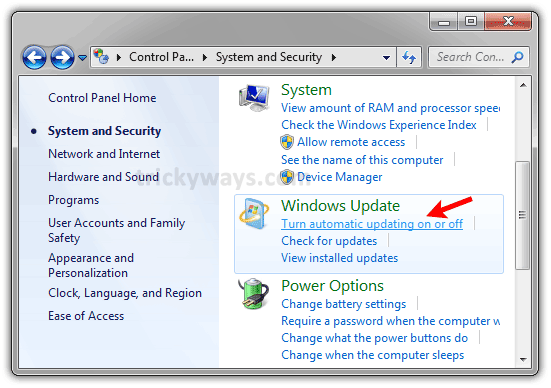
Navigate to “Windows Update” > “Turn automatic updating on or off”
Select “Never check for updates” from drop down under “Important updates” section and click OK button

Now, the automatic Windows updates are disabled and see in Task Manager wuauclt.exe is also not available.
We should not turn off windows 7 update
I also turn off Windows 7 update as its quite annoying.
I have tried usingcthis method. It will NOT STICK! I press O.K but it doesn’t do anything. Its slowing down my computer SOOOO MUCH!