You can perform Spirit untethered jailbreak on iPad, iPhone and iPod Touch firmware 3.1.2, 3.1.3, or 3.2. Follow the given instruction to jailbreak iPad with Spirit in Windows.
Requiremenst:
iPad must be activated, It must not on connect to iTunes/Emergency call screen, iTunes 9 to 9.1.1 will work and syncing with iTunes is recommended before trying this. What is Spirit?
Step-1
Download Spirit file for Windows.
Step-2
Windows 7 users must set the compatibility mode to run this Spirit file (if you not using Window 7 jump to step-4).
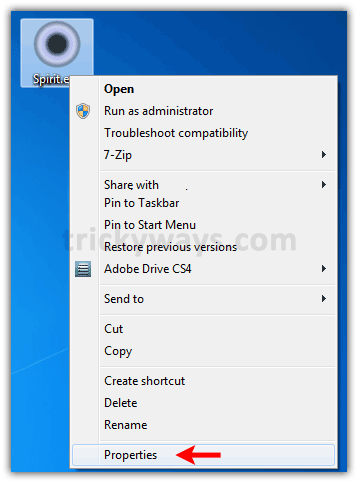
Right click on downloaded Spirit file and select “Properties” option
Step-3
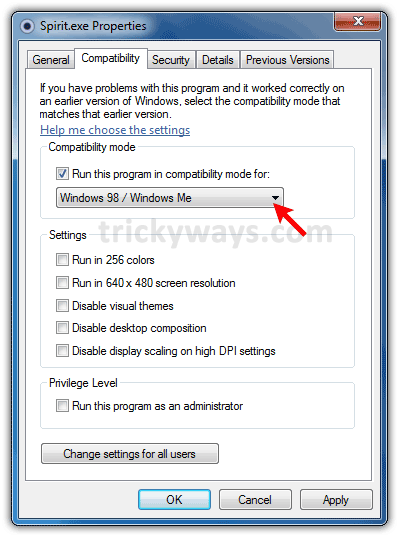
Click on “Compatibility” tab and select “Windows 98 / Me” option from dropdown as shown below in screen shot and click OK button.
Step-4
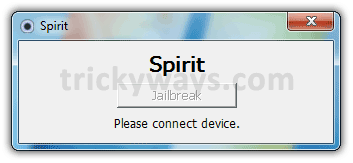
Double click the Spirit file to run it and connect your iPad with computer.
Step-5
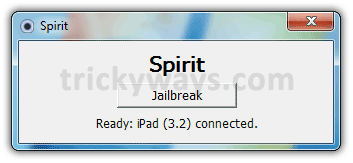
Click the Jailbreak button to start jailbreaking iPad.
Step-6
After a while Spirit will prompt with Success message, Click “Quit” button.
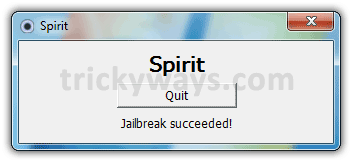
iPad will reboot and finish the process, Finally your iPad will be jailbroken wiht Cydia installed.
See also: iPad tips and tricks
Thanks for iPad 3.2 jailbreak guide