There is an Add-on available for Mozila Firefox named “BlockSite” which helps users to block websites of their choices and password protect the settings to stop unauthorized changes. So just follow the simple process written below to block sites in Firefox.
Block Web Sites in Firefox
Step 1
Add BlockSite extension to Firefox
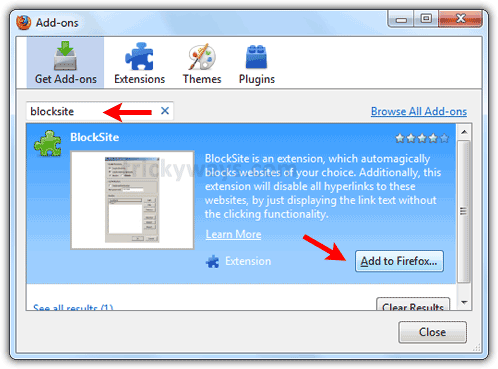
- Click on Get Add-ons.
- Type “blocksite” in search field.
- Click on “Add to Firefox” button to install.
Step 2
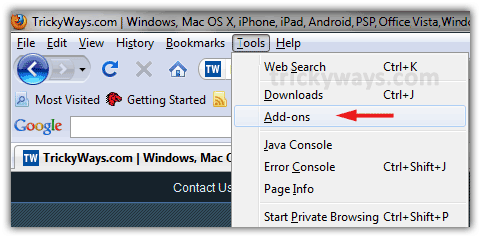
Restart Firefox and navigate to “Tools” menu and select “Add-ons”
Step-3
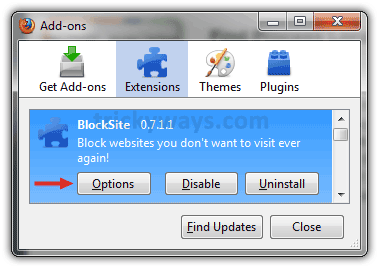
Select “Blocksite” from extensions list and click “Options”
Step-4
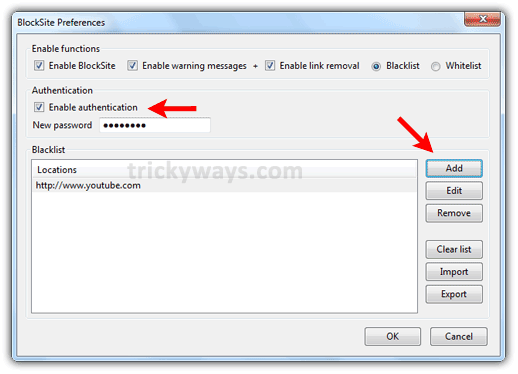
- On following window click on “Add” button to add URLs that you want to block.
- Check the enable authentication check box and enter a password to protect from anyone to make changes in this block list.
thanks to share this method to block sites in firefox
Thanks, but I want to add somthing. If you want to block any website then specify the url with and without http:// and www.
e.g
http://www.facebook.com
http://facebook.com
http://www.facebook.com
Thanks for plugin to block websites in firefox
Blocksite has a FATAL flaw: you just deactivate this add-on (which takes just a few seconds), restart Firefox, et voilá… Too easy a by-pass to help you not visiting certain websites.
wow… just loved the solution… tried many.. finally its blocked
I am glad you managed to Block a website in Firefox by using this guide.