Most of the users don’t switch to the Windows 7 due to inability to run some programs that only works in Windows XP like internet explorer 6. But Microsoft now gives an option in Windows 7 to run those programs from within Windows 7 using XP Mode feature.
You can run XP mode in Windows 7 as an application instead of remote desktop. XP mode application does NOT come built-in with Windows 7. You need to download an install it, its FREE!. But XP mode is only available for the following Windows 7 editions, you must have Windows 7 Professional, Enterprise, or Ultimate to run Windows XP Mode.
So lets see How to run XP mode in Windows 7
Step-1
First you check your system is capable to run XP mode or not?.
Step-2
Download Windows XP Mode and Windows Virtual PC installers according to your Windows 7 edition.
Windows 7 Professional 32-bit Windows XP Mode | Windows Virtual PC
Windows 7 Professional 64-bit Windows XP Mode | Windows Virtual PC
Windows 7 Enterprise 32-bit Windows XP Mode | Windows Virtual PC
Windows 7 Enterprise 64-bit Windows XP Mode | Windows Virtual PC
Windows 7 Ultimate 32-bit Windows XP Mode | Windows Virtual PC
Windows 7 Ultimate 64-bit Windows XP Mode | Windows Virtual PC
Step-3
First install Windows XP Mode and then Windows Virtual PC
Step-4
When finished installing both setups Click on Start Menu button > Windows Virtual PC > Windows XP Mode


Enter password for the Windows XP Mode


Click on Start Setup button
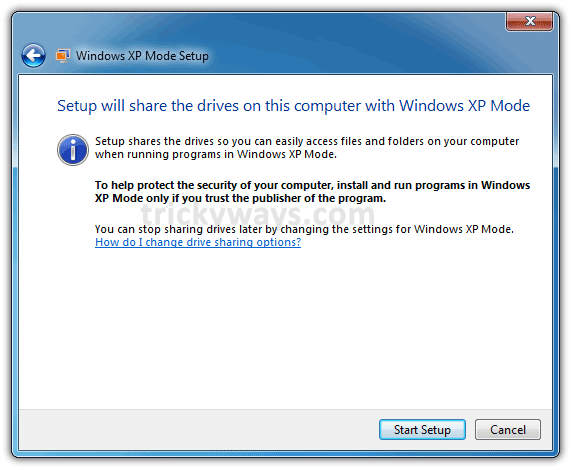
This will take some time to setup all things

and finally you can see Windows XP mode is running in Windows 7


Windows XP mode is greate feature by microsoft
I have Windows 7 premium is there any way to rum xp mode in it?
Thanks for Windows xp mode install and setup guide
Downloading Windows XP mode 😛
Is this like vmware?
No, XP Mode works like an application
Seting Up and Using XP Mode in Windows 7 is so easy with this guide, Thanks
Thanks!
greate post
Thanks
wow wowo wow
lololol
thanks a lot
Is there any way to shift back to default windows 7?
XP mode just run like an virtual OS in Windows 7 or you can say its run as an application and no effect on Windows 7.