How to access blocked websites here we will discuss few ways to bypass the restrictions at your school, college or office to access blocked sites like normal. Before you try out any of the methods listed here to access blocked Website, I suggest you install Firefox browser. For faster and smoother internet access, Firefox is the best browser available out there. When you are accessing proxy sites or similar sites, prefer using Firefox over Internet Explorer.
Note: Please authenticate with your local authorities before using these options. We will not be held responsible for any breach of regulation done by you.
1- Use IP Address Instead of URL
Sometimes we can easily access blocked websites by using IP address instead of using the complete URL of the web. It depends on the Software or the application used. We can check the IP address of any website by executing ping <website URL> command in the command prompt.
To run command prompt press “window key+r” and type “cmd” in the text field. Suppose you want to check the Yahoo.com IP address type “ping yahoo.com” and hit enter this will return the IP address of yahoo.com as you can see below in screenshot.
2- Redirection with Short URL service
Sometimes converting the URL into some undersized URL by using Short URL Services we can easily access banned websites. Here are some Short URL services MooURL, SnipURL, TinyURL
3- By using Google Cache
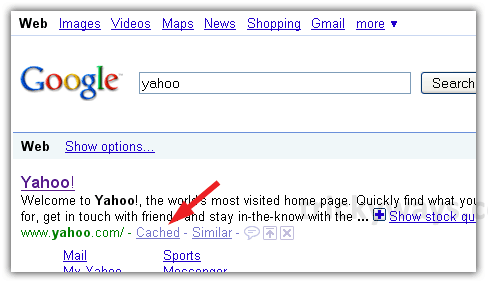
Most of the search engines like Yahoo and Google cached web pages. Web pages are being stored in search engines so we can quickly view cached versions of those pages by clicking “Cached” next to the URL in Google search Results, as updated as Google caches it.
4- Use Google Mobile search
Blocked web pages can access by using Google mobile search, but output may not be optimal. This is very similar to using a Web proxy.
5- Wayback Machine
This is another way to access blocked websites from the cache. Wayback Machine is an Internet Service that frequently keeps a copy of website from the day a website got started. By clicking on the latest copy of what Wayback Machine stored given us access to that blocked website, almost a latest cached copy.
6- Using a public Proxy Server
There are many free proxy servers out on the Web. Note that to use these you have to change internet connection settings in Internet Explorer or whatever browser you use. To get free proxy click Here.
a. Proxy Surfing – Firefox
Go to: Advanced tab > Network tab > Connection Settings.
Select Manual proxy configuration, insert your proxy under HTTP proxy.
b. Proxy Surfing – Internet Explorer
If you are using Internet Explorer then you have to follow these instructions:
Tools > Internet Options > Connections tab > LAN Settings
Check Proxy Server. Insert your proxy URL inside Address.
Important!
Be careful when you are using public proxy servers. It is possible for the guy who is hosting the service to snoop on the data that is passing through. So I wouldn’t recommend putting any important information such credit card details when you are using public proxy server method.
7- Anonymous Surfing
Some site allows you to take advantage of their proxy or domain to surf other sites as no identity. Check out the 100+ anonymous proxy websites to access block websites
8- By using Online Translation Tools
We can also use translation services as a web proxy. Online translation services allow us to translate websites from one language to another user defined languages, and display the translated output in their pages. Following are the best links; again Google is your best friend for more resources.
9- Subscribe to RSS Feed
If the site you want to visit supports the RSS feed, you can easily subscribe and read it with an RSS reader. You can also regularly send the contents of the web to your email using Feed service.
10- Get Web Pages via email
This is a useful way if you need a single Web Page. Obviously accessing large files is not possible in that way. Web2Mail provides us free services that send websites to our email addresses. All you need to do is send an email to [email protected] with the URL as the subject title.
11- Use Tor Distributed Proxy
Tor is an advanced proxy server using multiple anonymous servers for a single Web request. This requires an application to be downloaded and installed.
12- Your proxy server
This is an advanced technique and is probably the best. This requires your proxy server hosted either at your home or a HSP (Hosting Service Provider). You can enable SSL encryption and prevent any snooping on the content as well. Also, put some access control. Otherwise, someone can find the service and misuse it. You can use following server to do that;
- Apache Web server as a proxy server– A bit complex setup.
- Privoxy– This is the recommended approach. Please see this page for more details.
13- Use alternate content providers
When everything fails, you can use alternative service providers. For example, if Gmail is blocked at your place, you can take another obscure mail address and enable email forward at Gmail.
You can use above methods to access blocked websites, facebook, disabled mode websites, sites at school, web pages, youtube and more.
that be useful if you need get info off a website and it’s restricted now you can accuses it perfect ^^ thanks tricky ways
I recently came across your blog and have been reading along. I thought I would leave my first comment. I don’t know what to say except that I have enjoyed reading. Nice blog. I will keep visiting this blog very often.
Susan
i like your way to share tricks. thanks
Thanks for help to access blocked sites
yeh right.. great post, Thank You
Great resource. You listed many tips that i have never heard before but i hope they will work.
GET WEB PAGES VIA EMAIL -> Nice requester: power2mail.narod.ru
Awsome ways to access block sites thanks
Cache snapshot way to access blocked websites is great
Thanks
Hi all 🙂
why don’t you try this OpenBlockedWebsite It’s easy name to remember .. fast .. easy to use .. and has no annoying ads 🙂
enjoy 😉
Amazingly cool
realy appreciable work
Hello
Just wont to say it doesnt work !!!
Way ?
Becouse everthig is still blocked by administrator !
Which website is blocked by the administrator, what are you trying to access?
I use RSS feed method as you told above and that works nice.
hey it didnot work things are more complex here. certain things like flash or somethings like that are blocked here. how can i access that????
yes, this is problem if you don’t have Flash Player installed on you system
Thanks for providing the list of different methods to get access to blocked web sites.
filtered all site
i tried most of your methods above we have “lightspeed system content filtering” administrater-type system and it blocks most of the methods, i tired to do a proxy do you have any tips? anything that will not be blocked? please i wanna acsess my facebook!! ;(
ps. ill be checking to see if u reply dont trie to emial me cuz i cant acsess that either
thanks for sharing these tips to access blocked web sites.
thanks a lot for telling us about the methods to access blocked web sites.
Use this free proxy website to unlock Facebook, Orkut, YouTube, MySpace, Hi5, Bebo etc from work and school.
MaverickEyes.com
No need to install any software.
Its fast and easy to use.
Enjoy.
None of the tricks worked ..
Can you post some another easier trick ??
Good day very cool website!! Guy .. Beautiful .. Superb .. I’ll bookmark your blog and take the feeds also?I am glad to seek out numerous useful information right here in the put up, we need develop extra techniques in this regard, thanks for sharing. . . . . .