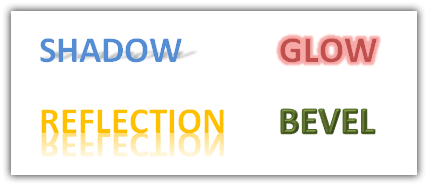
Effects like Shadow, Glow, Reflection and Bevel now you can easily apply to text in Word 2010. You can add text effects to paragraph styles. Effects used for images are now available for text and shapes.
Reflection text effect in Word 2010
Click on Text effects icons > Reflection and select an effect from different available variations. Click on Reflection options to create custom reflection effect

Shadow text effect in Word 2010
Click on Text effects icons > Shadow and select an effect from different available variations. Use Shadow options to create custom Shadow effect

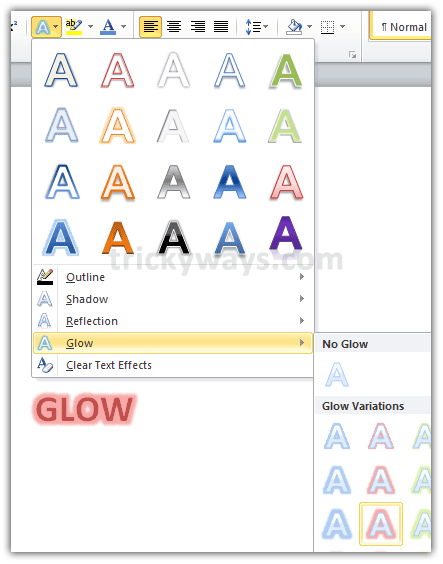
Glow text effect in Word 2010
Click on Text effects icons > Glow and select a glow effect from different available variations. Click on Glow options to create custom Glow effect
Bevel text effect in Word 2010
Click on Text effects icons > Shadow and click on Shadow options. In the next window click on 3d-format and set different available options for bevel effect as shown in the screenshot given below

Word 2010 looks fascinating thanks for this knowledge
it seems as office 2010 includes much nice features
Wow so now we can add visual effects to text in Word 2010 really amazing
Great post this will really help me.
Hey! You people really work nice keep it up.
this is really cool, thanks!
Yeah, this is nice and all, for I’m using it for a project. However, how the friggin’ HELL do you turn the effects OFF without having to just undo the whole thing?! >_>
To clear the effects from any text, click on Text Effect icon and choose “Clear Text Effects” option.
How can I resume normal formatting in Word 2010 without losing the text effects just applied. I do NOT want to clear the text effects already applied. I just want to resume normal formatting.