Full header information of an email is more helpful for system administrators than an ordinary person. Full headers information of an email contains delivery route and other information. By default different email service providers like Gmail, Yahoo, Hotmail, etc. shows little information in the headers in normal view, but you can see the full headers information. So to view full headers of Gmail, Yahoo, Hotmail emails follow the given steps below
View Full Headers Windows Live Hotmail (@live, @hotmail)
Step-1
Access your Windows live Hotmail email account
Step-2
Right click on the message and click on View Message Source

See full headers of Windows live Hotmail email

View Full Headers Yahoo (@yahoo, @ymail, @rocketmail)
Step-1
Access your Yahoo email account
Step-2
Click on emails folder like Inbox

Step-3
Right click on the email message and then click on View Full Headers
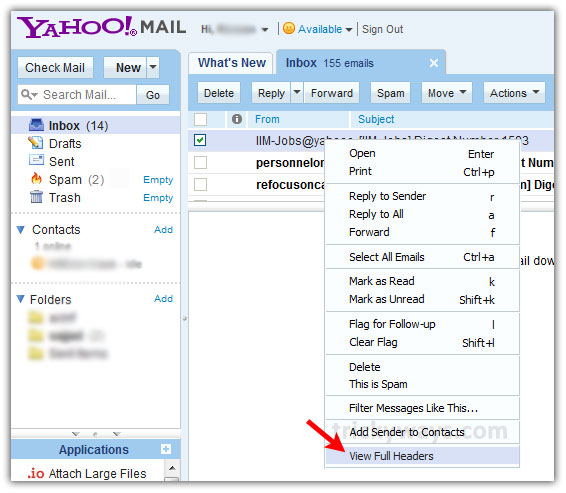
See full headers of Yahoo email

View Full Header Gmail (@gmail)
Step-1
Access your Gmail account
Step-2
Click on the email message to read it

Step-3
Click on arrow on the right side of Reply button and then click on Show original as shown below in screenshot
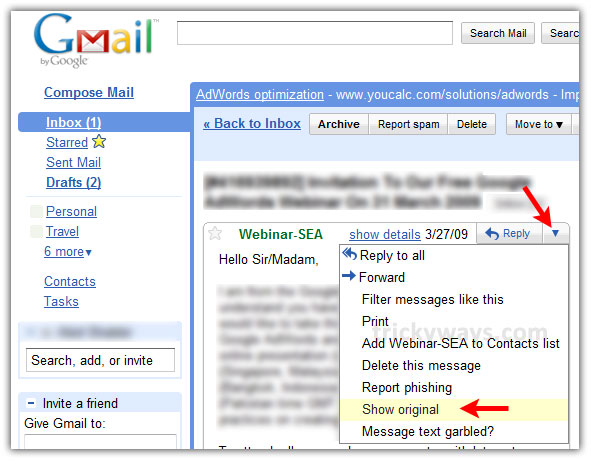
See full header of Gmail email

fabulous work, very nice email tips for expert levels
you place very informative stuff on your site, keep it up and thanks
Your articles are always informative and useful
Thanks, i was looking in Hotmail email options to enable full headers
Unable to get through to my email because of forgotten password for more than amonth now have tried through yahoo help tips but unable to get through where can i get help now?