If your preferred language is different from that is applied on iPad or iPad Air already then you can change it to your preferred language. You can change iPad language to the following international languages: English, Deutsch, Francais, Japanese, Nederlands, Italiano, Espanol, Chines, Pyccknn. See the following guide to change iPad language.
See also: Create Custom Keyboard Shortcuts on iPad
Change iPad Language on iOS 7
If your iPad or iPad Air is running iOS 7.x then you can follow these steps to change interface language.
- Tap on “Settings” icon on your iPad Air, Tap “General” on the left-side with gear icon (option #7 on the left in 3rd Group of options).
- Tap “International” option on the right-side (Option #17 on the right in 7th Group).
- Tap “Language” 1st option in first group, Choose your desire language from the available list of languages and tap the Done button on the top-right side of the language list screen.
- This will take few seconds to change language, and you will see iPad interface language changed to the language you chosen.
Change language on old iOS versions
Step-1
Tap on the following Settings icon

Step-2
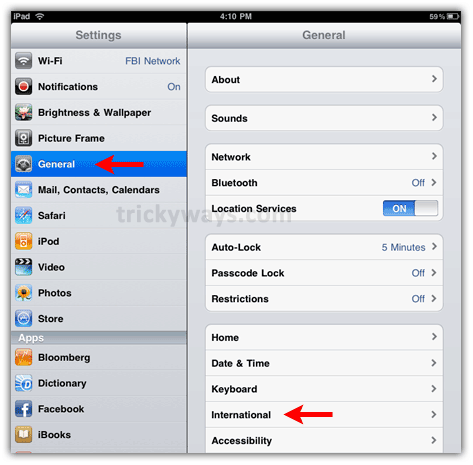
On the following screen tap on General and then tap on International option ( See screenshot below if interface language is not English already and get the idea where the option is, “General” is fifth option on left side…)
Step-3
On the next screen, tap on Language option

Step-4
On the next screen, tap on the language that you want to apply on your iPad.

nice iPad tips
Can we change ipad language to one that is not listed in available language options
HAVING DIFFUCULTY CHANGING GERMAN INTO ENGLISH ,
I DON’T SEEM TO HAVE ANY OF THE PAGES IN THE HELP SECTION,
WHAT KIND OF PROBLEMS ARE YOU HAVING ?
yes but when you change language as described and then use itunes and apps the language for these remains in the original unchanged one????
have you found a solution
I have had my iPad2 for two years … Bought in Canada. I am living in Mexico right now and just did an update to the iPad and now my updates to apps comes up in Spanish and I can’t update anything as I get the message that it has to be done in Canada. Do you know how I can fix this?
Still can’t change from Russian to English..help
how can i change the language into portugues as the ipad don’t have the option.
sandro
iPad language support is less than iPhone, at the moment iPad language support for English, French, German, Japanese, Dutch, Italian, Spanish, Simplified Chinese, Russian.
I am not sure there is an app available to change iPad language other than available language options.
Hi,
I speak and type in 3 languages, I want to quickly switch between the languages and that NOT the interface changes, but the Correction dictionary changes. Now explain to me how you do that… Because what you propose here only changes the interface….
Regards, k
remember about change language during install iTunes and turn on Ipad first time: when you go to website with itunes open it in your country/language and instal iTunes in language that you want. Because a lot of things from iTunes appear after for example, I have Ipad in english, iTunes in italiano and Calendar in Ipad is in italiano.
all my applications on IPAD are in english except Skype. I cannot get out of the Italian Skype. I have tried all settings and they are all correct. English is the chosen language, Skype comes up in Italian. I have found no help from the Skype personnel. They gave me your site. Please help.
Change your iPad language to English and then remove the installed Skype App from iPad (See how to remove app). Install Skype again from App Store.
Switched to Russian. How do I get back to English?
Home screen, tap Gear icon
Tap the menu with the Gear icon
On the next screen, scroll down and find the 2nd last group of options and tap the third option in this group
Tap the first option on the next screen.
Now the tap the Language that you want to choose and then tap the bule icon on the top-rignt corner of the windows.
Wait for the iPad to apply changes and it will get back to the Home Screen.
Thank you so much ,
trickYguY :
I just wanted to Thank you, for helping me change the language on iPad back to English. I tryed for week and couldn’t figure it out. So, THANK YOU, so much! Much appreciated…
I am an English speaker resident I Italy where I bought an iPad 2. How do I get iTunes, AppStore pages an: apps in English?
can not find location services on ipad in the general page. please help thank you
thanks it was helpful. so helpful
my fiance just brought me a ipad and then i change the language to vietnamese now i can’t change it back to English please help !
Hi Thy!
I was wondering how did you change your iPad into Vietnamese??
Reply through email if you can
I bought my ipad 2 in France. I have changed the language to English which works except with email. the keyboard remains french and the spell check tries to change all words into french despite the fact that in settings English is selected. Help !!
Please advise to change my iPad language from Arabic to english
Hi. I have apple Ipad air I cannot change the language from Japanese to Arabic or English how I can change it plz
Post is update for iPad running iOS 7 please check to change language on your iPad Air.
Bought brand new ipad mini and it will not let me register it because I can not get pass the language to slide open….help
i was playing around and added a Chinese language. Now I can’t get rid of it! When I go into edit my language, it only gives me option to delete English. How can I delete Chinese as all my searches have both
I changed my language on my Ipad and now I’m getting a error Change Language, You must reopen IJW
I’ve changed my language in my iPad 4 ios 9 screen has gone off how do I resolve this problem?
Ok…mine show English but has a foreign beside it. I have no idea how to change it back. Please help!!
Hi,
My I pad uses English everywhere except for iTunes and app store. I am not able to change the language in app store.
I have had my iPad for 5 years. Half of the iPad is in Hebrew, the other is English. I have tried for over a month to change it to English…….my settings doesn’t have “international” like your diagram shows, what is wrong? Please. Help me. Thank you very much.
Bunny gore
Hi,
Do you know the iPad model and iOS version installed on it?
It is usefull. thks.
Hey, I have a question, please answer! I have a problem on turning Chinese to English I pressed english version it didn’t work it was on English version but on my iPad it is only chinese blah blah so can you help me please