Turn off Keyboard Clicks Sound on iPad

email

If you are not comfortable with the iPad keyboard sound while typing or you want to turn it off in silence place than see the following guide to learn how to turn off iPad’s keyboard clicking sound.

Tap on Settings icon

ipad settings icon

Tap on General and then Sounds options
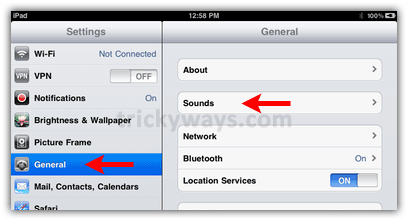
ipad settings general sounds

Finally tap on the ON/OFF slider to mute the iPad keys sound

ipad keyboard sound on off

For more stuff like this you can: Subscribe to RSS Feed or Get Updates Via Email or Follow us on Twitter

Share/Save this Post

Comments:

  1. prof 17 April 2010 at 11:57 pm #

    what the h*** is that ipad

  2. J.son 24 April 2010 at 11:48 am #

    Can we apply different type of sound to ipad keyboard clicks?

  3. mac 30 April 2010 at 10:56 pm #

    Sound click sound is annoying.

  4. Robert 9 May 2010 at 7:06 pm #

    Thanks

  5. KickStart 10 May 2010 at 1:11 am #

    Keyboard sound is off now, thanks for ipad tips

  6. GeekPub 29 June 2010 at 6:35 am #

    This is a pretty common annoyance on smartphones. I don’t know why they don’t default these to off.

Trackbacks/Pingbacks

  1. iPad Tips and Tricks | Tricks for iPad | Tips & Tricks for iPad | iPad

Leave a Reply