If you want to create custom ringtones for Android phone from a music or song file that you like then here is the method to make own ringtone for Android phone. This custom ringtone creating method will work on both Windows and Mac OS X.
Requirements
- Music file that you want to use as a custom ringtone
- Download iTunes and install on your computer
- Data cable to transfer ringtone to your Android device
Create custom ringtones for Android Phone
Step-1
Download and install iTunes, Run iTunes.
Step-2
Click on “Music” under “Library” section on the left panel of iTunes. If the left panel is hidden press Ctrl+S keys from keyboard to see this panel.
Step-3
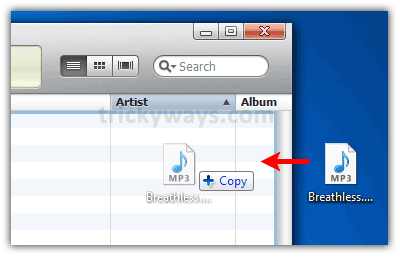
Open Music file in iTunes that you want to convert into ringtone, Click and drag file into iTunes as shown below in the screenshot.
Step-4
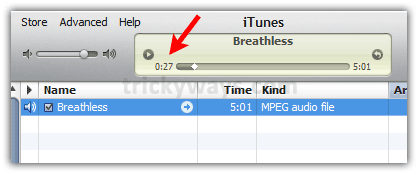
Play your music and note down the start and end time of your favorite music part that you want to extract form music file. Try and play again if you don’t guess first time.
Step-5
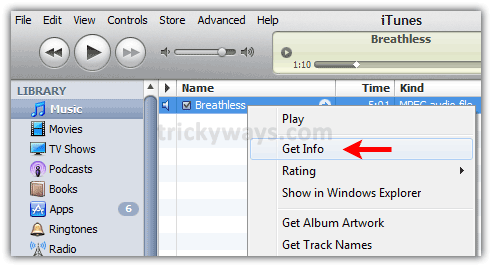
Right Click on the file and select “Get Info”.
Step-6
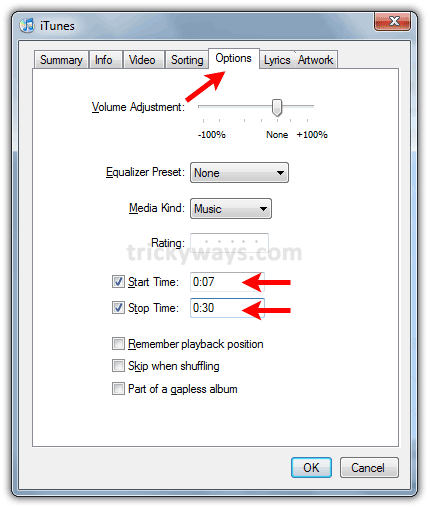
Click on “Options” tab and enter the Start and Stop time that you have noted down in step-4.
Step-7
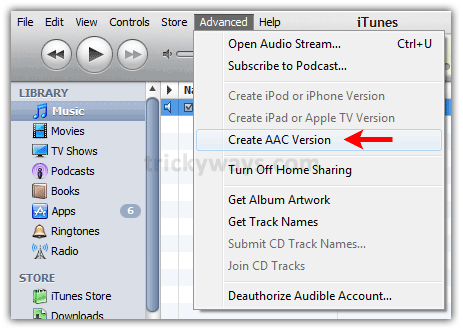
Right-click on the file and select Create AAC Verion option. This will extract and make custom ringtone file of specified time.
OR
Click on “Advanced” menu and select “Create AAC Version”, this will create a new file and add to the iTunes automatically.
Step-8
Click and drag this new file to the desktop.
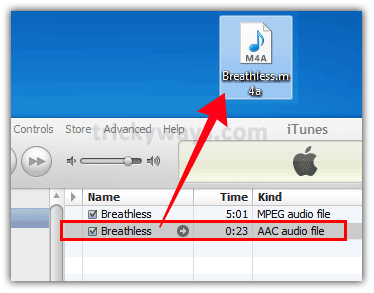
Now you have your custom ringtone for Android phone, close the iTunes.
Step-9
Transfer ringtone to Android phone
Connect your phone to the computer and let your computer to install its driver file if its not installed already.
Copy the ringtone file form your desktop. Open the Android phone icon from my computer and paste the file in the Ringtones folder.
Now see the ringtone file in your phone’s Settings > Sounds.
Successfully create a ringtone for my android, Thanks
i followed your method to create a ringtone for android it just works fabolus.
Hey i made my first ringtone for Nexus
I tried this and it works well. I usually use a different way but this works great. You can download all my ringtones at androiddownloadz.com to check some of them out.
I created ringtone for Nexus with your guide
Thanks buddy for method to create free ringtone for android phone
It works great to create ringtone for android.
a much faster and easier alternative is ringdroid. You can customize any mp2 or music file you already have on your SD card on the spot. You select the start and end points and save the ringtone/alarm/notification as a separate music file. Right from your android phone.
Thanks 🙂