Turning WiFi On or Off and connected to a different wireless connection is a straightforward task. If you are new to macOS and don’t know to connect to WiFi network, then this guide is for you. Using the simple WiFi menu, you can check the wireless connection status, switch to another connection, and turn Wi-Fi connection on or off. When you are out of battery, turning WiFi off can save the battery, so it’s a good idea to turn it off if you are not using it.
Connect to a wireless connection
- To see the nearby WiFi connections available, you can click the WiFi icon in the menu bar on the right-top corner of the screen. Click “Turn WiFi On” option if WiFi is off already.
- Choose a WiFi network connection from the list to connect to it. If the wireless network is secured with a password, then you need to enter the password. When you don’t know the WiFi password, then you have to ask the network administrator or the owner of the WiFi network.
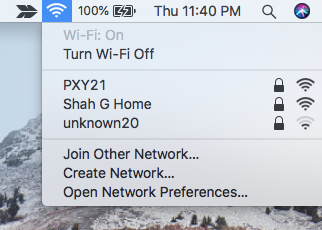
If WiFi network is not showing the list, then make sure you are in the WiFi signal range, and others can connect to it. If your wireless connection is hidden and not broadcasting the SSID (WiFi name), then you need to choose “Join other network” option from WiFi menu and then enter then WiFi connection details manually.
Turn Wi-Fi connection on or off
You might need to turn the WiFi connection off temporarily for some reason, and you can quickly do that from the WiFi icon.
- Click the WiFi icon in the menu bar and select “Turn Wi-Fi off.” option. You will notice the WiFi icon is empty without signal strength bats in it.

- To turn the Wi-Fi back on, click the icon and select “Turn Wi-Fi on.” This will scan and list the nearby wireless network connections. Just click the desired connection to connect to Wi-Fi.
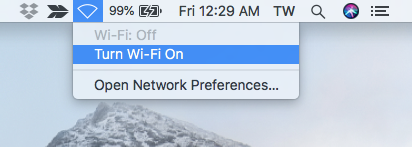
Enable Wi-Fi icon in the menu bar
If the WiFi icon is not showing in the menu bar, then you need to enable it from the macOS System Preferences.
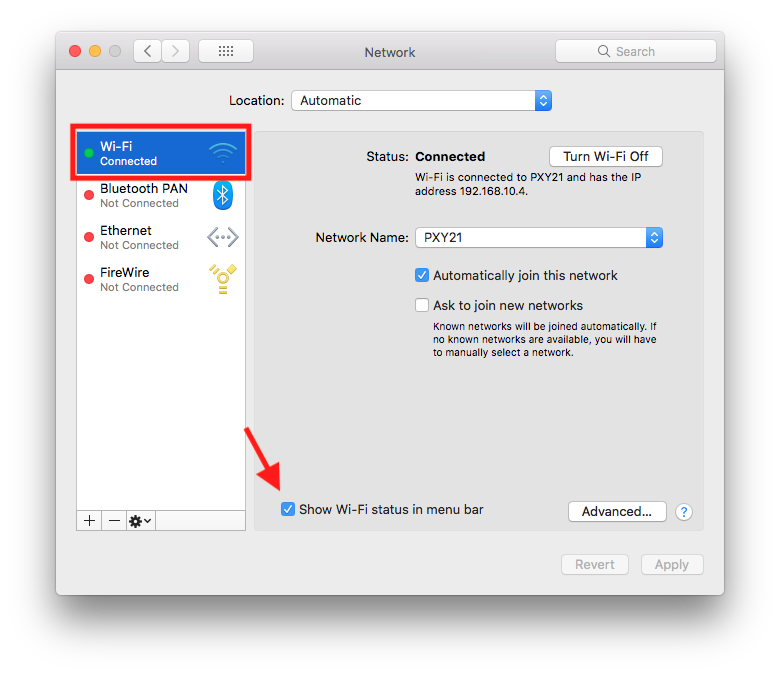
- Click the Apple menu top-left corner and select “System Preferences.”
- In the Preferences window click the “Network” icon.
- Make sure Wi-Fi and then check the option “Show Wi-Fi status in menu bar” as shown below.
Turn Wi-Fi on or off from command line Terminal
Through macOS Terminal app, networksetup command allows us to control Wi-Fi device. We can turn wireless connection on or off using the command line. Just open the Terminal app on your Mac.
- Press cmd + space keys from the keyboard, Type Terminal in the search bar and hit Enter to open Terminal app.
- Type the following command to run on Wi-Fi
networksetup -setairportpower airport on - Replace the word on with off in the command above to turn the Wi-Fi off.
Turn AirPort off on Mac OS X Snow Leopard
- Click on Apple menu and select “System Preferences.”
- Hit the “Network” icon under “Internet and Wireless” section
- Click “Turn AirPort off” button
To turn AirPort On use the same method, this time you will find “Turn AirPort On” button if it’s Off already.
see also: How to Turn Bluetooth On/Off Mac
NOTE: This guide was published on May 2010 and has been completely revamped and updated on May 2018 for accuracy and comprehensiveness.
There is airport card info showing in system profiler on my Mac Pro, so I know I have one. But when I go to internet and wireless in network in system preferences, there’s no turn airport on/off button. Does this mean that the airport card on my Mac is turned off?
I have the same case