Today i received an email from user that how can i shutdown my laptop if unplugged and installed Windows 7. Microsoft Windows 7 comes with lot of power management features and you can customize it according to your requirements. So here is the method to shutdown your laptop if you lose the AC power and laptop is on battery.
Step-1
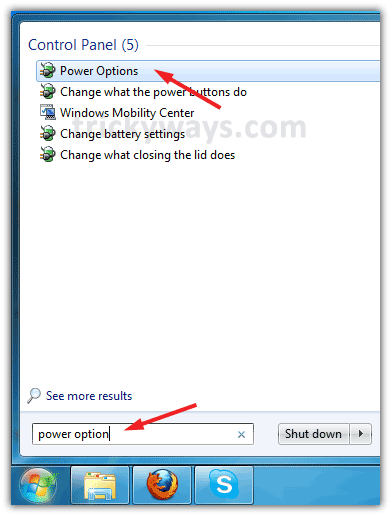
Type “Power Options” in Start Menu search text field and hit enter key.
Step-2
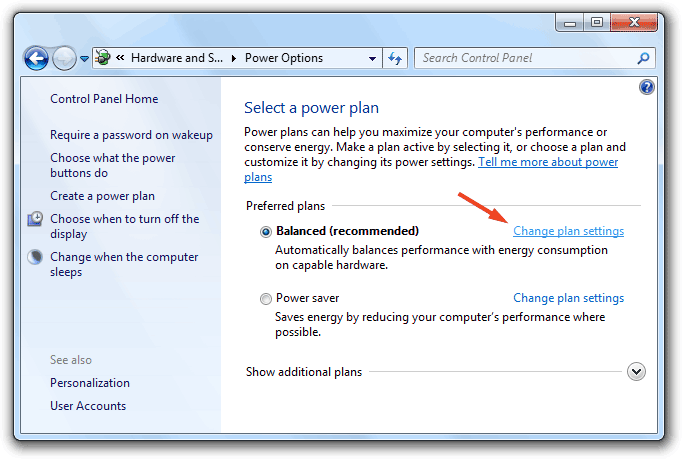
Click on “Change Plan Settings” in front of active plan (Balanced, High Performance or Power Saver).
Step-3
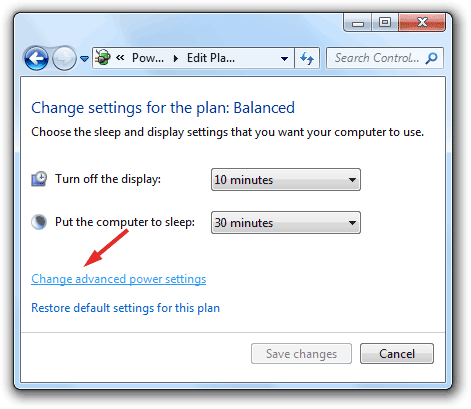
Click on “Change advanced power settings”.
Step-4
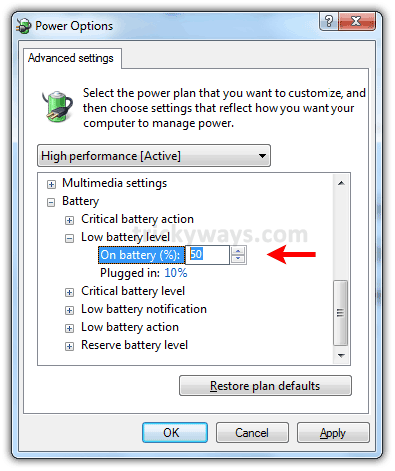
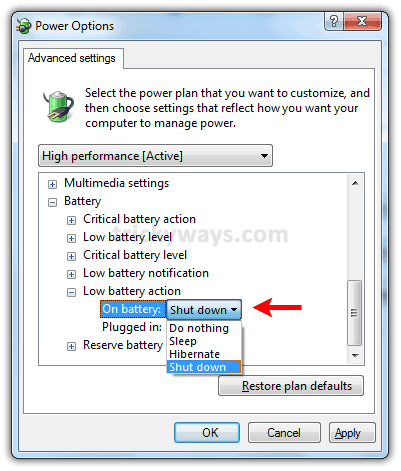
In the next window scroll down and find the “Battery” option, Expand it.

Step-5
Expand “Low battery Level” and change the “on battery” value to whatever you want.
Step-6
Expand the “Low battery action” and change the “on battery” option to Shutdown.
See also:
that’s great.
Yes its really great, i set the battery level to 80% and Hibernate the system instead of shut it down. Windows 7 is really cool with not only power options.
thanks for providing this useful tip regarding laptop automatic shutdown
Nice work keep it up
This is really useful when i am not on my desk and electricity shut down, using this Windows 7 power management feature my laptop automatically hibernate / shutdown when battery comes to specified level.
What is doing wrong? its not working on my laptop.
i haven’t low battery action and notification
its ultimate 7
This battery option is only available on Notebook computer not on Desktop computer, are you using notebook?
If you are using a notebook installed Windows 7, recheck “Low battery action” under “Battery” tree menu.