USB storage devices are so common these days almost everyone owns USB storage device in shape of small flash drives, external hard disks, mobile phones, cameras, and lots of other portable devices. So if you want to secure your computer from stealing data, viruses or any other risks then simply disable the USB ports for USB storage devices / disk drives. To block the USB storage devices just follow the given steps below.
Note: this method just block the USB drives (Flash drives, External HDD, Mobile Phones, etc.) not the USB mouse, Keyboard, etc.
How to Disable USB ports
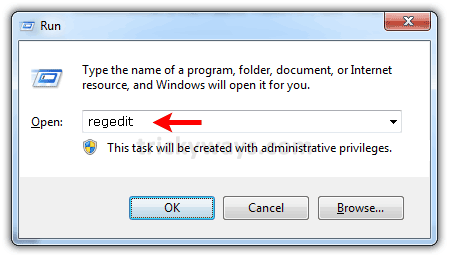
Press Windows + R from keyboard, type “regedit” in the “Run” window and hit Enter.
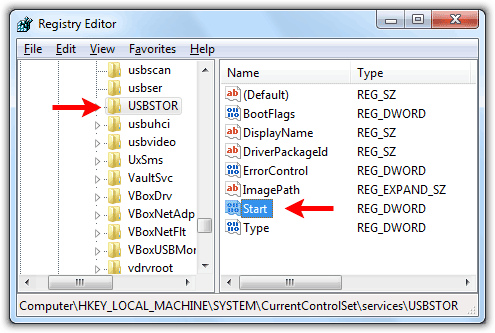
Explore the registry editor folders
HKEY_LOCAL_MACHINE\SYSTEM\CurrentControlSet\Services\USBSTOR
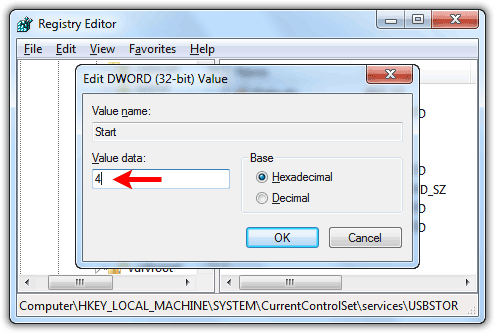
in the right pane double click to open “Start” DWORD value as shown below.
Change its value to 4 and click “OK” button to save changes. Close the registry editor and plug in any USB storage device to check.
see more Windows 7 tips
There is a great and elegant Way to Disable USB Ports to Block USB Storage Devices under Windows and Mac. The application is called My Endpoint Protector and it is even free to use.
Much easier than to edit the registry as descibed here.
http://www.endpointprotector.com/en/index.php/products/my_endpoint_protector_SaaS
i already disable usb port. how again i activate.
To Activate USB port, change the “Start” DWORD value to 3. See above screen shots in the post.
thanks I blocked the USB storage devices
Its a nice way to secure system if we disable USB ports, thanks for sharing these useful tips.
Nice tip to keep system secure.
can you tell me how to disable the port
very nice tip to secure system from unauthorized access
it’s not working when i change the storage device
how to disable the port
It does not work properly on windows 7