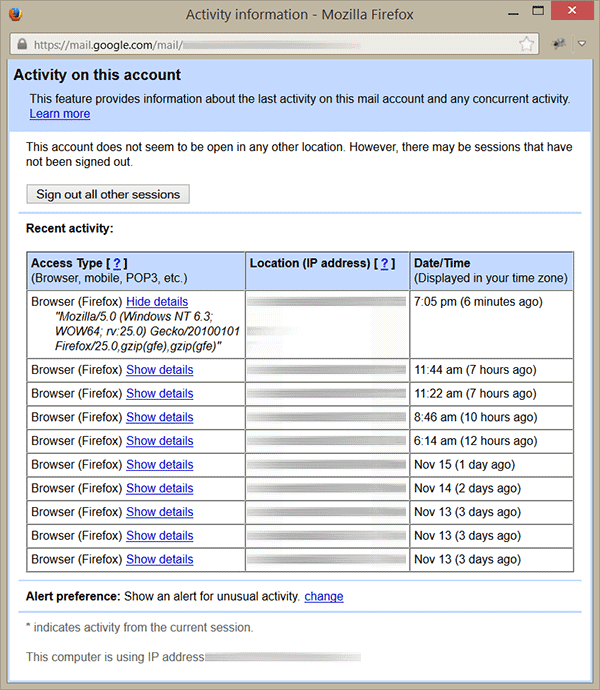
There is a great option in Gmail that you can view last login details including Access Type (Browser, Mobile, etc), Location and Data/Time. Using this account activity option you can find any unusual activity on Gmail account. On account activity detail windows you can sign out all other session that you may not signed out on other computer or devices. Another option to show alerts for unusual activity on your account. So lets see how to check last login activity on Gmail.
Step-1
Go to Gmail.com and login to your account using UserName and Password
Step-2
Scroll down to the bottom of the page and click on “Details” link
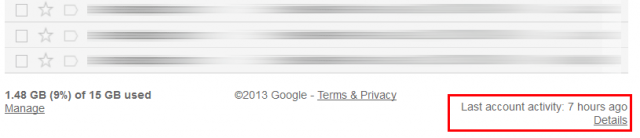
Step-3
A new windows will open up and you can see Gmail account activity history with details of Browser, IP address and Date/Time. To sign out session on other computer, click on Sign out all other sessions button. At the bottom of this page set the unusual alter setting as well.
Really great gmail option, thanks for sharing this knowledge.
Great tip thank you!
I want to find someone’s gmail account recent login. Is it possible?? How?
Idiot
Nice option thanks
wring password show
I need my account details
Please Consider me active my gmail account
which account
“which account” doesn’t describe your question, please tell us If you need any help related to Gmail activity.