If you want to allow others to use your Mac system then this will be a nice approach to create separate accounts for them. By doing this you secure your computer because other accounts could be created with limited authorities and rights, so in that way users of those accounts may be restricted to uninstall applications, to create new accounts, etc……
So, here is the method available to create or delete a user account from Mac.
Create a New Account
Step 1
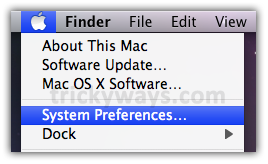
Click Apple logo and System Preferences
Step 2
In System section, click Accounts

Step 3
This is administrator account, click on “Click the lock to make changes” lock option

Enter the administrator Password for authentication

Now, it opens the lock. Click “+” sign, it opens a window

Step 4
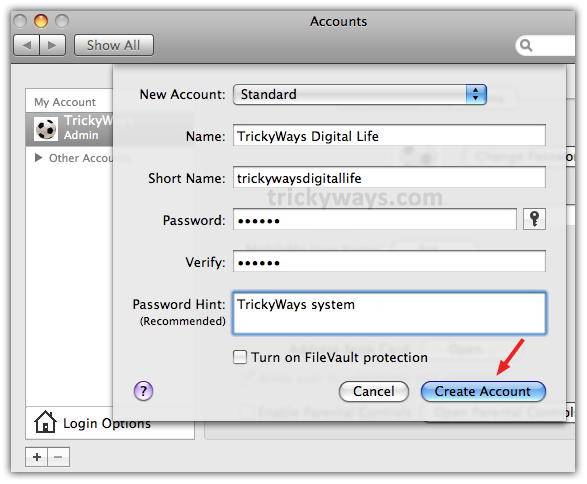
Select the type of account from New Account as administrator, standard etc…..and fill out the other information and click Create Account
Step 5
Now under Other Account you can see newly created account

Delete An Account in Mac
To delete an account in Mac, just simply go in Accounts as you follow the steps to go in there to create an account. Click on user name to which you want to delete and click “-“ sign, it opens a window like following, where you’ve to select an option according to your choice then click OK and that’s all.

thanks for sharing the process to add or delete a user account on mac
How many account i can create in mac, any limit?
Thanks for this guide to add or remove user account on mac
Nice work keep it up
Hi, I have a little question. How can you stop sharing the files from the Admin to the other users. Technically, I would like to block them from seeing any of my files…
I can’t seem to figure out how to do that.
Right click on the Folder that you don’t want to share and select “Get Info”
This will open the Info window
Expand “Sharing & Permission” option at the bottom and assign permission to user as you want.
Feel free to reply.
Yeah, it works, but it is laborious if you have too many (like me).
Yes, right click an d get info for folder sharing option or click apple logo > system preferences > sharing