In this PSP tutorial, you will learn how to install custom firmware of your PSP 100x (Phat) and PSP 200x(Slim) using TIFF exploit – ChickHEN.
IMPORTANT: This will NOT work with PSP-3000s [TA-090v2] or new PSP-2000s [TA-088v3]
Update 1: How to Check PSP Motherboard Model
Update 2: Follow the link Below to install CFW on PSP-3000s or new PSP-2000s [TA-088v3]:
Rest of the users please continue. Before starting please make sure you fulfill the following requirements:
- Firmware: 5.03 or below
- Have a Memory Stick
- Battery charged to more than 76%
Required Material
Create a folder on your desktop and name it CFW. Download the files linked below and extract them into CFW folder.
- PSP Official Firmware 5.03: PSP_Firmware_503.zip or PSP_Firmware_503.zip (No need to download if your PSP is already on Firmware 5.03)
- ChickHENR2 and Hellcat’s Recovery Flasher: ChickHENR2+Recovery.zip
Now your CFW folder will look like this:

How to Install Custom Firmware (CFW) on PSP
Step 1 – Update PSP Firmware to 5.03
Skip this step if your PSP is already on Firmware 5.03.
If your PSP firmware version is below 5.03 you need to update it to firmware 5.03 first.
Connect your PSP to computer via USB. Your PSP memory stick will appear in your computer.

Open the Memory Stick drive from your computer and copy EBOOT.PBP from PSP_Firmware_503 folder to the following directory on your memory card:
/PSP/GAME/UPDATE/
(Create the directory if not available. Make sure you name folders in CAPS)
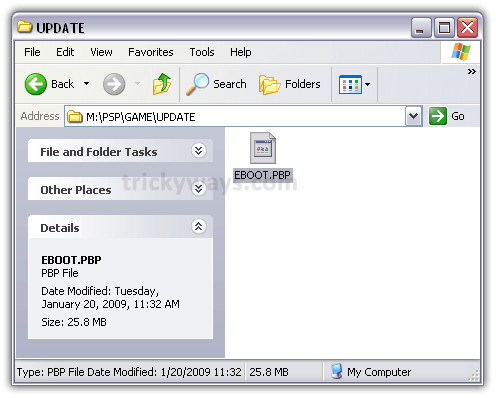
Now Press the O button of your PSP to disconnect it from USB. Now go to Game > Memory Stick on your PSP. There you will find the PSP firmware version 5.03. Press the X on PSP button to execute it. It will install firmware 5.03 on your PSP.

Step 2 – chickHEN R2
Assuming that your PSP is on Firmware 5.03, now is the time to load chickHEN R2. Reconnect your PSP to your computer via USB.
Copy h.bin file from ChickHENR2 folder to the root of your PSP. (ms0:/)
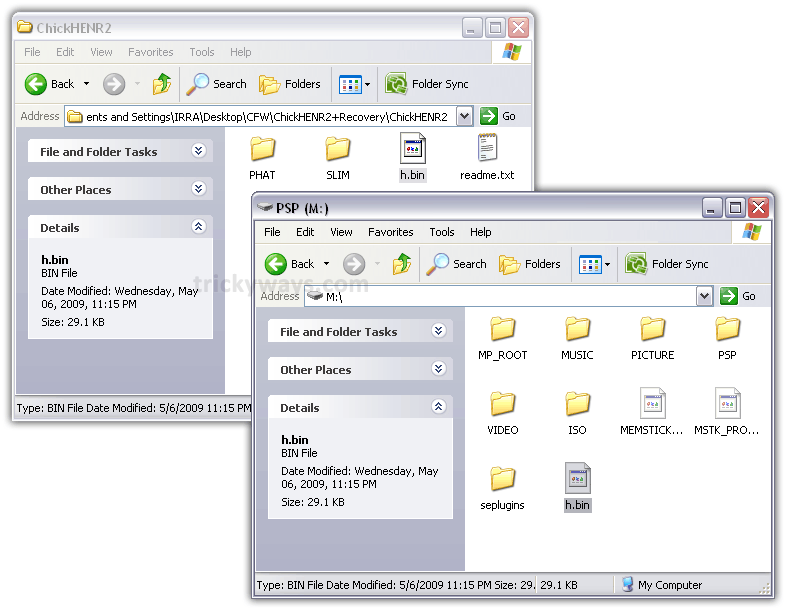
For Phat (PSP 100x)
Go to PHAT folder in chickHEN R2 folder and copy eggsploit.tiff file to the following directory on your PSP:
/PSP/PHOTO/FAT
(Create the directory if not available. Make sure you name folders in CAPS)

For Slim (PSP 200x)
Open the SLIM folder from ChickHENR2 and Copy folder ChickHEN to the memory stick under:
/PSP/PHOTO/

Step 3 – Hellcat’s Recovery Flasher
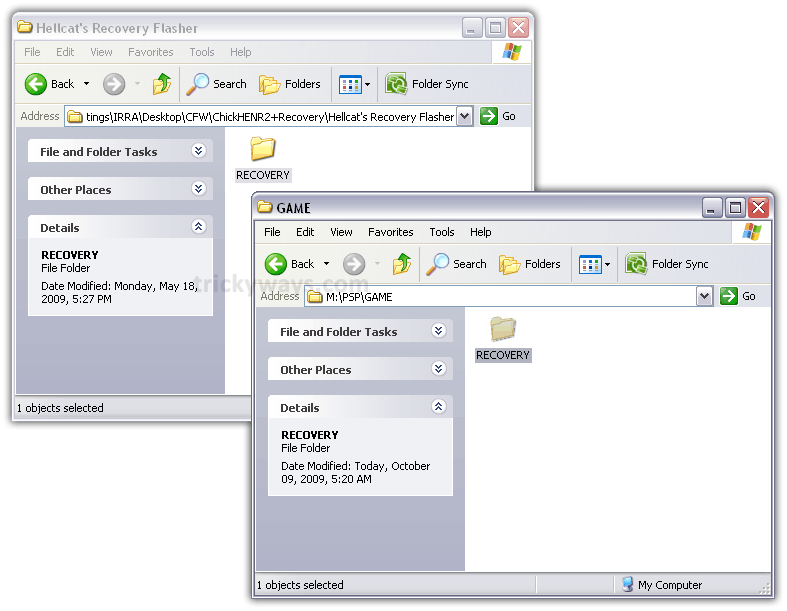
Copy RECOVERY folder from Hellcat’s Recovery Flasher folder to the following directory on your PSP memory Stick:
/PSP/GAME/
Step 4 – Load chickHEN R2
Now it’s time to unplug your PSP from the computer and load ChickHEN R2.
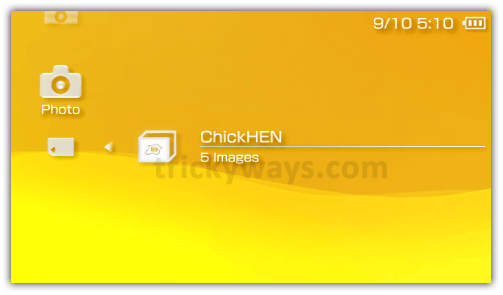
From your PSP, Go over to Photo > Memory Stick and click on the FAT folder (if you have a Phat) or ChickHEN folder (if you have a Slim). The screen should blank out then flash green, showing that ChickHEN has loaded. The PSP will then reboot automatically.
If it just hangup and shutdown PSP then your got to retry until it automatically reboot your PSP. It may take a few tries to work, in fact it took me 7 tries to get it to work. Here are few tips to get it working:
- Make sure there is no UMD in the drive
- The USB cable is unplugged
- Restore default settings under System Settings may help
Phat (PSP 2000)
Slim (PSP 1000)

Step 5 – Load Hellcat’s CFW Recovery Flasher
Assuming that ChickHEN has successfully loaded.
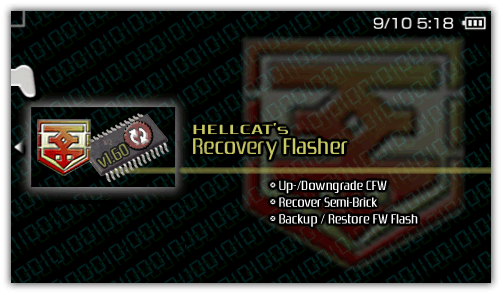
Now on your PSP scroll over to Game > Memory Stick and load Hellcat’s Recovery Flasher. When it loads, choose I agree to the notice informing you that the program touches internal flash.
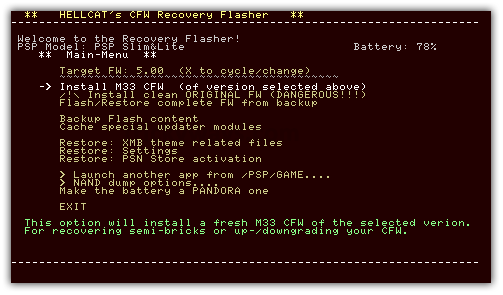
A brown screen menu will appear. Scroll down to Install M33 CFW and press X button. Then you will be asked if you want to reset your settings. Choose the first option (reset).
Then it will start install Custom Firmware on your PSP. When all done, press the X button and turn ON your PSP manually.
Go to Settings > System Settings > System Information and see what:

Congratz! You have successfully installed Custom Firmware (CFW) on your PSP. Input your desired settings again and enjoy 5.00 M33 on your PSP.
You may also be interested in:
How to: install ISO games on PSP
Really good guide for PSP custom firmware, Thanks.
Worked like a charm..Now I have CFW 5.00 M33 on my PSP
Is there any other way to hack psp?
I am newbie and tried 1st time, thanks for the help to install custom firmware
working smoothly on my psp. thanks
thanks for this PSP article
just to say to people, it took me 10 goes!, if it doesnt work at first keep trying!!! love x
Thanks for help to install custom firmware
how does it go to 5.00 m33 if we started with 5.03? 😮
im trying to do this on my psp 1000
Good Q :p
yeah you updates ur firmware to 5.03..
but the one living inside Recover flasher is 5.00 M33-6 which is CFW. and is installed in the end..
that’s why you get 5.00 M33-6
Looks like a great easy guide !! just 1 question though before i try it 🙂 . On the PSP phat if the psp is powered off after the install is finished will you have to install again ? . I have read on the PSP 3000 you can only put it in standby to avoid this happening but not clear on the phat
it happens with partially unlockable PSPs like 3000
PHAT is completely hackable so there’s nothing to worry abt 🙂
Just wanted to say THX !! . I have been looking around the internet for a couple of weeks for a guide on installing custom firmware and was picking up bits and pieces but nothing i could string together clearly from start to finish that i was convinced would work( pandora battery or not, which custom firmware etc). Your guide worked a treat and i’m now on 5.03 m33-6 !! . Happy happy happy . Thx once again for your clear guide and links to software . Top job 😉
Stay tuned for more upcomings for PSP
Hello i’ve got chickhen installed and then the cfw 5.00 M33-6, everything worked !!! But when i tried to play homebrew games (iso) my psp says (this game can not be started these data are damaged) what can i do about it? I can’t find a sollution.
hey you can use the “m33 vsh menu” or push the “SELECT button” then you can see the “UMD ISO MODE”‘S deafault VALUE is “NORMAL” change it in “M33 DRIVER” by pushing the (>) button,.,. i hope it will help you a lot.,,. THANKS,.,.
oops . Meant 5.00 m33-6 of course
Thanks for the PSP guide
HI,
I was using firmware 5.00 M33. Recently i upgraded it to 6.00. Now the problem is, I cannot play ISO file from M:ISO.
Whether i can degrade it back to 5.00 M33 or any other software has to be installed to play ISO files in version 6.00 itself?
Please someone help me to solve it out.
You guys are a great inspiration! Keep up the great work.
Thanks trickYguY for the help! just want to know after installing the custom firmware there are new files created like egghunt.bin and old ones h.bin and recovery should we keep the files or delete them? and having trouble loading games it says ‘game could not be started (80020321)'(final fantasy Dissidia) is this because I need to upgrade to a different version of this firmware? the ISO folder is on the root of my memory stick. Thanks
@Kk
Try this
1. Hold the power button for 4 seconds to Turn off the PSP
2. Turn on PSP while holding the R trigger to enter into the recovery mode
3. Open Configuration settings and locate UMD Mode setting
4. Keep press X button until you get this option UMD Mode (currently: m33 driver – no UMD -)
5. Go Back and Exit from recovery mode
Thanks for the fast reply. Its all working fine now also I didn’t have a UMD inside before but when its inside it works too^^ and I have notice that some games don’t work because it’s a bad file lucky I got afew different versions of the same game haha. I still haven’t deleted any of the h.bin, egghunt.bin files just incase something goes wrong hope this doesn’t affect the firmware??
@Kk
Great, Yes you can delete now h.bin and egghunt.bin files
will this work on all psp 2000?, or only the select few which are hackable? ive been trying to get the tiff exploit to work. no luck so far after about 20 tries
This will NOT work with PSP-3000s [TA-090v2] or new PSP-2000s [TA-088v3]
great tutorial. confirmed working on psp phat (1000 series). can now play homebrew and iso games 🙂 thanks!
thank you so much for the guide..this is the easiest guide I have found on the net and it is clear and detial..thank you again. a few questions for you sinc ei am PSP virgin…lol. My PSP is psp2001 slim (silver body). It has the version 4.02U on it. So can this be done. what do you suggest I do first?if it bricks can I fix it? Is what you listed on here an emulator too? Confused with all this…lol…basically what you have us doing is what? Sorry for being so dumb about this…
tony
I have ISOs and CSOs on my comp.
if some of the isos n csos r not working in ur custom firmware it is because the game requires greater firmware…but i hav a software which decrypts the iso/cso file n rebuild it according to ur firmware..i wanted to play fifa 2010 but it wasnt working on my 3.90 m33-3…but i decrypted the iso file n rebuilded it…n yipee its working…if anyone need this software let me kno..i will be glad to help!!
chao!!
Ya i need that software for fifa 2010 mine is actually 5.03 Gen a full hope it’ll work on that
How do i know if my PSP2k is [TA-088v3] , And If it it, and i did this process will it damage my PSP?
Follow this guide to the installation of ChickHen but do NOT perform the custom restore via hellcat..
Install PSPIdent on PSP.. it will tell you the motherboard model..
A guide on how to check motherboard is coming soon
it was pretty good but i cant seem to open it it says curupppted data
corrupted data???
is it okay to delete the egghunt.bin and h.bin files after installation? thanks. 🙂
Yes..
thanks man
successfully installed custom firmware on PSP 2000
hello again!
maybe i’m not lucky to have PSP-2000s [TA-088v3], the flasher won’t work. any suggestions to make this model play ISO games?
thanks
Just published a new guide to install CFW on partially hackable PSP (3000, 2000 TA-88v3).. check out the PSP hacks category
Hi
i have a psp2000 slim i did all step to lunch hellcat. but when i run hellcat it prompt me “Recovery flasher detected a not cfw capable psp model. Unfortunately, due to added/fixed security measures by sony this ,pdel of PSP is NOT capable of having a CFW flashed toit. ….
Theredore, all flash writing functions will be DISABLED!”
now wht can i do ?
Check your PSP motherboard Model:
http://www.trickyways.com/2009/12/how-to-check-psp-motherboard-model/
then in the end you’ll be directed to different guides for different PSPs.
Update:
Just updated the current guide as well.. check out the top section
Hey. I downloaded the PSPtm Update Ver 5.03 but when i press o it says The game could not be started (DADADADA).
Help ;_;
Did you install custom firmware after installing official firmware ver. 5.03?
Nope. o.o My systems says SYSTEM SOFTWARE 3.52 M33-2
Actually I dunno if i installed the official one. ._.
Another question.
My System Software is 3.52 M33-2. The thing is i can play The Sims Castaway, a CSO file but i cant play Naruto Akatsuki, the one that i downloaded from bit torrent. I changed it to a CSO but still. It says game could not be started (80020321)
Help ):
Sorry its (80020148)
if i dont reply, i feel like an asshole
best guide on the planet : D
i can’t run chickhenr2 on my psp phat what seems to be the problem?
i have a really big problem.. i cant upgrade my software to 5.03. my current version is 3.02 EO-B. whenever i click the update in memory stick it says.. the game could not be started (DADADADA).. by the way i have psp 1002… thanks in advance
i have done all the steps… but when i am in the hellcat’s and i choose install m33 and choose reset there is an error.
flsh 2 wasnt assigned
error opening 500.pBP
please tell me what to do
Hey, I have the exact same problem. ya lmao I know its 2018 but if somehow you could remember what you did to solve this problem please tell me…if you ever solved this problem that is
Please Help.
everything seems to work great up to the Reboot to Accept Terms screen..
i run the Eggsploit image a million times till it works. then i go to the games folder and run the Hellcats recovery flaser, The PSP reboots to the accept terms screen, but is frozen there. i cant move the “X” to accept, or do anything else.
i restart and the screen comes right back. I have to remove the battery and start the whole process over again, only to get the same resulsts.
HELP.
its a fully compatable PSP PHATy. and i checked the motherboard model info with the supplied tools from this site.
all should be ok.
thanks for your help
i do all this things and the games give me error… and i want to do again,to see if i do it good and now i cant install CHICKEN…first time i did it but now i don’t can. i cant with that program and i cant manualy 🙁 please somebody help me… sorry my bad english
thnks for the guide. hey can we delete the recovery n chicken files copied on the memory stick
if we want to use a new memory stick on a psp that has cfw on it can we just bsimply format it from the system settings to make it work like the old one
this isnt working… i tried like 50 times and it just doesnt work …. i have a psp phat and im having trouble … CAN ANYONE HELP ME PLEASE!!.. sorry for caps but im in desparte need 😀 thanks alot
Will the ChickHENR2 + Recovery work on any filmware (My psp is a 1002 with 4.05 filmware) Will it work?, This is because i have not got a battery for the install of the 5.03 filmware. Thanks.
hey. i’m done with hen something. my firmware is now 5.03 chickhen something then now when i try to use the hellcat recovery flasher then i try to install the fw 5.00 it says error
i too had same issue
try to download OFW5.0 and rename it to 500.pbp and copy it to root
ur done
check out this link
http://forums.pspslimhacks.com/tutorials/4711-tutorial-how-downgrade-upgrade-your-psps-ofw-cfw.html
hi thanks for the post
i am all done but got stuck at a final point while working withh hellcat
it throws me a error in detecting fm while installing cfw
plzzzzzzzzzzzzz help me out
every thing else went well
i am using psp slim 2000 ta 085v1
Had difficulty also running hellcat recovery.
But i figured it out that it requires OFW 5.0.
Copy EBOOT.PBP of the OFW 5.0 to MS ROOT,
then rename the EBOOT.PBP to 500.PBP
Run again hellcat.
bdw, the system will reset to VERSION 5.03
if you fail to load hellcat properly.
If hellcat recovery fails, “Do NoT EXIT”
choose >Launch another app from /PSP/GAME…
and if you have PSPident, click it so that the
system will not reset and you will not again
run chickHEN.
Hope this helps.
Thanks trickYguY for the instructions.
I’m done converting my psp from OFW Version 5.03 to CFW 5.0 M33-6
Now, there are too many files in my ms.
File > Location
h.bin file > ms root (ms0:/)
eggsploit.tiff > ms root (ms0:/)
chickHEN Folder > /psp/photo
recovery folder > /psp/game
etc…
Which should i delete?
or can i just format my ms?
Thanks!
when i open the link to ChickHENR2+Recovery.zip it says Due to a violation of our terms of use, the file has been removed from the server.where can i download ChickHENR2+Recovery.zip.
when i tried to open Hellcat’s Recovery Flasher it says This game cannot be started.The data is corrupted.
The “data is corrupted” error message appears when the chickHEN R2 is not yet properly loaded.
Make sure that you properly followed Steps 2 – 4
and take note when loading chickHEN R2:
The screen should blank out then flash green, showing that ChickHEN has loaded. The PSP will then reboot automatically.
If it just hangup and shutdown PSP, then you got to retry until it automatically reboot your PSP.
Hey,i need help when i will start hellcat´s recovery start there come:
The data are defective
sry for my english 🙂
Hi, everytime i run the hellcat recovery it shows error. Can you help me what to do with it. my psp is 2004 slim black with 3.71 m33
Thanks
how to downgrade psp 6.0 to 5.03?
Hey.. I have Psp 2000 4.01 Firmware.. is it possible to hack this?! and i dont even know what model my motherboard is? so i cant put games yet. i dont want to brick my PSP.. whahh..
Hoping for your REPLY.. thnks..
PSP motherboard identification:
http://www.trickyways.com/2009/12/how-to-check-psp-motherboard-model/
After doing this im having issues on Step 5. After i agree it says
“Install CFW (of version selected)” Instead of “Install M33 CFW (of version selected)” if i choose that i click reset on the next part and it comes up with this. Need help!
Installing firmware – PSP model: Classic “Fat” PSP
Updater used to extract FW: 500.PBP
Unassigning flashes….
flash2: wasn’t assinged – that’s OK
flash3: wasn’t assinged – that’s OK
Extracting special updater .PRX….
ERROR OPENING 500.PBP! (0X80010002)
Loading updater modules
Error 80010002 Loading/starting nand_updater.prx
Error 80010002 Loading/starting lfatfs_updater.prx
Error 80010002 Loading/starting lflash_fatfmt_updater.prx
—————————————————————-
There have been critical errors!
ABORTING!!! No harm has been done! Press any button….
i also have the same exact problem….. what do i do?
I’m having the exact issue… please help 🙂
yea can anyone plzzzzz tell us what to do with this problem?
srry this is my real problem exact why is t happanig wht do i do about it
plllllllllllllllllllzzzzzzzzzzzzzzzzzzzzzzz help
fix is here guys
http://forums.dashhacks.com/f127/hc-recovery-error-opening-500-pbp-t261318/
great minds i realy appreciate ur support on hacking issues.thanks. Am having error code 80020148(game could not be started) which make it imposible for me to upgrade to 5.03.i tried the recoverable method but my psp-1000 does not bring anything like recoverable menu rather it will start up normally.pls help me
am also having the same problem.mine is psp-1001.pls help us
To solve PSP error 80020321, see comment no. 14 reply
i tried the reply 14,but it doesn’t work.the psp is more or less like a new one.any time i hold r,it will just start up normally instead of showing the recoverable menu.please help me………it is version 3.70
hey man its dont wont to work with me
i tried so much … mayby i tried 43 time and it wont to load
i have psp-1004 can you one help me on this
and thaNX
send me ur mail ID
hey what the hell tell frm where i will download HELLCAT’S CFW RECOVERY FLASHER
it was not downlaod from giver URL so plz tell me as soon as possible.
thanKz
Sam
hey what the hell
tell frm where i will download HELLCAT’S CFW RECOVERY FLASHER
it was not downlaod from giver URL so plz tell me as soon as possible.
thanKz
tell me…………
Firmware file is uploaded again. We need to create ChicHenR2+recovery file again and will upload soon.
hii
Dude plz help me my psp is bricked when i m installing a new firmware(5.50 GEN-B) on psp slim 2000 n my battery was not paradora so what can i do plz help me…
Sam
sry it is GEN-D3
hey man its dont wont to work with me
i have done all the step but the checkhen wont load
i tried so much … mayby i tried 43 time and it wont to load
i have psp-1004 can any one help on this
great initiative,i bought a new memory card,which i inserted immediately,all of a sudden my psp show some error codes and the psp went off.please i need your help because anytime i press the on button,it will just show a green indicator light without starting up normally.please help me…………………..am tired.I will appreciate it if u can give your phone number.thanks
hey it gonna be bricked..
dear i m stil confused in Step 3 – Hellcat’s Recovery Flasher how to get there ?
hey i buyed one PSP 3000 piano black…if i add Firmware then my PSP say only corrupted data..i have 6.10 Version…and chikHEN doesnt work for me…plz help me
When I tried to install the CFW, it says there has been critical errors and then it aborts D:
also, instead of saying Install M33 CFW, it just says install CFW >.<
help on getting it to work? I'm pretty much noob at this, and this is the first time I'm trying this =(
this is happening to me too… instead of saying install m33 CFW it just says install CFW…. please some body help
…i have the same problem, is any solution found out?
okay, I think I know what the response to this will be but, I’ve got a fat PSP which since I’ve never really used the CFW on and needed to update to play one of the games I got recently, I decided to update it to 6.00, is there any CFW out there that work with 6.00 or am I going to have to go pandora to play ISO’s?
Thank you for this! It took me a while but I got it and it works perfectly!
One question…
Can you delete the Hellcat program after you updated to CFW?
Is it possible to mod a psp 1000 phat with firmware 6.30?
Dear bro,
I have PCP-2004, by mistake i install System Ver. 6.31, no I want to install 5.03 Hack, when i im going to install 5.03 the message appers “There is no need to update” please guide easiest way how could i convert my PSP system to 5.03
Thanks
How come, you can check in google for chickhenr2 free software , but after clicking the icon, you cannot access without paying it… eeewwwwwwwwwwwwwww
Hiiiiiiiiii guys i m using PSP 6.30 firmware i downloaded one CSO file i m not getting how to run game in my psp please help he
i need help have framewere 5.03 and cant install chickhenr2 restore or get custome frameware , pls pm me i have a iso version of ff10 and that would just be amasing if i could have some help
I search for a guide to install custom firmware everywhere but nothing has worked. Yours worked perfectly on my PSP 2004! THNX 🙂
i’ll try this
Hay, what do you do if your psp software is at 6.20?
hi i wonderin i want try this tomorrow but do i have 2 buy a pandora batt first anyone please x
Hey Guys, Im new to CFW and need some help. Anyways, I just installed 5.0 33 CFW or whatever on my FAT PSP. It says that it worked, and when im at Home on the PSP menu if i hold select it comes up with a new menu. When I load my game (MH2 Freedom…), I don’t understand how to get to the CFW code. I heard you hold like select or D-Pad up, but thats not working. Do i need to change a setting or something to allow me to view the CFW menu while playing a game?
i encountered critical errors, it says error opening 500.PBP and errors ong loading updater modules. please help.
error opening 500.PBP what will i do?
Hay When i go to install it said error unpacking files and dosent do it i dont know why can you help?
is this ok even without pandora and mms? I FOLLOwed the instructions and i did hundred times installing the chickhen but it never reboot my psp. pls help
Hello will this work on psp 1000 japanese version
the functions are reverse i mean the accept button is O and the cancel button is X..will this work?
hmm….
it’s not working at all , i try it all night long ihav PSP 2006 i download psp ident it say coruppted i download the hellcat it corrupted too what i must do >.<
Hey I have a psp 2004 with TA-088 v2.
I successfully installed the official 5.03 firmware provided and also the chickHenR2.
But when I run the hellcat recovery flasher and click ‘Install CFW(of version selected above)’ it fails.
It says there have been fatal errors.
HELP ME
What it exactly says is
Installing firmware- PSP model: PSP slim&lite
Updater used to extract FW: 500.PBP
Unassigning flashs…
FATAL: Error 0x80020321 while unassigning flash0
WARNING: Error 0x80020321 while unassigning flash1
* Disabling settings formal, clearing registry!
flash2: wasn’t assinged -that’s ok
flash 3: wasn’t assinged -that’s ok
Extracting special updater .PRX….
ERROR UPDATING 500.PBX (0x80010002
Loading updater modules
Error 90010002 loading/starting nand_updater.prx
Error 90010002 loading/starting lfatfs_updater.prx
Error 90010002 loading/starting lflash_fatfmt_updater.prx
ERROR reloading decrypter module! (0x80020316)
Hey i am also having same problem how did u solve it
same problem wats up with this
I’ve got a psp 1K with OFW 6.35. I’m having difficulties downgrading (it keeps telling me there is no need to update), is this possibly due to the fact that I have the latest OFW or am I doing the guide wrong? Keeping in mind that I’m completely new to this stuff.
i got to a 6.37 ohh i beat all of you
Plz tell me where i will download HELLCAT’S CFW RECOVERY FLASHER
downlaod URL is not working so plz tell me ?
I get to the part were i press the eggsploit pic, it reboots my psp, all fine an dandy.
but when i use hellcat’s recovery flash, and get to the “reset(format) settings as well” it gives me an ERROR, what shall i do?
plz reply
im having the same errors about 500.PBP, please help us tricky guy.
links dead
Hi. i have a psp 2000 (6.35) and i want to install farmware but i dont know which frmware i should install because there are many framware. I would like to know also haw many fail are inside in the right winrar.
cant update 🙁 it keeps saying…
the system software on your psp system is version 6.39
there is no need to update.
please help 🙁 🙁 🙁 🙁 🙁 🙁
hi, could anyone tell me about my problem! i’ve downloaded hellcat’s CFW recovery flasher but i dont see ‘install M33 CFW’ what should i do !!! plzz help me
hi
ok so my psp is 3.71 M33-2 and when i try to update it ..it shows a folder on my game thing on my psp and when i press x on it ..it works ..and when i agree all the conditions it says ”no memory card inserted” i have a 4gb memory card with 2000 mb space ..what do i do?
can i ask?? why there is no install m33 CFW in hellcats recovery when i run it. . .there is only install CFW
I get “error opening 500.pbp” (0x80010002) when i try to install the firmware :(. ANy ideas?
How do you install these games on psp 1000 if you have v6.60 software?
I have the same question… plz reply
one question. Can u still instal custom firmware if your psp 2000 is already hacked by using pandora battery?
Does any body know where i can get ChickHENR2+Recovery.zip
the on e given on he tutorial is not good. THX
When i try to install the update; i make a new folder in game (update, all CAPS) place that file in folder, and when i go under Games on my PSP it says (corrupted file) and when i open back up the folder on my pc theres no file in UPDATE anymore but when i go check on my psp there is still “Corrupted Data” PLEASE HELP!!!
P.S. the link to “ChickHENR2+Recovery.zip” is broken so this tut is pretty much useless anyway…
hey trickyguy i have a psp slim 2000 and i can’t open the chikhen image, my psp just shuts down and i’ve tried this a lot of times and everytime its the same what can i do???
mhm i have 6.60 PRO-B10 if i install the chicken does games will work or i have to downgrade fw and then install CFW?
Howdy folks.
Couple of hints.
1) This is not the page to look at if you have a newer 2000 or if you have a 3000. Go to the other page.
2) Yep, the Recovery link here is dead. That’s OK. Google “hellcat’s recovery flasher” to find the link for download. I got it in less than a minute.
3) Good luck!!
I’m still on my way to “freeing” my PSP I just bought. So far so good, it’s a used PSP-1000. Dude at the store was like “Uh, you don’t want the new one?” Nope!
Can i delete everythink after i’m done?
does anyone has ChichHEN R2 and Hellcat’s Recovery Flasher here?the one in this site is broke and not available already. Please give me please please!
“Next download the official 5.00 eboot for official firmware. Don’t download 5.03 or any other version just the 5.00 and make sure that it is the official version. ”
I think that’s what saved me, I assumed the 5.3 Eboot I used to update my PSP would be the same file I needed to change to 500 – completly wrong.
Mega big thanks for thanks!
I cant get the green flash at all tried 10 times it keeps saying “this game cannot be started”
Hello I would really like to try this, but the “ChickHENR2 and Hellcat’s Recovery Flasher” link is no more 🙁 ; could you please upload it again, please? thanks!
I managed to get up to helcats recovery thing thing but when i click instal cfw m33 it says error opening 500.pbp, then some other error messages. Please help
P.S i did not use the hellcats thing you uploaded because the link is broken, could this be the problem?
right, I’m on 6.6 software and it wont let me degrade it…. any help?
can u help me how to install for psp 2004?plzz
not got the m33 cfw at the top of the list i have a classic fat psp
and i keep getting error opening 500.pbp0x80010002
I got a psp and the custom firmware is 3.40 so how do I update it to latest firmware…can someone please help me…thanks
Everything was working great until I got to the part about Hellcat’s flash recovery Where it says here Install M33 CFW,
Mine just says Install CFW. When I click on that I get a bunch of error notifications. Is there a step somewhere I missed? I’m confused at this point.
hey rar files are showing unkown or format what should ill doo
if i have 5.5 gen-d3 for the frmware, what should i do?do i need to dwngrde it to 5.03?sorry im new to psp things..=.=
hey ,
iam clear with the terminology of firmwares.. but i have no idea on how to proceed further. I have a psp-1000 with official firmware 6.39. I learnt that custom firmware is highly recommended for all psp users, but iam still confused on how to handle these firmwares. what should i do so that i can play iso or cso game files on my psp ? it says the minimum requirement id version 5.03 or below. Should i proceed ? Thanks in advance
I have a Mac, can anyone help, how I can do this whole process on Mac and my PSP slim? Everywhere I can find only how it is done on PC, but can any of you help, how I can do the same on Mac?
gan….psp ane fat1001 v.6.20 bisa ga
I try to install ChickHEN R2 I do all you say ..but when I go to photo Fat .. the device just hangon and shutdown..I try more then 10 times..and no succes… Can you help me?
Hi i cant find the download for the Hellcat’s CFW Recovery Flasher can you put one up that one is broken
hello i am new to flashing psp. im trying to flash my psp using ChickenR2 and Hellcats recovery flasher V1.65 during the upgrade to 5.00 it continually says critical error and stops its very frustrating as im following all the steps correctly
WHY DOES MY PSP IS SHUT DOWN WHEN I UPDATE THE FIMWARE?
my psp model is n1004 which frimware i should download..???
I have custom firmware 3.40 oe-a, will this guide work for me?
my psp have 6.20 version how i install custom firmware
I will like to enjoy putting games on my psp any time
Hi, great post. Unfortunately, I’ve run into some errors and can’t seem to find answers:
Error 80010002 loading/starting nand_updater.prx
Error 80010002 loading/starting lfatfs-updater.prx
Error 80010002 loading/starting lflash_fatfmt_updater.prx
I’ve already placed the OFW in the root of the device/GAME folder and renamed both 500.PBP. Hellcat’s Recovery still fails. This is with a PSP 1000.
hi, i have installed all until i attempt to run the final part which is to load the hellcat recovery flasher but it says:
‘ this game can not be started. the data is corrupt’
any reasons?
it said the same thing to me
will this work on 1001 psp
My PSP is on version 6.60 so I followed the steps, and loaded update 5.03 onto my PSP. It won’t let me down-grade it, it just says, “The system software of your PSP system is version 6.60. There is no need to update.” What do I do now?
The chickenhenr2+recovery.zip is “error file not found” on the rapidshare..
I got chickhen to run but I just don’t see “Install M33 CFW.” It’s really annoying to say the least. I need help
Hi guys, I have a problem. I failed at 1st step (facepalm). So when i paste firmware to that folder everything is fine and then i try to play file through PSP and it pops out everytime i press it “The system software of your PSP system is version 9.90. There is no need to update” so wtf??? Someone please help me cause it have no idea what to do. Thank you!
My is got crashed.. Unkowningly I formatted the internal os drive of 30mb using PC..
Now it’s not getting started. please help me how to install this os in this type of crashed os psp 1001
I NEED HELP QUICK
THE CWF LINK ISNT WORKIN
Hi, nice tutorial but the downloads are not working anymore!
I got the psp1004 with the 6.60 firmware. Would this work on my psp?
Its original so i only got 32mb memory stick.
The most firmware versions got 44mb or somthing so its not fitting.
i did all the steps correctly but now my psp wont stop loading on startup
Does the install downgrade my psp version since is on 6.39?
thanks!!! it helps, really!! 🙂
After loading Hellcat’s Recovery Flasher, on the brown screen, I only have “Install CFW” and not “Install M33 CFW”. 🙁
Get stuck with Loading in helcat and can’t even scroll down to “Agree” with running the program. Also, pls provide the links are they are now inactive. Not sure if i downloaded the right versions of firmware and helcat. Pls HELP……………ASAP… @trickYguY.. Thanks in advance…
Guys i can’t get past the install hellcat step. Everytime I try it just says “The game cannot be started. The data is corrupted”. I’ve tried on countless guides and forums but the result is always the same. I got my psp on version 5.50 any help would be welcome
What if mine is 5.50? Is that ok?
please help me, I don’t know how to install custom firmware, for my ppsspp, Android app
When I am clicking on PSP_Firmware_5.03. A new windows opens and say that the “THIS PAGE CANNOT BE OPPENED” what can I do now?????