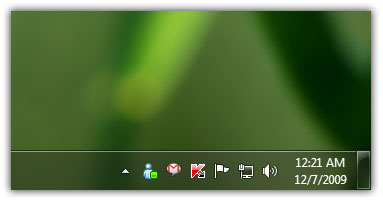
If you’ve upgraded to Windows 7 and have installed Windows Live Messenger on Windows 7, you’ve probably noticed the annoying behavior that Windows Live Messenger won’t minimize to system tray rather it stays put on the taskbar.
Luckily there’s a simple solution to this annoying behavior of Windows Live Messenger in Windows 7.
Minimize Windows Live Messenger to the System Tray
First of all close the Windows Live Messenger.
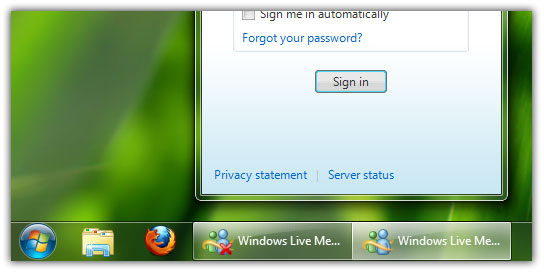
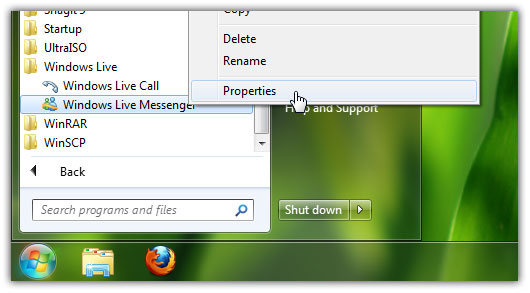
Now navigate to Start Menu and locate the Windows Live Messenger.
Default location: Start > All Programs > Windows Live > Windows Live Messenger
Right click on Windows Live Messenger and choose Properties.
Go to the Compatibility tab.
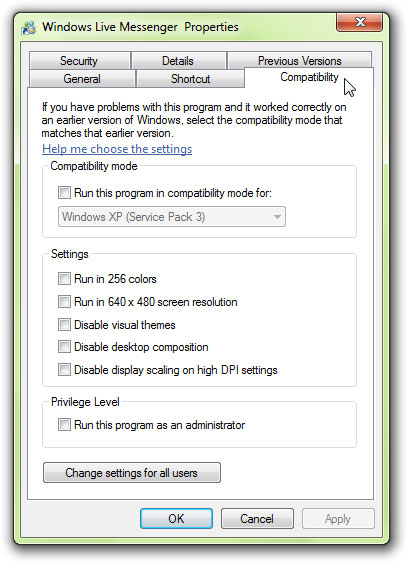
Check mark Run this program in compatibility mode box, select Windows Vista from the drop down menu and hit Apply button.
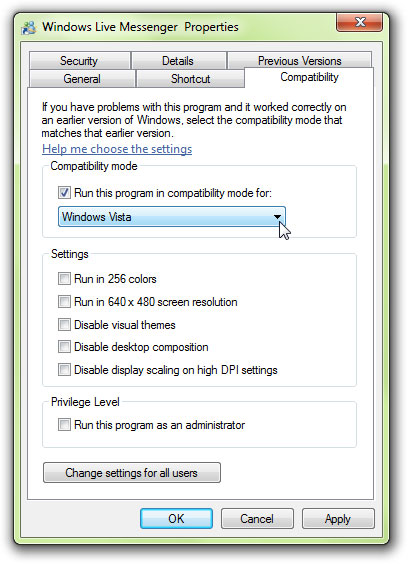
Now your Windows Live Messenger will act just like it does in Vista. You’ll now be able to minimize Windows Live Messenger to System Tray in Windows 7. Now when you press the x button of Windows Live messenger, it will be minimized to System Tray.
Nice windows 7 articles, keep it up
How do you make taskbar button looks like windows xp?
See this like http://www.trickyways.com/2009/11/customize-windows-7-taskbar-and-notification-area/
Thanks, live messenger icon on taskbar was irritating me
your guides are really inspiring
Wow very nice guide to learn how to minimize windows live messenger to system tray
mostly your articles on windows 7 are very useful.
Unfortunately, the solution above breaks both Messenger & Live Mail with Live Essentials 2011 🙁