In this PSP guide you’ll learn how to install ChickHenR2 on your PSP that let you hack your PSP and install custom firmware on PSP. Once you’ve installed custom firmware with the help of ChickHEN hack, you’ll be able to play iso/cso games on PSP, install themes on PSP and other fun stuff.
What is ChickHEN
ChickHEN is an loader for all Sony PSPs (1000, 2000 and 3000), developed by Davee and Team typhoon, to run homebrew apps on official PSP 5.03 firmware. The latest version of ChickHEN is ChickHenR2. Unless you stray away from the instructions, there’s no risk of bricking your PSP because everything runs on the onboard memory of the PSP.
WARNING: If you have official firmware 5.50 installed on your PSP, STOP NOW!
PSP OFW 5.50 has patched the TIFF exploit used to install chickHen hack so, you can NOT run chickHen on OFW 5.50. If you can’t install ChickHen it means you can’t hack PSP and install custom firmware on your PSP.
ChickHenR2 Requirements
- Your PSP firmware MUST be 5.03 or lower. on higher PSP firmware, you can NOT install ChickHen.
- Download PSP firmware 5.03: Mirror1 | Mirror2
- Download ChickHenR2: Mirror1 | Mirror2
Extract all the downloaded zip files into a folder.
How to Install ChickHenR2 on PSP
 You can run ChickHenR2 on all PSP models (3000, 2000, 1000). Lets install ChickHenR2 on your PSP.
Step 1 – Update your PSP OFW to 5.03
In order to install ChickHen on your PSP, you need to update your PSP firmware version to 5.03 first. you can skip step 1 if you already have OFW 5.03.
- Connect your PSP to your computer in USB Mode. Your PSP memory stick will appear in your computer.
- Open the Memory Stick drive from your computer and copy EBOOT.PBP from PSP_Firmware_503 folder to the following directory on your PSP memory card:
/PSP/GAME/UPDATE/
(Create the directory if not available. Make sure you name folders in CAPS)
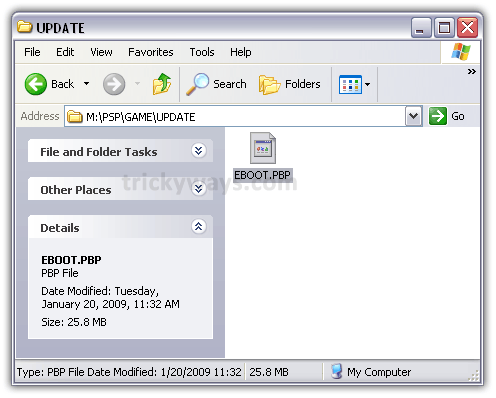
- Now Press the O button of your PSP to disconnect it from USB.
- Now go to Game > Memory Stick on your PSP. There you will find the PSP firmware version 5.03. Press the ‘X‘ button on PSP to execute it. It will install firmware 5.03 on your PSP.

Step 2 – Install ChickHENR2 on PSP
Assuming that your PSP is on Firmware 5.03, now is the time to load chickHEN R2. You can install ChickHENR2 on your PSP in two ways.
- Manual: you put all the files to the right folder by yourself.
- With easy installer: The little program copy all files to right folder with a single click.
you can follow any of these two ways to install ChickHEN.
IMPORTANT:
Before installing ChickHEN you should perform the steps below in order to increase the chances of running ChickHEN successfully on your PSP:
- Make sure there is no UMD in the drive
- Restore to Default Settings of PSP (Settings > System Settings > Restore Default Settings)
- Turn off UMD Auto-Start and UMD Cache (Settings > System Settings)
- Character set to US (Settings > System Settings).
- Revert theme for classic. (Settings > Theme Settings)
-
Manually installing ChickHENR2
Assuming that your PSP is on Firmware 5.03, now is the time to load chickHEN R2.
- connect your PSP to your computer via USB.
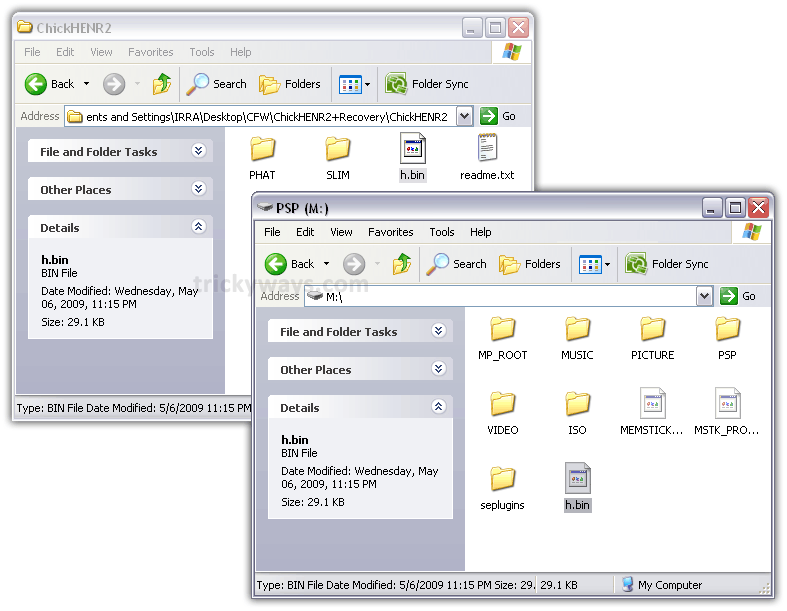
- Copy h.bin file from ChickHENR2 folder to the root of your PSP. (ms0:/)

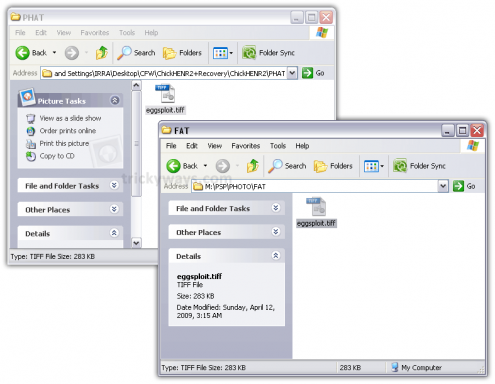
- For Phat (PSP 100x)
Go to PHAT folder in ChickHEN R2 folder and copy eggsploit.tiff file to the following directory on your PSP:
/PSP/PHOTO/FAT
(Create the directory if not available. Make sure you name folders in CAPS)
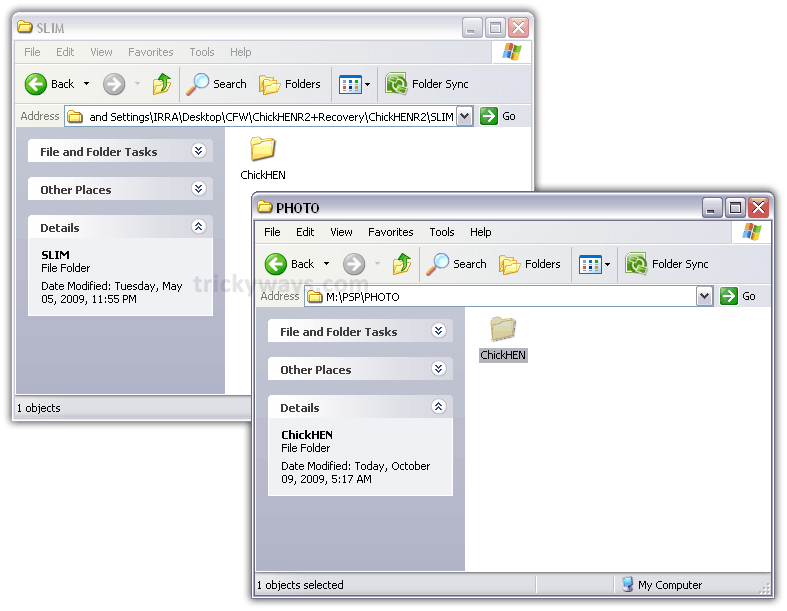
- For both PSP 200x and 300x
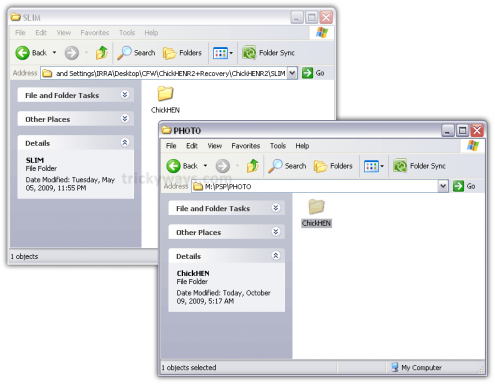
Open the SLIM folder from ChickHENR2 folder and Copy folder ChickHEN to the memory stick under:
/PSP/PHOTO/
- Disconnect PSP from computer. Turn it OFF and then back on.
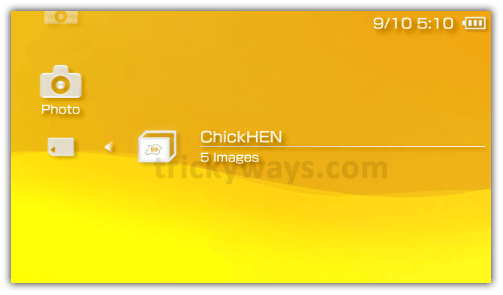
- On your PSP go to: Photo > Memory Stick
- Go to FAT folder (if you have a 1000) or ChickHEN folder (if you have a 2000 or 3000).
for PSP Slim/Brite (2000/3000)
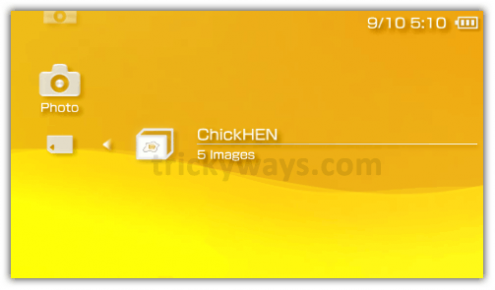
for PSP Phat (1000)
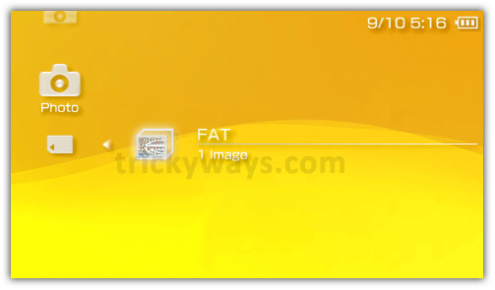
- The screen should blank out then flash green, showing that ChickHEN has loaded. The PSP will then reboot automatically.
If it just hangup and shutdown PSP then your got to retry until it automatically reboot your PSP. It may take a few tries to work, in fact, it took me 7 tries to get it to work. - To confirm go to: Settings > System Settings > System information. System Software should be: 5.03 ChickHEN R2
-
Easy Installer to install ChickHENR2
If you’re too lazy to install ChickHENR2 manually, you can use an easy installer to install ChickHENR2 with a single click.
- Download the installer for your PSP Model:
for Phat (PSP-1000): Mirror 1 | Mirror 2
for Slim/Brite (PSP-2000/3000): Mirror 1 | Mirror 2 - Extract the zip file and execute the program included. (don’t worry it’s not a virus)
- Connect your PSP to your PC.
- Hit the install button from the software.
- If ChickHEN R2 is successfully loaded, PSP screen shows flashing colors, and it will reboot automatically into ChickHEN.
- To confirm go to: Settings > System Settings > System information. System Software should be: 5.03 ChickHEN R2.
- Download the installer for your PSP Model:


Now that you have successfully installed ChickHEN R2 on your PSP, it’s time to install custom firmware (PSP Hack):
- Install CFW 5.00 M33-6 (PSP 2000, 1000)
- Install CFW 5.03 GEN-C (PSP 3000, 2000 TA-088v3)
- Identify PSP Motherboard Model
- Install iso/cso games on PSP
Hi! I’m a noob of this trick but I tried on my friend’s PSP that has chickHEN installed before and played ISO games until one day he accidentally formatted the memory stick and all games gone.
The firmware is 5.03 slim, I tried to install the chickHENR2 again which I downloaded here and installed successfully after a reboot. The firmware changed to 5.03 ChickHENR2 but still cannot play the ISO games I load.
after I rebooted again, the firmware goes back to 5.03 same as before without chickHENR2.
do I really need to install the CFW in order to run?
how does the formatting of memory stick affect the entire settings of chickHEN?
thanks
After ChickHEN you need to install CFW:
http://www.trickyways.com/2009/10/how-to-install-custom-firmware-cfw-on-psp-1000phat-2000slim/
then you can run ISO games:
http://www.trickyways.com/2009/12/how-to-install-games-on-psp-custom-firmware/
i have psp 3003 firmware 6.60 how do i downgrade to firmware 5.03
a you just need to install the 5.03-Gen a and after that install gen-c and put games on it im 100% sure with it
You’re the man!!!
I have tried many guides to install ChickHEN R2 on my PSP but yours is the best..
thanks for the superb guide..
Looking formward to see more on PSP Hacks.
Good job.
i have a really big problem here.. i cannt manage to upgrade my firmware to 5.03.. my current version is 3.02 OE-B. it just dont work…
how will i put the PSP firmware in my PSP?
Check this link to install custom firmware on your PSP
http://www.trickyways.com/2009/10/how-to-install-custom-firmware-cfw-on-psp-1000phat-2000slim
its my nth time to open the chickhen on the photo but the green screen never appeared and my PSP never rebooted..what other trick can i do to install install chickhen in my PSP?
same problem with pep pl. help us trickyguy..thanks
make sure you put the file h.bin in the root of the memory card
hi, my psp is a 3001 with all chickhen and gen-c 5.03. i have been trying to open the chickhen on the photo but the green screen never appeared and my PSP never rebooted..what should i do. whenever i try it just shut down. pls help me
Hi..
I really have a big proble with my psp..
My psp is phat 1000x version 5.03..
I want to install chickHEN in my psp..
My cousin told me to install chickHENr2+recovery.zip, my question is what is the difference of chickHEN and chickHENr2?? and what is the use of recovery??..
I tried to install chickHEN but the green screen never appeared on my screen and it never rebooted by itself…
I also followed your steps but when I transfer the EBOOT.PBP my PSP says that,that file is corrupted…
SOMEBODY HELP ME!!!. I NEED YOUR REPLY ASAP!!!… THANKS…
follow this link:
http://www.trickyways.com/2009/10/how-to-install-custom-firmware-cfw-on-psp-1000phat-2000slim/
i have a PSP 1000 with the 5.03 firmware, so everyting on this tutorial is airtight as far as i’m concerned, however, i tried to use it manually, but it didn’t work. so i tried the automatic install program…same thing. it either freezes after it acsesses the photo portion of the memory, or it doesn’t reboot. i tried everything, from making a FAT folder in the photo with the auto install (or even putting the .bin or .tiff on the files.), but no results. any suggestions? any voodoo that will make it work either?lol
hahaha amazing.lol it worked without even picking the picture.lol sorry for wasted space.lol
i have been trying to open the chickhen but it doesnt. help.
Hi, im a total n00b i need help with the EZ installer thing i downloaded it but i dont know if i have to drag it over to my PSP thing or what…
and one more thing….does this hack the PSP so it will allow me to play ISO games on my PSP?
BTW i have a PSP 1000/PHAT/FAT
hey my chicken doesnt load specially when i wait at the slim tiff the screen doesnt break it just hangs everytime i already did the same thing over and over again this past few days it worked but now it doesnt even work!! please help me!
TrickyGuy,
I hope you can help me with this! I have PSP that is running on 6.10. All i want is to be able to transfer iso or cso games to this but each time i do so (and i have tried a number of ways) it tells me the file is corrupted. I tried to this that you wrote here the update shows on my psp but wont let me update. It says “the system software of your psp system is version 6.10 there is no need to update” so it wont let me update this. I dont know what to do 🙁 I just paid 40 dollars to be able to download all these games and i cant put any of them on here. All the iso files i try to put on here says corrupt data..
Can you help me? or point me in the right direction? do i need something else?
Please help after installing PSP Custom Firmware 5.50 GEN-D3 all the buttens stoped working any help Please any one know what to do i can start in recovery mode but not sure what to do next.
Please help after installing PSP Custom Firmware 5.50 GEN-D3 all the buttens stoped working any help Please any one know what to do i can start in recovery mode and all the buttens work there. but not sure what to do next. vsh menu enable or disabled dont matter dont work ether way. do you know of a way to resent it to the previous FW automaticaly because buttens are not working?? Please any help would be great
Is it possible to run HELLCAT’S CFW RECOVERY FLASHER from recovery mode??? does anyone know / and how
ITS NOT WORKIN AFTER CHICKEN HEN IMAGES THE GAMES ARE NOT STARTIN
lol..
diS is workin.. DUMBASS!!
i hv got motherboard model TA-090v2 v5.03 ihv successfully loaded chickhenr2 & gen-c but the games(iso/cso) are not working. pls help
Can you tell me the error message
game could not be started (80020148).
Try this
1. Hold the power button for 5 seconds to Turn off the PSP
2. Turn on PSP while holding the R-trigger to enter into the recovery mode
3. Open Configuration settings and locate UMD Mode setting
4. Keep press X button until you get this option UMD Mode (currently: m33 driver – no UMD -)
5. Go Back and Exit from recovery mode
sorry it is 80020321
thnx dude its working fine now.
Great!
why when i am hacking,it appears yellow scatters,not green scatters..why??pls reply
is their anyway to put the gameboy emulator on a psp with system software 6.20? and if not duz anybody have any ideas how to do it?
hi!i have psp 3000 version 6.20 how can i downgrade to 5.50 without pandora and play cso/iso games?
thank you
Hey
I am having problems, my psp is a 2000 slim with mother board TA-88
I previously has 6 some thing firmware and used magic stick and pandora battery to downgrade the firmware.
Now the firmware is 5.00 M3/4. When I update to 5.03 OFW the screen goes black and nothing happens I then have to hold down L and it shows various options 1)install 5.00 M33 2) Install 5.00 OFW 3) Test 5.00
But I have to go into test M33 to access the PSP. Do I need to remove the pandora battery and format the magic stick and use a normal battery to install the OFW 5.03 firmware and then the custom firmware
Please help
I NEED YOUR HELP. I THINK MY PSP MODEL IS 2000 SLIM. I PUT CHICHEN R2 AND EVERYTHING TO MY PSP BUT I STILL DO NOT NO HOW TO RUN IT. THANKS…
did u read the guide?
okay when you ment if it get stucks and off automaticly, did u mean u have to start all over again? i mean restoring defolt settings and everithing.
No.. simply go to Photo > Memory Stick and Chickhen or FAT folder again to retry..
i have tried that many times and all it has done is froze for a while then shut down…how come it does not work…and also it may have worked on yours due to specific system…or you just copied the entire guide.
my psp 2000 pb cant run games, says “the data is corrupted” plz help me out
anybody help me!!!!
i am using ver 5.03
pls help me…..how to downgrade or upgrade version 5.50 without using pandorama battery and magic memory stick?plsssssssss…..i trust this site…..thanks….
nice guide.. thnx man!
i have version 6.20 and which hacker do i need chickhenr2 or someting other.
help me out
Help !!!!!!!!!!!
I have PCP-2004, by mistake i install System Ver. 6.31, now I want to install 5.03 Hack, when i im going to install 5.03 the message appers “There is no need to update” please guide easiest way how could i convert my PSP system to 5.03
http://www.dailymotion.com/video/xdqz1i_how-to-easily-downgrade-from-6-20-o_videogames
Thanks Prince, I hope it will work, but dear Is there any other option other then Pandora battery, because i could’nt find pandora battery in a market.
Thanks again
not that ive found. though i am searching for a way to downgrade without one, though im starting to believe that there is no other way.
hi broww …
i tried install 5.03 firmware …
it successed …
i tried install ChikHen 2 didn’t work …
Can u give me link DL ChickHen2_R the newest …
i tried with 1 click didn’t work …
Thanks for read this …
try to download from this tricky ways website go in psphacks there you will see intall chicken hen for your perticular psp .Get it from there.
i trust this site
i have a quick question. i updated my EBOOT to higher than 5.03 is there any other way to do this? i know i cant downgrade an update so this is a problem for me.
When i opened the chikchen folder in my psp and waited, the screen went black for 0.1 sec and turned completely red. It does not reboot. HELP!!!
i have a phat psp 1001 with da ofw 6.31 . how can i install cfw in it ???
please do hlp! i hav been tryin 2 install al d types o cfw bt no one’s workin on owf 6.31…..
please help!
hi sir.. i have a problem of my psp i have an firmware of 5.03 and i want it to downgrade to 3.81 or somthing like that
because i dont want to use chickhen.my friend tell me that use chickhen but i dont like because it so hard to crack an psp like that i want it no using chickhen for my psp i want normal.. so plsss help 🙁
hi:
I have a problem with my psp, is a 3001 with firmware 5.03, i can´t install the chickhenr2, just turn off when i check the photo album. I follow your tutorial but my psp don´t works. Can you help me.
I tried to install chickhenr2 multiple times however it never worked!! I have PSP 1001 k with FM 5.03 the serial # starts with “SU”… can I install CFM without installing chickhenr2?? if yes, which CFM should I install…please suggest!! Thanks
O.K. big problem here, I installed chickHen R2 yesterday and then from there installed 5.03 GEN-C.
Well, today I wanted to go into recovery mode, so tried to turn off the psp and every time i would hold the power button down for 5 seconds, turn it back on and it was like it just went into sleep mode or something, cause when it turned back on there was no boot logo. So I decided to turn it off via VSH (you know, Select >VSH >Turn off device) and when i booted it back up, it booted back up into 5.03 OFW.
Now when i try to install ChickHen R2 nothing happens, it just turns off and when i turn it back on it’s back into 5.03 OFW
btw I have PSP Slim ta 088v3 and you know OFW 5.03
I have PSP Slim 2000…i tried to install the chickhen on my psp b4…its success beutifully..but 1 day…i try to play PES2011 on my psp…its hang up…so iwant to make it like b4…its din’t hppen…its keep freezing my psp…i really dunno what i ve to do now…can u help me?
i have a psp v 6.20
how do i play games of cso/iso format
PLS HELP.. I ALREADY INSTALLED THE CHICKHEN R2 LAST NIGHT AND I PLAYED THE ISO GAMES.. BUT I ACCIDENTALLY RESTORE THE SYSTEM AND NOW I CANNOT FIND THE GAMES ON MY PSP.. BUT THE GAMES I DOWNLOADED ARE STILL ON THE ISO FOLDER.. HOW CAN THIS BE..? PLS HELP!
MY PSP VERSION IS 6.39 and When I try to open PSP Update ver 5.03 it says “The Software of your psp version is 6.39 There is no need to update”.
i need help my psp is v6.30 do i need to down grade?
once you have updated there is NO turning back…your stuck with that version and you will never be able to downgrade it.
where can i get this software ???
Hey @TrickyGuy or any user in this site my the hellcats recover flasher wont work it says here This game cannot be started.
The data is corrupted.
pls reply.. PLS HELP ME!!! :((((
i don’t understand
I can’t get it please answer i try and try but the thing just shuts down and restarts but doesn’t turn on and i try try i did everthing you said please help
Could you update the links? Megaupload died. D:
why i cant download it
hello
I did a big mistake,
I was the reason to break my friend PSP PHAT (1000) , and am trying to unbreak it … and I searched all over the internet to know how to unbreak it, and nothing to find,, especially that I cant find which motherboard is the psp ,,, as the info on the label are not there anymore, and also (( I CAN NOT UNBREAK IT BY HOLDING THE R1 AND L1 AND HOME BUTTON WHILE OPEN IT ))
please , someone help me…
Still trying to get ChickHEN to load, but thanks a lot dude, you’re awesome. Writing all this must have taken a lot of time XD
i have 6.20 version eggspilot.sttb says unsupport data what i do
hello guys the like for checkHen R2,how can i download it ?
i cant run chikhen on my psp, i’ve tried to do that for about 20 times and still just goes black and shuts down, plz help
Thanks
Hi,
I have a PHAT PSP v1000 and I cannot seem to install update v5.0.3. It just gives me a file called “Corrupted Data.” Please help!
The link of the ChickHEN R2 don’t work? why is that? is there any alternative link?
Why does my psp says tiff image is corrupted?
I followed the steps but why does my psp says the last image is unsupported?
I’ve been trying to load chickHEN on my psp for the past 20 minutes, about 15 times, and it still hangs up and just shuts down, not a sign of automatic reboot. What could I be doing wrong? Thanks!
my firmware is more than 5.50 what to do