You can create user accounts separate for each person that will be using your computer. This will allow each Windows user to have their own settings, documents folder, visual style, wallpaper and so on. So separate account for every computer user is much better idea and you can do this simple from command line. To create a new user in windows or to delete a user just follow the steps below. This guide is tested in Windows XP, Vista, Windows 7, 8 and 10.
See also: How to rename Windows default Administrator account
Add a new user account
Step-1
Right-click on Command Prompt and select Run as administrator option.
Here how you can find Command Prompt in different Windows versions:
Windows 10 : Rignt-click on Start button and then select “Command Prompt (Admin)” option from menu. Click Yes to UAC alert.
Windows 8 : Hit Windows key from keyboard and type Command Prompt.
Windows 7 / Vista: Hit Windows key and type Command Prompt in start menu box.
XP : Click on Start button > All Programs > Accessories > Command Prompt.
Step-2
On command line type this command net user UserName Password /add
Where:
UserName = Name of the user account.
Password = Password of the user account.
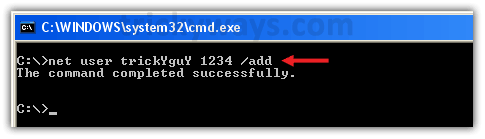
See the new user account has been added.
Hide password: Instead typing password that is visible while typing, you can type * instead typing complete password like: net user UserName * /add. Here, (*) means when you execute this command by hitting enter, command prompt will ask you to type a password for the user. When you type, password letters will not be displayed on screen.
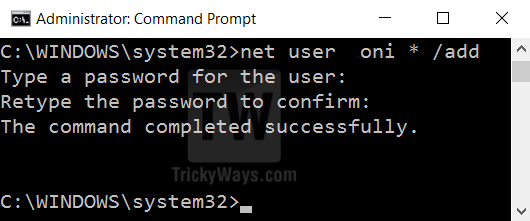
Make an administrator user account
Default privileges are limited for all user accounts that created from Command Prompt, first you need to create a user account following above commands and then to give administrator privileges to a user you need to run the following command.
net localgroup Administrators UserName /add
Where: UserName is the name of the user account
Error : You might get this error while running commands.
System error 5 has occurred.
Access is denied.
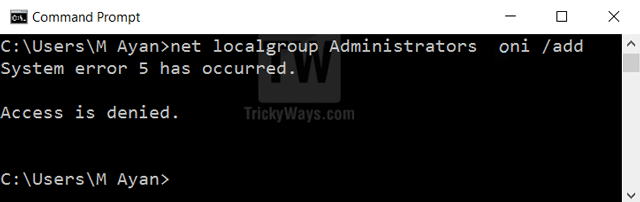
To fix the error your user account must have administrative privileges to run this command. and Command Prompt running with admin rights as well, look at the first paragraph to see how to run command prompt as an admin.
Delete user account
Step-1
Run Command Prompt as administrator, as we did in Step-1 above.
Step-2
In command line type this command net user UserName /del
Where:
UserName = Name of the user account that you want to delete
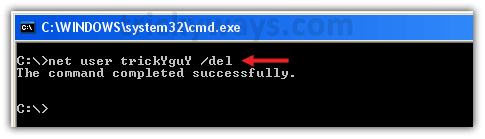
Disable user account command
You might need to disable any Windows user account temporarily, see this guide to enable or disable user account in Windows from command prompt.
Few more “net user” command tips
While adding a new user you can use the following switches with the command to add comments, set full name, password modification rights and more.
/fullname:"<FullName>" Instead username, specify user’s full name.
/comment:"<Text>" Give descriptive comments (48 character max.) about user account.
/passwordchg:{yes | no} Allow or restrict user to change own password, default is Yes.
Usage:
net user UserName Password /add /fullname:”UserFullName”
net user UserName Password /add /comment:”Temporary user for few days.”
net user UserName Password /add /passwordchg:”no”
If you like this guide then, use social buttons and if you want to ask anything please leave a comment below.
I try this on Windows Vista thx for these Windows OS tutorials and keep t up
thanks for sharing this knowledge of Windows OS
its so simple to use cmd
Thanks for helping me in deleting user accounts
I try this to add new user through command line, it works for me
Will this remove the profile of the user as well?
i cannot delete my user password:
this msg appear
c:\net user username /del
system error 5 has occurred.
Acces is denied.
You must log out from user account that you want to delete and log in to another account that must have Administrator privileges, then use this command to remove Windows account.
not able to delete
cmd showing error
i do i run it as admin tho
There are many ways to fix this problem, using batch windows, and connecting them to systems32, but the easiest is to make sure you are on an account with Administrator privileges, or that you know the password of an account with those privileges. First, go to Start>All Programs>Accessories>Right Click on “Command Prompt”>Run as Administrator, and one of two things will happen. One, if you are on an account with admin privileges, you will go straight to Command prompt, but it will say “windows/systems32> instead. Or two, you will be prompted for a password of an administrator account, and then the same will happen. Your Welcome, email me or reply with any questions.
Okay, I know you probably posted this a while ago. i tried it using Windows 7, adding an account.
I only have 1 user account, which has administrator access but for some reason can’t add secondary accounts using cmd? I can using control panel.
comes up as above…
System Error 5
Access Denied.
Run command line as an administrator.
Type
cmdin Start button’s Search box then in the search results right click on cmd.exe then select “Run as administrator”.Then execute commands to add or remove user accounts.
See also: http://support.microsoft.com/kb/555644
Nice and great command to delete user to recovery Windows.
I have one question: “How to delete user is the username has space. NET USER Tegar Essentls /DELETE will not work.”.
Thanks.
If username contains spaces in it then put double quotes around username while running delete command.
e.g.
net user “K Jim” /delete
Thats cool… but the command creates a Limited Account..
How can i create an account with “computer administrator”
Simple! First of all, make sure you ran it as an administrator by right clicking on it and then left clicking on “Run as Administrator” Then, type ((Without quotes))
“net localgroup Administrators USERNAME /add”
and obviously, hit enter. To see a list of localgroups on your system, type
“net localgroup” most of them are just jibberish, random numbers and letters, just paty attention to Guests, Users, and Administrators. Your welcome, please email me with any comments, questions, or concerns, or just reply to this. Thank you for your time.
hi does anyone know how to change a users account name on windows 7? the pc connects to windows server 2003 and i dont know how to enter the machine locally to change this. can this be edited it dos?
when i forget password user account what can do?
what can i create user account without log in windows?
what cant i use CMD when i don’t log in window7?
This will delete only the user and it is not deleting the user profile. Can you provide me the command for deleting the user profile?
Thanks for sharing knowledge, it was useful.
got a system error 5
i tried but it says access denied
It works for me.
can we remove the password of user through cmd if yes then how
thanks
when I do this step, it says “Access is denied”. what shall I do?
You must have admin rights or Run command prompt as Admin rights.
Please see the replies to comment #17.
to make the account administrator type this in command
net localgroup administrators [user] /add
net user [user] /active:yes
for some reason when I create a user it doesn’t show on the login screen, do you have to be on the correct drive in order for it to show up? ex: C:/ instead of X:/
thanks to all thing
it says that ‘net’ is not recognized as an internal or external command
Me thought
After create a user then net localgroup administrators [user] /add
using this command no need to use command
net user [user] /active:yes
:-S
Good evening!
When I try your method of deleting /adding user it does work perfectly fine until the moment i want to delete a guest acc.
It shows “sytem error 1371” I can not remove pre-made accounts.
Can you maybe help me? Is there any other command to delete guest accounts in particular?
Greetings,
Rita
Guest account is built-in account and you can’t delete it but, can disable or turn it off. So I suggest you to disable it instead of trying to remove it. See how to enable or disable account in Windows
Thanks mate, the way you shows works for me…
Hi. How do I delete the admin user using cmd?
Command to delete users in windows also mentioned above in the guide. If you having any problem while using command on command prompt please reply..
I remove administrator a/c .
Now how to add administrator a/c please tell me
Steps to create Admin account in Windows through command line if mentioned above.
This started with the May update and continued even after a fresh install on my PC. I tried to figure it out but can’t. Is there a chance that October release will fix this? I would post a screenshot if I could.