Transfer iPhone Pictures to PC Windows 7

So you have some beautiful pictures in your iPhone and you want those iPhone pictures transfer to your computer. Transfering pictures to your computer from iPhone is very easy. Check this guide if you want to transfer pictures from computer to iPhone.

See how to transfer iphone pictures computer (Widnows 7)

Step-1

Connect your iPhone to Computer using data cable that comes with your iPhone.

Step-2

When you connect your iPhone to computer.

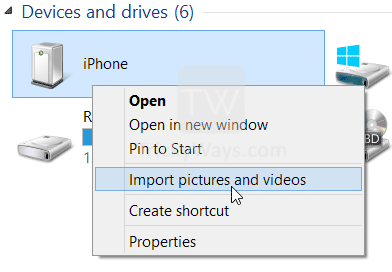
Option 1: You may see an autoplay window, click on Import pictures and videos

- OR -

Option 2: Click on Start button > Computer

See the Portable Devices section, right click on your iPhone icon and click Import pictures and videos option

Step-3

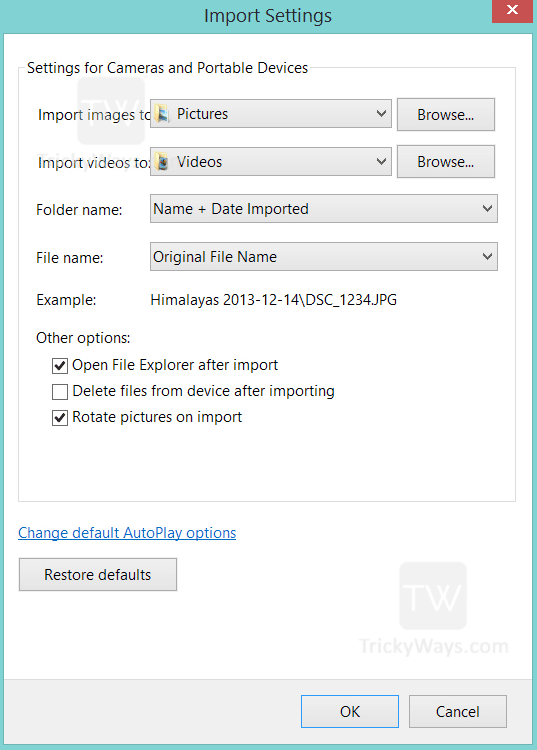
Enter tag name to tag these pictures (optional) and click Import button

this will start importing pictures form iPhone to computer. You can check the Erase after importing check box if you don’t need picture in your iPhone after importing in your computer

Finally you can see pictures are transferred to My Pictures folder. To Access these pictures click on Start button > UserName Folder (e.g. administrator) > My Pictures Folder

For more stuff like this you can: Subscribe to RSS Feed or Get Updates Via Email or Follow us on Twitter

Share/Save this Post

Comments:

  1. pics 26 January 2010 at 5:24 pm #

    Nicely guided iPhone basics

  2. vash 27 January 2010 at 2:02 pm #

    Why don’t you access iPhone pictures from my computer

    • trickYguY 28 January 2010 at 1:43 pm #

      Yes, you can access iPhone pictures by opening My Computer and then double click on iPhone device icon

      • Kamran 19 February 2010 at 8:56 am #

        Thanks fro helping to copy pics to computer

        • Bill 28 July 2010 at 7:32 pm #

          Great info! I share this another guide on transferring songs, videos, photos, sms, call lists, contacts and ibooks from iPhone to Computer.
          Paid application here: transfer-iphone.com/transfer-files-sms-contacts-call-list-ibooks-from-iphone-to-computer.html

  3. kami 27 January 2010 at 7:00 pm #

    Can i use the method in Vista to transfer iPhone pictures?

    • Ameed 27 January 2010 at 5:02 am #

      I hope so, b/c Windows 7 and Windows Vista interface is very much similar and this picture importing method will be same.

      • Xise 19 February 2010 at 10:19 am #

        You can transfer pictures in Vista and Windows 7 same method

  4. Nahil 1 February 2010 at 2:12 pm #

    You ever place very nice step to step guidance tutorials.

  5. Will Turner 9 February 2010 at 4:20 am #

    Am running Windows 7 with iPhone 3GS connected directly to USB on computer (I can also sync with hub with iTunes; would prefer to use hub).

    I followed the above. When I connect directly w/o hub, iPhone does not appear under My Computer. System pop-up says Win7 says it needs to install a device driver. Then it attempts and fails do to so. It tells me to contact the device manufacturer. That’s Apple and iTunes, which is installed, updated, and by nature doesn’t import photos from an iPhone. >:( Help!!!

    • mozcin 28 April 2010 at 4:39 pm #

      Im having the same issue. Can anyone please help?

      • scren 28 April 2010 at 8:39 pm #

        Hi,

        When i first time tried i got the same iphone device driver error then i unplugged the iPhone and plugged again and its working and i have successfully transferred my pictures. Try this!

        • katelr76 23 January 2011 at 3:13 pm #

          unplugging and pluging in again worked for me – the iphone finally showing up on My Computer.

          Such a simple thing – I should have thought of myself! :-)
          Thanks ;-)

    • Synectikos 8 June 2010 at 11:15 pm #

      I’m having this same issue. The iPhone is properly installed and syncs with iTunes, however it won’t show up in My Computer. I’ve switched USB ports like others have tried and still no worky! Please help. :)

      • trickYguY 9 June 2010 at 3:02 am #

        Try this:
        - Connect your iPhone with computer using data cable.
        - Open Device Manager and find your device.
        - Right click on it and select uninstall.
        - Wait a moment to refresh it.
        - Unplug your iPhone from computer and plug it again.
        - Windows will reinstall its drivers, i hope this will work.

        • Synectikos 9 June 2010 at 3:56 am #

          Finally got it to work. I had to actually launch the Camera App on the iPhone in order for Windows to recognize the device as a camera I could copy pictures from.

        • noruyo 14 June 2010 at 8:01 am #

          Thanks so much! I tried so many methods and this one works for me! Thanks for the enlightenment! (:

        • Sammyisit 28 September 2010 at 5:38 pm #

          Thanks so much! I really wanted to back my photos up and couldn’t believe there wasn’t a simplier iTunes way to do this.

        • Coops 24 November 2010 at 11:59 am #

          Cheers mate, worked a charm!

        • u2rican 19 March 2011 at 9:25 am #

          Thanks so much!!!!! THIS finally worked and now my Iphone imported the pictures! :-) happy heart!

        • enakshisaidwhaa 2 June 2011 at 1:48 pm #

          GAAH!!! this is not working for meee :( im depressed npw :/

        • cweidlich 14 June 2012 at 7:22 am #

          I know this is really random and late but this step REALLY REALLY Helped!

        • Musto 24 March 2013 at 5:11 pm #

          thank you very much …. you gave the simplest working solution.

      • Subs 26 February 2013 at 9:49 am #

        After making iPhone as camera, I am able to import pictures to my laptop. Great!!!

  6. J.son 9 February 2010 at 6:12 am #

    Do you have installation rights on your Windows 7 computer, Make sure you are logged in as an Administrator or have admin rights.

  7. 3GS 15 February 2010 at 2:30 pm #

    Downloaded my iphone 3gs pictures to PC

    • Steffybaby 21 November 2011 at 4:15 am #

      I have the same prob as geehee cant download frm 3gs except i can still take pics wat can i do my phone is full of pics??

  8. Lilly 15 February 2010 at 6:02 pm #

    Pictures transfer is really easy, Thanks.

  9. soren 15 February 2010 at 10:57 pm #

    I like this and you describe this method to copy iPhone pictures very easily I am very excited to see this, i will try it.

  10. Aakash 19 February 2010 at 5:06 am #

    i transferred my pictures from iPhone to PC

  11. a175rgr 11 June 2010 at 5:46 am #

    If you can’t import photos from your iPhone to your computer (whether Mac of PC), you might want to check to see if you have any photos in the camera roll on your iPhone that did not originate from the iPhone camera (i.e. someone emailed you, taken on another camera, received from your computer, copied from the internet, etc.). If you do then Apple disables your ability to import or sync ANY photos contained on your iPhone until the non-originating photos are removed from the iPhone camera roll. The only work around is to email those non-originating pictures to yourself and then delete them to re-enable your ability to import/sync the remaining photos. I know it’s a pain. Of course you could let Apple know how unsatisfactory this is at: apple.com/feedback

    • shyamaldilan 11 August 2010 at 11:09 am #

      wow wow wow …… wt a brilliant clue is that !!!!!!
      thanks sooo much for this. finally i found the solution for ma problem.

      tx tx tx

    • renato 22 February 2011 at 9:39 pm #

      leaving a comment to let you know that this is great advice and solved my problem! thanks a lot!

    • koththuwa 10 May 2011 at 1:38 pm #

      thanks very much for your sound advise plus helpful clue!,i was getting to the point giving it up, when i saw your comment, so i deleted a couple of pics i had downloaded, and it worked like a charm. thanks a bunch

    • jewelrygirl85 30 July 2011 at 9:19 pm #

      How can I tell what I have taken and what I saved….I can’t get my computer to recognize my iphone as a camera and have like 300 pictures I would like to uplaod. What do I do?? Please help! Thanks

    • grateful1 13 July 2012 at 8:33 pm #

      You are a genius. Thanks!

    • niho 20 August 2012 at 11:24 pm #

      I know you wrote this 2 years ago, but this finally worked! You’re a genius! Thank you!

    • happy baby 10 September 2012 at 9:26 am #

      Wow, it’s very clear and useful instruction.

    • max 24 January 2013 at 9:37 am #

      really works, great, thanks!!!!!

    • maggie 29 January 2013 at 8:35 pm #

      This helps. Excellent advice.

  12. Synectikos 15 June 2010 at 10:18 pm #

    After successfully importing my photos from the iPhone, iTunes no longer detects my iPhone as a device! Please help.

    • trickYguY 16 June 2010 at 7:29 am #

      Make sure the following 2 services are running in the Task Manager under services tab.
      AppleMobileDevice
      iPod Service

      If both services are running then also check replies to comment#6 (trickYguY)

      Feel free to reply

  13. keiquesim 26 June 2010 at 7:36 pm #

    It isnt working. I cant get it to appear in my computer folder or the window to pop up asking to import. It used to but it doesnt anymore. I uninstalled and reinstalled the drivers, I followed all the steps. It wont work.

    • trickYguY 27 June 2010 at 6:19 pm #

      Are you using Windows 7 or any other operating system?
      Check out other comments for solution.

  14. Harprit Singh 11 August 2010 at 9:22 pm #

    I have tried this option but it do not transfer the HD videos from the iPhone 4 to the computer (Windows). My video is even under 10 minutes.

  15. aamer 5 September 2010 at 11:53 pm #

    I want to copy my picture from iphone to my pc using win7 but its copying only the pictures from Camera roll folder, how about the other folder, how can i copy pictures from other folders to my computer.. does any one knows about it ?

  16. Tony 12 September 2010 at 6:49 pm #

    That is accually the photos not the “Pictures” Pictures and Photos are different. and i want to know how to get your Pictures from Iphone to my pc. Photos is no Problem but Pictures are. help me

    • BRAMS 10 December 2010 at 12:14 am #

      I am having the same problem as you, I can get my photos onto my computer but can’t get the pictures. Did you ever figure out how to do this?

      • frank 29 August 2011 at 11:18 am #

        Brams,
        Iam having the same problem tranferring pictures from my iphone 4 to my computer HP/PC with windows 7 64bit. I saw the pictures on the computer but they disappeared! Looked everywhere for them!

        • ashley 21 December 2012 at 10:26 pm #

          same here! gone!! and they’re deleted from my phone :( ever find them?

  17. MikeyWand 21 October 2010 at 10:17 pm #

    Hi,

    I used to be able to plug my Iphone 3GS into my pc and laptop and it used to think it was a CAMERA, then I could open the pics/videos and copy them to my desktop or whatever.

    A few months ago I noticed my Iphone stopped showing up. Itunes could still find it, but windows could NOT. I’m not sure what changed a few months ago, I have a feeling it was a Itunes update. I have a feeling APPLE is being dumb and not allowing you to easily transfer files you own (they tend to do that)

    If I am wrong, and someone knows a way to fix this problem, I would grately appreciate an email response to my problem.

    • trickYguY 22 October 2010 at 2:20 am #

      This method is still working with all iPhone models and also no problem with latest iTunes.
      You can try one of this trick:

      Try to plug in your iPhone in different USB port.
      See my reply to comment# 5 and 12 as well.

  18. marksman2021 17 November 2010 at 8:17 pm #

    how do you do the reverse, transferring photos from your pc pictures file to the iphone4? i’ll appreciate any info. i just got my iphone4. if it’s not able to do that, i’m not keeping it. thanks

    • trickYguY 18 November 2010 at 5:26 am #

      Follow this link to transfer pictures from computer to iPhone 4

  19. Tracey 28 November 2010 at 2:49 am #

    I have a different problem……when I start an import, my PC isn’t seeing ALL of the photos in my Camera Roll – it’s skipping over approximately 60 photos. Wouldn’t you know it, most of these are from a vacation and are specifically the photos I wanted to import! I tried to re-import, thinking my PC would simply pick up everything (warning me about duplicates, etc.), but each time I try to import, it “sees” fewer and fewer of the 250+ photos on my phone. Any suggestions? Thanks for all of the information above, it was really helpful and got me this far along, at least! :)

  20. na0289 10 January 2011 at 9:23 am #

    soooooooooooo helpful thank u so much!!! :D

  21. smanfa 20 January 2011 at 12:51 am #

    thankyou, i had problems at 1st but i changed a few settings i think under device manager and all of a sudden the iphone device icon appeared all photos are now safe on my pc thankyou for your help

  22. Bart 25 January 2011 at 4:19 pm #

    Thanks. This worked perfectly through My Computer.

  23. fireproof 3 March 2011 at 9:04 pm #

    I have uninstalled the driver and reinstalled it and am still not getting auto-play or iphone appearing on ‘computer’
    any suggestions on what to do next?

    • fireproof 3 March 2011 at 9:12 pm #

      ignore the above comment, i opened the cam app the plugged it in and auto play worked!!!

  24. Newbie 6 March 2011 at 9:44 pm #

    This was very helpful – thanks! I transferred all my pics to the computer. Now, next time I hook it up to do that, will it transfer all of them again? or will there be an option to just transfer new photos taken since the last time I imported? Thanks again.

  25. Tracey 14 March 2011 at 6:57 pm #

    Hi everyone,
    these instructions are nice & clear … BUT I’m not able to complete step 2 as I can’t see my phone in the Windows “Portable Devices” section – it’s just not there.
    (screenshot: http://screencast.com/t/3ZSorxE1tcvu)

    If anyone has any other suggestion I’d be most grateful!

    Until recently, as soon I plugged in my phone, it would transfer my photos – but something changed (no idea what!) and that stopped a few weeks back.

    thanks in advance,
    Tracey

  26. STINGAREE 4 April 2011 at 8:28 pm #

    Thank you SO MUCH I feel like such a dope for not having
    figured that out already, very sweet. Thanks Again

    Kenneth Ransdell aka STINGAREE

  27. iPhone123 1 July 2011 at 8:57 am #

    What if there is no portable device section or iPhone icon?

  28. kawal 6 July 2011 at 3:24 pm #

    While uploading first picture file from PC (windows7)to iphone4, I had no problem but when I loaded the second picture file, it overwrites the first file. Tried many times each time the second file overwrites the exsisting file in the iphone 4. Any one, please help with solution!!

    thanks

  29. Ahmed 8 July 2011 at 1:46 am #

    See comments blow to solve iPhone driver issues.

  30. nurseama06 27 July 2011 at 2:45 am #

    best instructions ever!

  31. Evoen 6 August 2011 at 3:26 am #

    I get an error message saying there are no photos or videos on my iPhone. I wonder if it’s a Windows 7 problem because sometimes it will see the pictures, sometimes it won’t. Very annoying.

    • geehee 6 November 2011 at 8:48 pm #

      i experience the same problem as well!! its very very annoying and started to mess my college work !!

      • Sue 8 January 2012 at 5:45 am #

        Hi,

        Were you able to solve this problem? I’m having the same problem now and tried different ways, still can’t solve it :(

        Thanks!

  32. lelaine11 9 August 2011 at 5:21 am #

    thanks for the thoughtful, laid-out step-by-step guidance!

  33. frank 29 August 2011 at 11:08 am #

    I downloaded pics beautifully, from my iphone 4, saw them on my computer screen, went to home, desktop came back to my pics, nothing there! went to Start to Computer, double clicked on icon for iphone goes to memory left. When I went back to download again, it said I had no new pics to download. How can I find my pics??????

  34. frank 29 August 2011 at 11:39 am #

    I FOUND MY PICTURES THEY WERE IN AN UNMARKED FOLDER AND I JUST OVER LOOKED THEM, THE INSTRUCTIONS FOR DOWNLOADING WERE EXCELLENT, I JUST HAD MY HEAD UP MY A– AND I PANICED TRYING TO LOOK FOR THEM!!!!! SORRY!!!! ALL MY PICTURES TRANSFERRED, ONES SENT THROUGH TEXTING AND ONES I HAD TAKEN A PICTURE OF AN OLD PIC. I FEEL GREAT! NOW I HAVE BACKUP FOR MY PHONE, THANK YOU VERY MUCH!!!!

  35. jpangles 5 September 2011 at 8:21 pm #

    I received some photos taken by a friend via e-mail, they were taken on an iphone but I have a PC Windows 7. How do I open them?

  36. shishkebab 15 September 2011 at 4:28 pm #

    Thanks, this was SO easy! The Apple instructions didn’t make any sense and I was about to give up but yours did the trick brilliantly :)

  37. veronaleea 21 September 2011 at 8:33 am #

    Thanks for the help!

  38. jojo1117 17 October 2011 at 9:01 am #

    My autoplay isn’t popping up and my iphone isn’t showing up in the computer section. Please help, what do I do from here?

  39. geehee 6 November 2011 at 8:45 pm #

    i can’t “IMPORT” photos from my iphone 3gs into my PC !! it sync, but I’m unable to take the photos.. HELP :’( thank you~~

  40. cig32 14 November 2011 at 7:16 pm #

    This helped thanks you!!!

  41. nick 22 November 2011 at 1:07 pm #

    thnks…..

  42. IPhone Apps Developer 10 December 2011 at 4:29 pm #

    Thanks, it helped me, it was really easy and I could have tried it myself by plugging in the iphone wire to the pc, but it seems we have a hang of google now and we have stopped trying ourselves.

    :)

  43. Kunal 13 December 2011 at 8:16 am #

    Thanks for the tutorial. They should have had this facility in iTunes when the phone syncs

  44. Ally 19 December 2011 at 3:40 am #

    When I first got my iphone 4 a yr ago, I could click on the pix I wanted to import from phone to pc…so if i just wanted 2 pix for example I could do this. However, lately I dont have the option, all the pix get imported sometimes theres over 200 pix….its really annoying, how can i change this back to the way it was?? tia

  45. rohit 16 January 2012 at 6:38 pm #

    sir i am not getting iphone icone in my computers

    sir i have apple 3gs plzzzzz mail me a support

  46. Sylvie 2 February 2012 at 11:54 pm #

    Hi,
    I am able to transfer my pics from my iPhone to my computer and see them without a problem. My problem is that some of the pictures that I took downloaded sideways or completely upside down for whatever reason. I am able to turn them to view them using the arrows, however, when I try to save the pictures upright, I get a message saying :” Windows photo viewer can’t save the picture because there is a problem with the picture’s file properties”. I have tried searching for ways to fix this problem and have had no luck so far. Does anyone know?

  47. Erin 18 February 2012 at 12:16 am #

    THANK YOU SO MUCH!!

  48. sailorhank 7 March 2012 at 8:07 pm #

    I am running Windows 7, Iphone 4, and Itunes 10.5.3.3: I plug the phone in at night and in the morning I find a pop up screen in the lower right wanting to download my pictures to the PC.
    I have found no way to dictate where the pictures are to be copied or name the pending file. Then I can not find them. They are not in “my pictures”, or downloads. If I had a file name I could do a search. Have any ideas?

    • Debbie 11 March 2012 at 12:11 pm #

      You should be able to see a little link there that says Import Settings. In there you will find the folder that the pictures are downloaded to, and what path is defined for them. You can change it to whatever you want from there.

  49. Debbie 11 March 2012 at 12:12 pm #

    Thanks for this, it had been downloading automatically when I first got it but with the latest OS update the auto download stopped. I could still get them if I went into the directory and manually found and downloaded, but didn’t think to right click to prompt the auto download.

  50. Eric 27 March 2012 at 8:18 am #

    I just did this recently and works fine. Anyway, my question is if and when I do import a second time, meaning I have already imported once before, will those pictures already imported be re-imported again thus resulting in duplicates? Or does Windows 7 maintain sort of a database of which pictures/videos have been imported and only import those that have not been imported yet?

  51. chloe777619 31 March 2012 at 12:28 am #

    i cannot access my iphone from the folder ” my computer” not is there a pop-up

  52. angetroy 7 April 2012 at 5:01 am #

    Thank you sooooooooo much!!!

  53. Aequitas 19 April 2012 at 1:53 am #

    I’m using an iPhone 4 and Windows 7 64 bit. I followed your importing instructions. All my pictures came in fine, as did two of my three videos. The third video will not play in any of my media players, however, and I haven’t been able to find anything anywhere on this problem. As a note, the first two videos 25 min, though I don’t see why that would be an issue. Any help would be much appreciated.

  54. Rohan1152 24 May 2012 at 10:00 pm #

    Hey hi all i hav a problem, i don’t have a iphone but one of my friend mailed me a video that is recorded from iphone and i am not able to open that file in my computer. Please help me how can i open that video on my computer. I am using windows 7.

  55. k1000 26 May 2012 at 3:11 am #

    Hi Guys,

    Thanks for all the posts…
    I’m running it on Windows XP (SP3) and I’d the same issue for Apple iPhone appearing in windows explorer but couldn’t see any photos.

    Thanks for Synectikos, turning on the camera and refreshing windows explorer proved to solve the issue…

    So here you’re, it works even on windows XP ;)

  56. Andre 6 June 2012 at 8:04 am #

    I all,

    I have windows 7 enterprise at work, and the computer pops up the window when connected but doensºt find any pictures in my iphone 4S.
    All the picures are taken form the cellphone and I have plenty of them, but the computer says I have none!

    Anyone can help me with this problem?

  57. lolo 22 June 2012 at 7:19 pm #

    I’ve transferred all the pictures successfully to my PC (I guess), but, I can not find them! I wrote down the file name and have searched and searched. Obviously, I must have left off the end of the name. It tells me they are located in “my pictures”. Not there! I tried to re-transfer the pictures and it says there are no new pictures. Can someone please give me an idea of where to find my pics?! Thanks!

    • d mangone 28 June 2012 at 2:06 am #

      Check the “my pictures” folder. I had to scroll down the list until I found the correct date, clicked on it and they were all there.

      • Lolo 16 July 2012 at 12:54 am #

        Thanks! I had to get my husband to help find them. Finally did!

  58. mohit 30 June 2012 at 7:39 am #

    actually i have iphone 3gs bt it is unable to copy all fotos from it. the fotos which are in camera roll are being copied to my laptop bt else cant can u help me :) !!!!!!!!!!!!!!!!!

  59. jmignacio 4 July 2012 at 7:34 am #

    Hi got a problem with this one. I cannot transfer my photos from iphone to pc when i updated my itunes to version 10. no autoplay window popped up and has not detected any portable device like before. but i can access my iphone through itunes. i have so many photos to transfer yet i cannot.. pls help is there any settings that i should change? thanks i’ll appreciate your big help.. :(

  60. jmignacio 4 July 2012 at 7:35 am #

    Hi got a problem with this one. I cannot transfer my photos from iphone to pc when i updated my itunes to version 10. no autoplay window popped up and has not detected any portable device like before. but i can access my iphone through itunes. i have so many photos to transfer yet i cannot.. pls help is there any settings that i should change? thanks i’ll appreciate your big help.. :( and also im using windows XP. thanks again..

  61. wireless transfer app 21 August 2012 at 8:23 am #

    you can simply download the iOS app “Wireless Transfer App” to help you if the Wi-Fi connection is available on both your iPhone and your Windows 7.

  62. Tracy 3 September 2012 at 6:45 pm #

    Trying to transfer photos onto the computer, it says “the scanner or camera is in use. Please try again later”. Please help…..

  63. Seggy 6 September 2012 at 1:47 pm #

    Hi, have got to tranfer some picture from my Iphone to my PC without success, using Window 2010. Do you have any idea on how I should go about this? With Window 7 no problem.

  64. Bpolite70 17 September 2012 at 9:50 pm #

    Thanks! worked perfectly.

    B

  65. chulachocks 18 September 2012 at 5:21 am #

    thanks so much for your directions, it was pretty painless to transfer from my i-phone to Laptop (Vista), at first I couldn’t see the device listed but then plugged and un-plugged and it appeared. Happy camper here :)

  66. grimmizz 5 October 2012 at 9:24 pm #

    I am running Win7 32 I have a iPhone 4 all updates are complete. When importing photos/videos it takes TOO long. The total # of pic/vid’s were 628 and it has been importing for 20 hours now and at 586 of 628. Am I doing something wrong? It shouldn’t take this long for this.

  67. wooders322 19 November 2012 at 4:17 am #

    Thanks so much, So simple but yet I would never have though of it!

  68. anjli 27 December 2012 at 2:27 pm #

    thank you very much ..

  69. kreda1234 20 January 2013 at 4:45 am #

    thank you very much for this simple but yet highly useful info

  70. RR 4 February 2013 at 10:03 pm #

    There is one essential thing you should add to these instructions. I had a problem where I could see the phone on my Win 7 computer but the DCIM-folder was empty. The fix for it is dead simple: WHEN YOU CONNECT THE IPHONE TO YOUR COMPUTER, MAKE SURE THAT THE PHONE IS UNLOCKED AND SHOWING THE HOME SCREEN.

    At least this might occur running iOS 5 and later. I suggest you add this to the tutorial.

    Cheers!

    • pantscat 15 March 2013 at 3:04 pm #

      your are a genious (and saved me from unnecessarily deleting loads of downloaded photos). Thank you!

Trackbacks/Pingbacks

  1. iPhone Pictures to PC
  2. Upload Video from iPhone 4 to YouTube | iPhone
  3. Transfer Pictures from iPhone 4 to PC | iPhone
  4. HP to launch new webOS phones in early 2011 - Comments/Discussion - Page 9 - PreCentral Forums
  5. Transfer Pictures form Computer to iPhone | iPhone
  6. iPhone Ringtones Free, Create iPhone Ringtones | iPhone
  7. How to Transfer Pictures from Motorola XOOM to Computer | Android
  8. Born » Blog Archive » pc photos
  9. Comic » Blog Archive » import pictures and videos
  10. Mobile Phone Guru's recommendations needed - Page 3
  11. Saving iphone photos to Laptop - Timeshare Forums
  12. Visited my first home today - Pelican Parts Technical BBS

Leave a Reply