Reset Nexus One to Factory Settings, sometimes your Nexus One may freezes or doesn’t respond, if this happening continuously than you need to reset your phone to the factory settings called hard reset. To hard reset Google Nexus One mobile phone you need to do the following steps.
 Before hard resetting your Google Nexus One make sure you have backup your all date including your emails, contacts, pictures, music, etc.
Reset Nexus One to Factory Settings
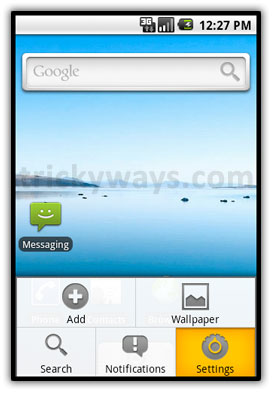
Tap on Home  icon, tap on Menu
  icon and then Settings
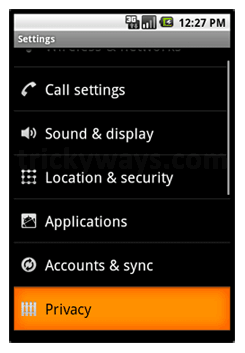
Tap on Privacy and then Factory data reset

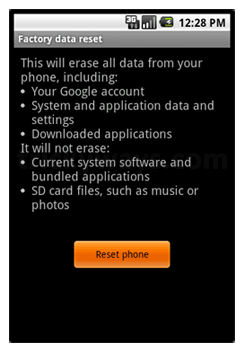
Read the text carefully on your mobile b/c hard reset will erase your all data on Google Nexus One.
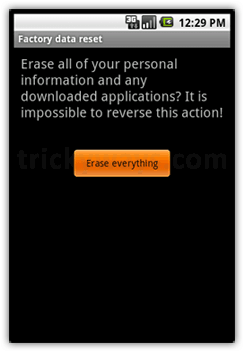
tap on Reset phone button and then Erase everthing button
Thanks for phone reset. Goggle nexus one is nice phone
I want google kick out the iphone lol. google is doing a great job with this new phone nexus one.
Nexus is really nice phone.
I forgot to save my data from Nexus before doing reset.
Reset Nexus successfully, thnks.
thanks buddy reset done
Nexus One reset is realy easy thanks.
How long does this usally takes?
Im just wonderin? i got it together!
ty for the guide
amazing,that even you see it many times..but the one time you really need it, you cant seemto find it back
thnx for the post, could’ve saved me lot of annoyance if i checked it earlier 🙂