Some times this is required to display the list of all created user accounts on Mac OS X login screen. So, in the following guide you will learn the method that how you can enable this option.
Just as a prerequisite, you must be an admin account holder on Mac with full privileges and rights to do that system change.
Show Off All Accounts on Login Screen on Mac

Step 1
Click on Apple logo > System Preferences

Step 2
Under System category click on Accounts

Step 3
Select Login Options and then click on lock
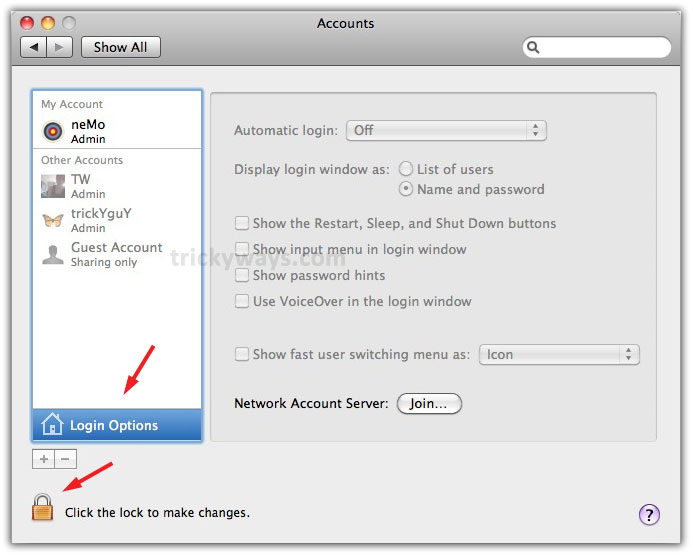
On pop-up screen enter your Mac Password and click OK to proceed

Step 4
Now select List of users option and lock to prevent from further changes and close the screen

Now, when you will restart your Mac, all the existing user accounts will display on login screen.
before reading this article i do not know how to show all accounts on login screen on Mac thanks
Nice and informative Mac OS X tips. Keep it tips