We already written a guide to Export iPhone contacts in Windows 7. Now lets see how we can export iPhone contact in Windows XP as CSV file and you can open this csv file in Excel or you can import this iPhone contacts file in any other email application or mobile device. You just need your iPhone, Data cable to connect and iTunes running in Windows XP.
Export iPhone contact as CSV file in Windows XP
Download and install iTunes, install and Run it
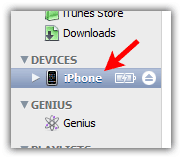
Connect your iPhone with computer using data cable, Click on iPhone device under “Devices” section in iTunes
On the safe side BACKUP YOUR DEVICE FIRST , Right-click on your device and select “Back Up” (in-case of any problem with iPhone Contacts you can restore your contacts from backup later).
Click on “Info” tab

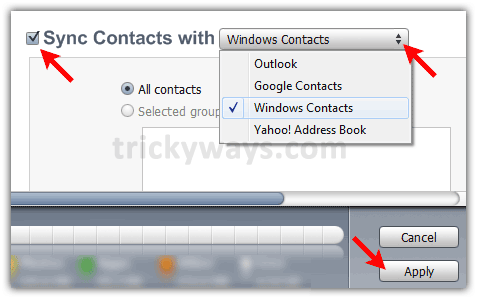
Click on “Sync Contacts with” check box, select “Windows Contacts” from drop down menu and click “Apply” or “Sync” button. Now you can close the iTunes.
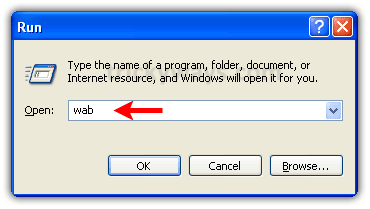
Open “Run” windows by Pressing “Windows + R” keys form keyboard and type “wab” command in “Open” filed and hit OK
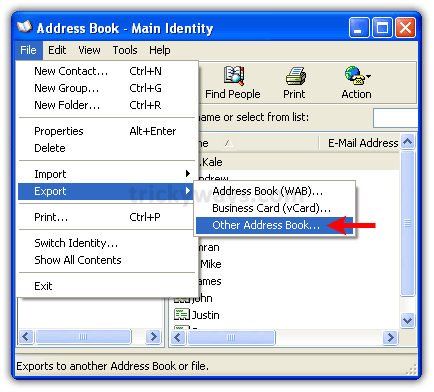
This will open up “Address Book” application.
Click on “File” menu > “Export” > “Other Address Book”.
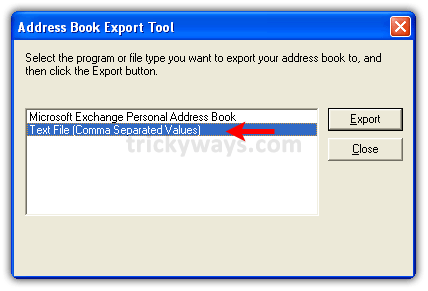
Select “Text File (Comma Separated Values)” option and hit “Export” button
Choose a location to save CSV file and hit “Next” button

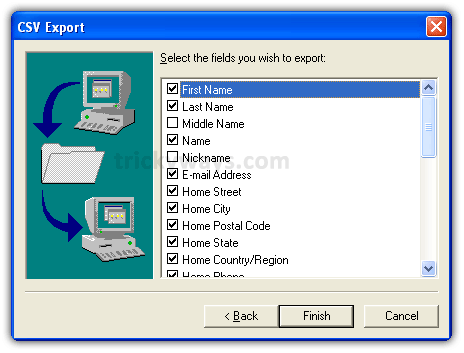
Select contact fields that you want to export and hit “Finish” button
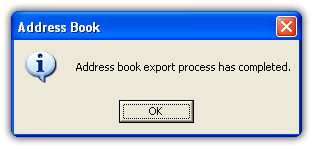
You will see this message if iPhone contacts saved successfully as CSV file.
See also:
Wow this is a great resource.. I’m enjoying it.. good article
This tutorial has saved my sanity, thank you so much.
This option i tried but cannot copy my Phone Book contact, or maybe am poor of IPhone. Could have any suggestion how to export my Phone Book only to my PC? i use Window XP.
You must be doing somthing worng this method is working 100%, just follow the guide step by step to export contacts.
This does not work. There is no way to export your iPhone contacts to a Windows PC per se. It only syncs. Meaning if your Windows contacts is empty, it will wipe out your iPhone contacts. It’s really very silly.
Syncing is not wipe out, i have synced the contacts and its working fine didn’t wipe out anything even don’t have a single contact in Windows contacts application.
This does not work? I did it twice opened windows address book, and its all blank… no contacts????
There must be a step your leaving out…???
If you are using windows vista do you use these steps or are the steps different?
You can follow this guide to export iPhone contacts in Vista or Windows 7 http://www.trickyways.com/2010/06/how-to-export-iphone-contacts-as-csv-file-in-windows-7/
it doesn’t seem to copy the number if its saved as ‘other’. the name appears, but its empty. any solutions?
See the second last screenshot make sure you have selected the correct columns to export contacts.
hi Guys, I tried to copy my iphone contacts using the window 7 csv file but I couldn’t find any contact in the folder I saved them in my computer.All my contacts on my phone have disappeared and I tried using itune restore backup still I couldn’t get any contact on my iphone
Thanks! You saved me!
hi trickyguy, installing a fresh itunes and connecting my iphone, will that erase all the iphone contacts? just like what happens to ipods when you connect it to another PC… please confirm, thanks.
Hats off to your clean and crisp tutorials.
Thanks
It really helped me a lot to restore my contacts from Iphone 2G to Iphone 4. Thanks a lot buddy …
i did fllw the steps but got only email addresses exported — no mobile phone numbers even tho i did it twice and the second time round ticked only phone numbers and leaving out all other info
i did fllw the steps but got only email addresses exported — no mobile phone numbers even tho i did it twice and the second time round ticked only phone numbers and leaving out all other info
I followed the instructions. There was a step missing in iTunes that asked if I wanted to merge or replace contacts. I want to keep them on the iPhone and in Address Book so I said merge. Once complete I look at the contacts in Address Book and although they are all listed many have had their details removed (no phone number / email etc.) – just their names are there. When I look on the iPhone I discover that the same has happened there – the details have been wiped. I am seriously pissed off.
hi..i sold my iphone and got a blackberry..i have backup files on my computer, however, when i opened my address book it was blank…what do i do? i need to transfer my backup files onto my new bb..PLEASE HELP
Thanks for the excellent solution. So easy.
Can you please explain what steps I will need to do to import this contact list into my new iPhone?
Hi,
It does work.. partly. There seem to be lots of contacts that Itunes did synchronise with the trick you describe, but also a random lot of contacts that still only stay on the phone, instead of on the computer as well. Do you know anything for that?
It works 100%
Coz i had tried it. A csv file has been created through the process given above. Now i hv a backup of my all contacts and now replacing the iphone with a HTC sensation after having satisfaction that i hv saved my contacts and now can erase my all contents from iphone
I tried several times with windows7 to export the contacts nothing happened. I have only my name in the .csv file. I followed all the steps but I was not able to export the contacts. Can someone help me?
I have tried this over and over. Out of 900 contacts only 50 are in Windows address book.
i am trying to transfer my contacts from iPhone to PC but could not do it.
I don’t know if the problem is that I’m using Explorer 9 or not, but the computer only transfers my ‘administrator’ name onto the contacts list, even though it tells me that the contacts have been exported they don’t appear at all. What can I do? I realise that this problem has been faced by other people as well, but no answer as to how to solve it. Please advise. Thanks.
works great! thank you 🙂