If you are going to change your iPhone or just want to take backup of your iPhone contacts, here is a simple way to export your iPhone contacts as csv file in Windows 7 and you can open this csv file in Excel. You just need your iPhone and iTunes running in Windows7. Windows XP users here.
Export iPhone contacts as CSV file or to Excel
Download and install iTunes, after installation Run iTunes.
Connect your iPhone with computer using data cable. In iTunes if sidebar is not showing, press Ctrl + S to view the iTunes sidebar.
On the safe side BACKUP YOUR DEVICE FIRST , Right-click on your device and select “Back Up” (in-case of any problem with iPhone Contacts you can restore your contacts from backup later).
See also: Make free ringtones in iTunes
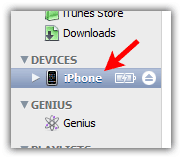
When iTunes finish the back up process, Click on “Info” tab

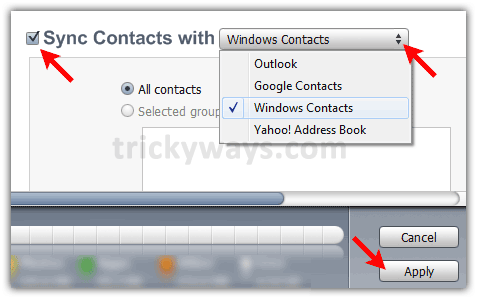
Click on “Sync Contacts with” check box, select “Windows Contacts” from drop down menu and click “Apply” or “Sync” button
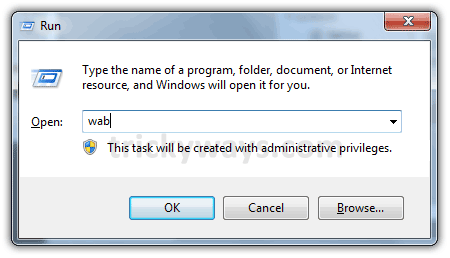
Press “Windows + R” keys form keyboard to open “Run” window and type “wab” in “Open” filed and hit OK
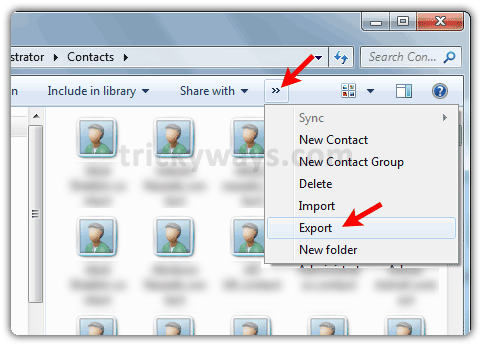
Click on tiny arrow and select “Export” as shown below
Select “CSV (Comma Separated Values)” option and click “Export” button
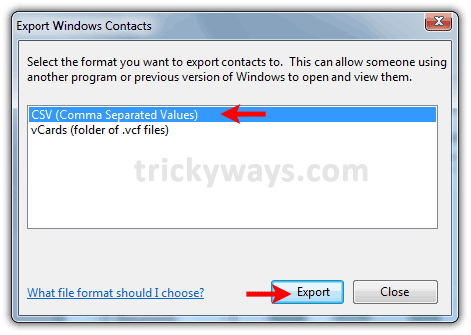
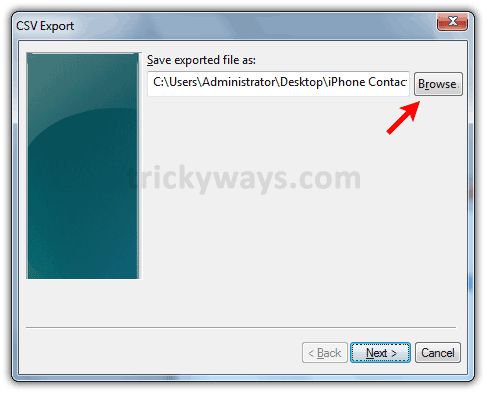
Click on “Browse” button, choose location to save iPhone contacts as csv file
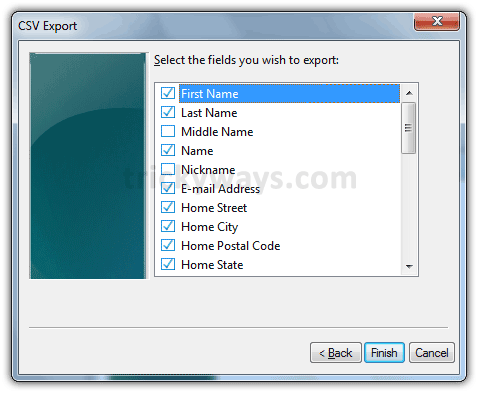
Select iPhone contacts fields that you want to export and hit “Finish” button
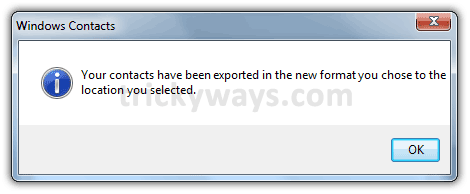
You will see this message if iPhone contacts exported as csv file successfully, hit “OK” button.
Now you can use this csv file to import iPhone contacts in any other application or device or you can open this file in Excel to view all iPhone contacts.
See this guide if you want to Sync iPhone contacts with Gmail
Great information to export iPhone contacts, I’ve been looking for something like this for a while now. Thanks!
thanks for writing this guide about iPhone contact syncing to computer.
You rock! I had no clue about “wab” or the Contacts folder in Win7. I was hitting brick walls with the very frustrating Apple philosophy of making things exceptionally challenging to convert to and from “the Guild.” Not only did you nail exactly what we needed to do, you did so in a very simple, step-by-step manner. Thank you for taking the time to post this!
Sean
Thanks Sean.
I follow you instruction, sync via iTune to Windows Contact. But after I run “wab” the folder show up and show only 1 contact (mine). What should I do?
Oh ok, after I sync it the second time it appears 😉
I’m in the same boat – when I run “wab” it just opens up an Explorer window with on *.contact file.
I synced a second time, but this did not help.
i had the same problems at first and when i checked again by disconnecting my phone and connecting it again, i noticed it had sync’d the contacts with Outlook instead of Windows although I am pretty sure I had selected Windows Contacts. I selected Windows Contacts again, clicked Merge contacts when prompted and it worked! Thanks for this post ! Saved my day!
This post really helps me to save iphone contacts, Thanks.
I’ve been trying to get this damn thing done for quite a while now and i was about to throw this damn iPhone away.
THANK YOU!
is it for sure that this will not sync it other way around? so it doesn’t wipe out the contacts in iPhone? cheers
Thank you! Worked like a charm.
this is great, good info that works. I have been trying to do this for hours after trying all sorts of things from advices from people that should know – telephone sales people. Thanks it really works like a charm. God bless
Perfect! Thanks!
this works for newer Nokia phones contacts too, if u sincronise it with ovi and back up your contacts into your computer, after doing that, folow the same steps begining with Run->wab, the rest is the same. worked with windows7, probably vista is the same. hope this helps
You ROCK!!! Thank you so much!!!!!!
your guide to sync iPhone contacts to system works perfect. I just tried it thanks for all these iphone tips.
You are brilliant! A bigger genius than those ‘Geniuses’ at Apple support. All they could recommended was the Mobile Me program, which is okay if you have everything ‘Mac’. It is such a pain losing one’s contact list! And now I feel secure it won’t happen again with this back-up system. Honestly, if I wasn’t married, I’d marry you! Thanks for all your help.
Now, hopefully, if ever the day comes, it will be easy to restore the backed up contact list into the iPhone from Windows 7? Would you kindly point me in the right direction on how to do this if you haven’t covered it before. Thanks again.
Thank you very much for the information. It really helps me a lot backing up my contacts.
I was backingup/synching into my google account but it has stopped doing that so I would like to follow these instruction via Windows 7 to create a csv file but I’m also concerned (as in POINT 7)that it will work the other way around and wipe my current iphone contacts. Please could you let me know before I do it? Thank you
If you are syncing with Windows 7 first time then you don’t need to worry about it. Anyway If you afraid of losing your contacts, you can backup the device using iTunes. Connect your device with computer, and from left pane of iTunes Right-Click on your device and select “Back Up” option. You can restore your device from the same menu in-case of lose.
Now you are safe, Export your iPhone contacts as CSV file using above guide.
Thanks for helping me.Your instrution of how transfer iphone contact to window is very clear in step by step.
thanks a lot
I tried this and it wiped out all of the contacts and left me with one contact labeled with my name.
It did not backup my contacts. It deleted them.
You can restore your contacts if you have backed up as mentioned above in then step after downloading and installing iTunes.
I selected restore device in iTunes. It began restoring. the phone then rebooted. iTunes automatically performed a sync when it rebooted. Now my .csv file and my iphone have lost all contacts.
I had a blackberry before the iPhone. I wanted a bigger screen and a touch screen. Man do regret my decision to buy this thing. It seems to be geared toward children who play games, listen to music and mess around with goofy apps. My iphone left seqential backup files on my CPU. I could restore any one of them including the firmware at will.
Sync is a rotten way to do anything. It sells a bunch of worthess apps and services as business people live in fear of losing their information. Trust me. I know. I have over 1500 contacts that get entered into my phone while I am on the road. I live in constant fear of losing them, as I have now.
Any idea what to do now.
Spring for DrFone. It works. I just recovered all my contacts, notes, emails, pictures, etc off a totally broken phone. Hint: install the “free” app, then uninstall it. When you do that the price drops by $40!
Have tried several times, but only get 8 of my contacts to sink (several hundred missing). Any ideas? I’m desperate. Thanks.
Hey there.
I have ttried all of the export suggestions and I have had no luck.
I have gone as far as exporting all my contacts from both Outlook and my GMail so that there is a clean slate, the bloody phone won’t export all of the contacts. Am I missing something? the phone is a 3GS with the latest software.
It’s driving me mad……. thanks for the other tips, love your work.
I used this to copy the contacts from the iphone and it worked sucessfully.
I searched the net for a long time and was about to give up and i got this link…..
thanks a ton
A
I don’t get it.
It doesn’t work for me.
I get one record and it just has the name of my iPhone (I think).
Along with a bunch of commas.
Why do an Export form WAB?
I thought the flow of data was from iPhone to WAB.
That would be Import, right?
Anyway, nothing happens.
I wish someone could set me straight.
Thanks for the help.
Bob
Don’t forget to click “Apply” after selecting “Windows Contacts” in the Sync Contacts window. Thank you so much for the tip – was able to get all my contacts’ info in 1 minute!
Thanks…….you are great…… solved my problem
I followed the instructions and opened it with excel afterwards, it doesn’t show the phone numbers,only the name and last name. is that suppose to happen?
Hi,
before you export, make sure you have checked all relevant boxes including mobile number, office etc.
Hi
Gr8 article.
Well is it possible to import in the exact format as iphone
because all the addresses are seperated by the default values of windows contacts.
thank you for putting this together. Just backed up well over 1000 contacts that were locked on my iphone. Very well written guide; simple to use.
thank you. thank you. thank you.
Great info!! I was struggling with importing my iPhone contacts to Windows 7. This was quick, easy and saved me from purchasing software to do the import. Thanks!
Hi I have successfully completed exporting my iphone 4 contacts to windows csv file.
However when I tried doing the same process with my partners iphone 3 when it came to syncing and running the wab my contacts from my iphone 4 appears and none of his??? I deleted them all and tried process again but now nothing shows up.
Can someone please help me with this.
Cheers
Becstar
Thanks for the info!!! i was going nuts trying to find out how to do this, and was about to start entering them manually.
the final step was to tell windows live mail to merge duplicate contacts. Finally my mess is almost sorted!
gr8 work… was looking for this since months…. thnx…
Hi
I followed the method but i have a problem in that all contacts are transferred but where i have a problem. in some cases where there are more than one phone numbers for contacts, both have transfered but in other cases one number is missing.i am checking in wab folder and in csv file both.
thanks a ton.. all working
I LOVE YOU!!!!
THANKS A LOT!!!
thanks thanks thanks and thanks!!!
useful, thanx, keep making tutorials like this one
when i go to the info page my sync contacts with doesnt have a drop down menu and there are no options. i am unsure why this is.
Same problem here. No drop down box next to the Synch with option…
I am having same problem. I’m running windows 7. I do not get the drop down menu. I do not have outlook installed. Would that be a reason?
ADDEM, I just figured it out. You must go to settings on your iphone. Click on icloud. Then click off for contacts. You just turned off the synching of contacts with icloud. Now you will see the drop down menu.
Hope this helps.
This didn’t work as expected for me. In fact, I had the same problem as EagleBrewing (see comment, above). I have 85 contacts on my iPhone 4, and only 1 (my own contact record) was transferred to the CSV file using this process.
I have followed this step by step but then I open the file there are no contacts there and my iphone has been wiped of all my contacts?
What can I do, please help!!
i empathsize with you above, I ‘played’ with it for half a day to become familiar with Itune, ITune is not exactly intuitive. You need to be very careful and read and know exactly what the damn tool is telling you. if you forgot to review the Advanced section near the bottom of the Info page, and uncehck ‘replace information on this Ipad/Iphone, whatever is checked will get overlaid. if you had replaced the contact on your computer (messed up to only 1 entry left) then your iphone will get sync over with one entry left – the only remedy is if you had backed up step performed before so you can go back and restore from backup.
with Win 7, it accesses the contact info already synced by the itune ‘apply’ step hence you only need to ‘export’ and not import. into the CSV format. Also, you need to check the ‘mobile’ fields, etc in order for the data to show up. I have some fields came from Ipad and they did not have the corresponding field names and the values did not get carried over into CSV fields
how do i import them back to my iphone?
you can easily google how to setup your iphone to receive the contacts back from either yahoo, gmail account, assuming you had performed the step to get the iphone contacts sync up to your email account first.
see example on how to with Yahoo
http://help.yahoo.com/l/us/yahoo/contacts/basics/contactsbasics-11.html
thanks so much you solve my problem..thanks once again its work..
Good, but a problem: The field “other” (DK version “andet”)- do NOT apepar in the export, how can i get this included?
Maybe this time it’s allowed to say that there is an app that makes it as easy as can be: My Contacts Backup
thanks a lot, it solved my problem.
Anyway ITunes and IPhone sucks, big time.
The morning I have decided to buy an IPhone I wish
I had broken my leg instead, it would have been less painful
This is wonderful, but do you have any way to do this if I don’t have my iPhone? my iPhone was stolen and I still have all my backup on iTunes/ iCloud, and now have a Droid… any way to export my contacts to it?
Thank you!!
Simply Beautiful… Thanks
Only the contacts from my windows contacts were transfered to my iphone, not the other way around. Im using iphone 4 running on firmware 5.0 and I have the latest itunes installed.
This will make it much easier:
http://www.trickyways.com/2010/06/how-to-export-iphone-contacts-as-csv-file-in-windows-7/#comment-6784
Worked well, thank you very much.
Thx for this; it’s been a great help!
One question: I need to transfer my iPhone contacts onto a sim card – any suggestions?
Thx!
pls iPhone backup transfer to mobile to PC & PC to mobile .
it works perfectly fine. thanks a ton.
Thanks for the info – very easy – BUT – when I exported the numbers, after I checked ALL options, all ‘other’ phone numbers are missing in the excel file; only ‘mobile’ numbers transferred. There is no ‘other’ option (I have a 3G iphone, and only a few phone numbers that are entered as ‘mobile’, as I didn’t really pay attention and/or put effort to mark them as ‘mobile’). Does anyone know how this could be fixed? I believe this happened as there is no ‘other’ option (among many others) to be checked off.
Thanks in advance for all your help.
V
Thank you for posting this information. I followed all the steps and it worked very well.
Thanks you … you are the best
I think ,that iOS Devices when I sync with empty library or empty contact. My contact in iOS Devices is gone.
I first try by your blog post. contact in my iOS Devices isn’t lost. and added in my windows contact.
Thank you for this article.
Thank you so much! Really clear and easy to follow instructions, worked first time.
Apple couldn’t help me, TMobile couldn’t help me, so it’s a good job for us technophobes that there are clever folks like you around!
its working ….
thnx…
Hi, this was great thanks. Just another tip, make sure you turn off Icloud or it won’t pick up your contacts.
thank u – this really helped me – shockign that itune and apple support is so unhelpful
Great information. I did not know about wab. very much pleased to know it. Thanks a lot
I just wanted to add that if someone had other labels for phone numbers than the standard ones, they will not get synced using this method. So for example, if you have a contact that has a “Skype” phone number or a “Mobile2” phone number or “G-Number”, etc…. none of these numbers will get saved. Windows Address Book will only copy the standard labels for phone numbers, such as, Mobile Phone, Business Phone, etc….
Brilliant! I was looking to backup my contacts since many days, now my issue resolved, you are real champ and you rock
Regards,
Raheel Tariq
I’m using the iPhone 4s and Windows 7. After following the exact steps, this method is not working.
The problem is that my Windows Address Book (“wab”) is blank, even after clicking “Apply” and then “Sync” on iTunes.
trickYguY has a screenshot of his Windows Address Book (“wab”) with ALL his contacts from his iPhone. My Windows Address Book shows zero contacts, so clearly they aren’t being synced onto the computer. Thus when I export the contacts I get an empty .CSV file.
Any thoughts?
I am having the same exact problem. Did you ever get it fixed?
I’m having the same problem! I cannot get this to work!
Use free app “My Contacts Backup” from the App Store, works like a charm.
Hi all – thanks for the post – I’ve done this numerous time successfully without issue – only problem is that even after I sync / update the contacts / many thousand – it seems to lag behind a few weeks – meaning the recent contacts from iPhone are not merged into Windows Contacts (or Outlook) – IDEAS? thx in adv
I didn’t even know that you can manage contacts with Windows. I just tried it out, but honestly it is not very user friendly, especially when it comes to the creation and modification of contacts groups. But, I like the idea to manage contacts directly on the PC and to sync it afterwards with my iPhone. Is Windows contacts the only way to do so, or are there other possibilities?
I have tried several times, but I get only 175 out of more than 1000 contacts. Any ideas? Shall I copy them one by one and throw this damn stupid Iphone4. Thanks.
You rock! This totally did the trick! I was afraid that I was going to lose everything… AGAIN!
I did everything said here and it didnt work, the contacts was blank. double checked I did it right and still nothing.
Thanks! I was tearing my hair over the lack of a ‘physical’ store of my contacts due to the lack of an address book on Windows 7, and MS’s insistance I use Windows Live, which I dont use and dont want.
This works perfectly!
Great, if you perfectly export iPhone contacts.
Hi trikYguY. Thanks you for the useful instructions. I feel lost though. I still do not understand why every single piece of information (including my personal contacts) must pass through iTunes first in order to get transferred. I am so frustrated with iTunes now. I wish there was a simple and direct way to back up my iPhone contacts.
Excellent information, this was what I really was looking for. It works!
Will this interfeer with my icloud back up?
I run my backup though icloud and do not want to risk to damage this.
I tried and all I got were the headers in an Excell spreadsheet. My iphone 3GS has the latest update 5.1.1 and I am running Windows 7 Ultimate and my iTunes is up to date. I have no clue what went wrong. At the end of the process I was expecting a message saying all cotacts have been exported but did not get that. Thanks for the instructions. This was nice of you to put these instructions up, but it did dnot work for me.
I tried again and receive the message that my files have been exported. They were not. Again, only the headers were there 🙁
I went through the whole process. When I open the windows excel doc it only shows 1 contact and thats my computer. I have gone through process like 10 times. Please help!!
Awesome work. it worked just like magic, thanks a lot
I followed all the instructions given above accurately, but when i opened the MS-excel folder which i named as iPhone contacts it just had the first name, last name etc. Not a single contact of mine. What should I do ?
Today I needed to do a backup of my contacts and after searching I found this other method. Dont get me wrong this is good.
IF YOU HAVE AN IPHONE 3GS TO 4S THEN YOU ARE GOOD TO GO.
TURN ON YOUR ICLOUD – AND ONLY SYNC YOUR CONTACTS– ONCE SYNC YOU MAY GO TTO ICLOUD.COM – AND EXPORT THEM EASILY, NOW IF YOU DONT WANT TO BE SYNCHING YOUR IPHONE TO THE CLOUD THEN ALL YOU HAVE TO DO IS… TURN ICLOUD OFF!!
YOU ARE VERY WELCOME.
hello! 🙂 woahhh i think u had the best answer the icloud thing i just paid attention but do u have to save each one? or is there a way to save all?? thanks 🙂 cheers! 🙂
no success here, pls help….It worked for my duaghters ipod. But when I try to sync my iphone with our new laptop this way it just copies her contacts again, not mine. even though I have created a new folder for my contacts…..very frustrating spent hours trying to get my contacts from my iphone4 to the new laptop- windows live mail….
Thank you so much for these wonderful instructions. They worked perfectly the first time, with Windows 7, 64-bit system on my fully updated iPhone 3GS. Now I can change to an extended battery with confidence.
aah I have sussed it now! The problem was my icloud setting was on for “contacts”. I thought this was to backup not to sync to icloud. all the on/off settings under icloud are for synching not backup, in true apple style it doesnt tell you this! you can only sync to one of pc/icloud so I turned icloud contacts off & it synched with imported contacts as above easily! what a waste of several hours, if only this was clearer on apple website/ settings!
Many many thanks, this is a fabulous help
I have followed these steps and I have lost all my contacts. I am sure that I have followed the steps correctly. I am very frustrated and pissed off and i really don’t know what to do
waste of time!
Did you follow the first step and backup you device first.
If you did then you no need to worry, you can restore contacts from backup.
A MILLION thanks. To those who are only exporting a single contact (their own): go back to step 2 and “Sync contacts with” .
The instructions worked perfectly, what a relief.
iTunes is so un-intuitive, it drives me crazy! Please rewrite ALL the instructions! Thanks again.
Why do I have to turn on sync… and even sync… when I don’t want to “sync” at all?
I want to “Export iPhone Contacts as CSV file”… just like the title of this page says.
Thanks for this, however only 8 of my 200 contacts exported. The 8 were Icloud contacts what ever that means? How di I get every single contact on my phone to export? Thanks alot
I don’t understand this Icould thing. I’ve tried turning it on and off, it doesn’t do anything. All I want is to have all of the exact same contacts on my Iphone as I do in my Outlook, it shouldn’t be so difficult! I have contacts on my phone that are not in my Outlook contacts, how do I get them there? Thank you
it worked! thanks!
Awesome, Thank You for the fantastic Info. Great site
this worked with my loast Iphone but not this time. There is only 5 contacts in the export list, but I have a couple hundred. Where have they all gone? Is this to do with Icloud?
for those of you not seeing the contacts show up in your windows adressbook its possibly due to the fact that you did not disable your icloud storage (general settings > icloud > storage & backup > icloud backup > off)
This solved it for me! Thank you thank you!
It don’t like iTunes and didn’t use it since at least December 2011. Additionally I don’t trust iCloud. As I am certainly not the only person who’s syncing an Apple device without iTunes and I just recently found a solution to sync my contacts directly with my PC. The app is called Copy Trans Contacts and a good alternative to the iTunes/iCloud sync!
Brilliant – very easy to follow! I have been looking for some time to back up my Iphone contacts, in some other form than Itunes and I now happily have an excel document with my contacts there! Thank you.
And maybe worth to mention for all those people (like me) that don’t use iTunes. There are some tools that allow you to export your iPhone contacts to Windows without iTunes. E.g. my contacts backup and copy trans contacts
Your are really life saver for all of us. I think this Idea work Million Dollar and you should Patent this and sell to Apple to make every one life easier.
Thanks
Peace
my 2 cents. This works. To be straight-forward,
If your iPhone is connected to iCould, delete it from the phone.
You must do this on your phone. Also make sure itunes isn’t connected to iCloud either. Comprede?
Hi, when I export my contacts, it only exports the contact I synced with google contact. I don’t have the contacts that were initially entered in the iPhone, i.e. those with phone numbers
Glad I found this site. Thanks for being here.
I have a long story following about my success using your instructions. It’s not bad!!
Fairly easy to get all my contacts downloaded from my iPhone3GS running the new iOS6. I did have to tweak your instructions a bit – possibly due to iOS6. I’m also running Win7, MSOfc2010, iTunes 10.7 [just loaded] on my desktop PC. “Tweaks” follow:
1. I found that in the left column the DEVICES folder with my iPhone did not load at first.
2. I had to press CTRL, then SHIFT, and hold both down as I connected the USB cable to the PC.
3. Your instructions showed backing up the iPhone before getting it loaded. You need to move that line down in the sequence.
4. After that I did click on the INFO tab – then clicked Sync Contacts with – chose “Windows contacts” – then clicked on “Apply”. I did not click the lower Sync because I was just doing a download of my info. Also, the new iOS6 UG, page 14, warns against doing this due to possible duplication of info.
5. Your next direction starting with “Press Windows + R” has a typo using the word “filed” when I think you meant to show “field”.
6. In the “Run” window you show the “wab” already there when something else will show when it opens. I just replaced what was there with the “wab”.
7. The next window shows the list of items in sequence but in my PC all these showed in a “task bar”. It did all work ok.
8. Clicking “CSV”, “Export”, choosing a location on my hard drive, “Next”, selecting the fields [I chose all just to be sure I didn’t miss any info] then “Finish” and all the info came out fine as a CSV file which I saved and later converted and resaved as a MSEXCEL2010 file so I could manipulate it.
Basically – all this worked out just like I wanted.
Thanks for building all this for people like me.
Now – a question – can I make changes in the Excel file, change it back to CSV and load it back into the iPhone?
If you don’t have that program available yet I, for at least one, would like to see if you can do it.
Thanks again.
Jim Lynch, Shorewood, IL
thanks alot dude..
Super génial!
Thanks a lot man!
Thought this looked like a great plan until I synced to ‘windows contacts’.
This lost all my named phone numbers from my iphone and had hundreds of work email names and emails in there place. Not very helpful.
thanks a lot for this valuable info.
Try Contacts To Excel and Export My Contacts on the App Store.
Yet another thanks from me.
My phone died yesterday for an hour and I panicked as I thought I lost my contact numbers. Phone came back somehow, but I think it’s on it’s last legs ( 3GS btw).
SO I thought I’d write out my lit of contact numbers, all 145 of them lol.
Sure glad I found your page.
Hi
Thanks a ton, my iPhone is losing battery pretty frequently and so if I don’t charge my phone frequently it just dies, which means I am stuck with all my contacts on the phone, even I cant use my land line as my phone is dead and don’t have access to all my numbers. I was desperately looking for a faster way to access my numbers independent of iPhone and I am able to do it successfully now. Thank you.
Thank you very much! That was the most helpful guide I have come across untill now!
heres what i did to export from iphone 5 to windows 7 pc, edit, then import back to iphone:
I was able to export from phone and save to csv using trickyways instructions above.
Then I exported a csv of contacts from windows live mail and combined data from both files into one.
Then I imported the final file back into windows live mail and exported all finalized contacts from windows live mail this time choosing the vcf file type option.
Then I navigated to c/user/contacts and imported these files into this folder (since this is where windows 7 stores contacts and is the location itunes syncs from)
Then I synched the iphone with windows contacts using itunes (info/sync windows contacts)
HELP!!! I tried this and it eresed all of my contacts off of my phone. The .csv file in my computer is blank except for my own contact info. I had well over 200 contacts and have absolutely no clue where they went. Anyone have some thoughts?
Did you backup your iPhone using iTunes before following this guide?
Hi trickYguY.
Love your work!
I have noticed with the newest version of iTunes, I’m no longer presented with a check box at your step —- Click on “Sync Contacts with” check box, select “Windows Contacts” from drop down menu and click “Apply” or “Sync” button —- Maybe this has to do with iCloud ??
Could I ask you please to maybe offer some work around for us less wise? I would really appreciate it. Thx Peedy
A friend forwarded the LINK to an app to move Contacts by exporting them from our iPhones. MUST we open it and do FROM the iPhone? Or should we open on PC & download there? It seems to take a PC to make it open, right? Need some help on Exporting Contacts & have an iPad also. Do I need to do on both devices, or will the iPad and iPhone sync?
Thanks a lot for info
Thank you so much for this information! I can relax now that my info is restored.
Thanks a lot worked for me.
I never knew
i could not see the export option once synce to windows contact is done.
for some reason I didnt get the >> arrows to chose export, I just get Organize, Views and Burn.. 🙁 Is there something Im missing? I could sync all of my contacts though.. at lease I can see them in the folder.
Help me.. cuz it seems like a super easy way to export my contacts. Thanks!!!
When I open ITunes 11.0.4.4 Idon’t see devices or that menu that is usually down the left hand side (windows 8)
how do you turn that on? I can’t see it in View…rather, I don’t see an option under view from the menu bar.
ah, show sidebar…dang my bad
It worked bro!!!
Thanks a lot…
manbir
best
After searching all over finally found something that worked really well….!! thanks a lot
Wonderful Advice! Finally transferred the contacts to Excel!!! Thank YOU so much!!!
great job, success… thnx…. thnx…..thnx…… love u
thank youuuuuu sooo much
its really work
Great Job. After many days and many ways finally I found right solution. Thanks
It worked great until I got to the type Windows+r and then nothing – no run window. Where do you need to type this?
Windows+R keys combination works on all Windows versions to open Run window. Make sure your are pressing Windows key, a key with windows logo on it.
thanks, it helped.
Thanks a ton
its very helpful,thanks buddy
it isnt working for iphone 4s running on iOS 7 the csv file is showing only the top fields ie first name last name etc and no numbers and names are visible please help asap is it something to do with my internal setting of phone?
Great Help! It worked like every word you mentioned. Thanks!
Hello, this works, however, I noticed not all my contacts were copied. Any idea how to get all my contacts from my iphone? thanks!
Awesome! Was trying to find some rubbish freeware to do it, all the while it was literally on my fingertips! 🙂 Cheers!
I followed these instructions step by step and it even said that files have been exported to the selected location, but there is nothing there! Please help!!
Thanks its really works.
🙂 Thumbs UP.
when i am opening wab only 8 contacts are coming and ihave like 400-500 contacts …. what to do please help !!
Awesome thank you… one important detail that found me out, don’t forget to scroll down and press ‘apply’ when you change to windows contacts.
Thank you thank you thank you
This actually works
You can try these steps :
Turn on iTunes
Choose your iphone devices.
Find iCloud from itunes
Turn on iCloud
Sync phone
iTunes will sync all iCloud contacts with contact to windows
After sync finishes, turn on iCloud contacts on phone and merge contacts
Thank you for the tutorial on this!
Absolutely what one requires! No beating around the bush kike other websites and answers like install xyz app, just the right info.
Thanks.
Thank you!!!!!!
I can’t tell you how happy I am that you supplied this information and that it worked!
I burst into tears earlier because I feared that I had lost my contacts forever, since my iPhone 3 has a white screen and is unusable. To add to the stress I bought an iPhone 5 and went to get a new Sim card. The company cut the card down to fit the iPhone 5 even though I mentioned that I did think it was compatible. The iPhone 5 still does not see the Sim so I was scared that the card was damaged by cutting it and all of my contacts were gone. But I was able to put it back into the iPhone 3 with the new Sim shell they were nice enough to supply. After recharging the phone I wiped away the tears and found your article. After connecting it to iTunes I was able to “merge” the contacts and then I followed your instructions so I am now so Happy to have them back.!
Sorry, this does not export anything but contents of Windows Contacts. I have contacts entered directly on my iPhone that are not in windows contacts, and iTunes Sync only brings contacts from windows contacts and merges with contacts already on my iPhone.
HOW do I export contacts from my iPhone???
When I plug in my iphone and go to the info tab on itunes(12.1.3.23), it does not offer me the option you describe. Just tells me my contacts are being synced “over the air” from icloud, and that I can change my “over the air” settings on my iphone, but I can’t find anything on the iphone that would allow me to sync with windows on my pc.
You jst need to change contacts back up setting in iPnone as not to back to icloud. It means you need to switch off icloud backup for the contact. After that you will find that option. Have a good day. Thanks for the sharing “TrickWays”. I had lot of trouble to back this thing. finally I’ve done my contacts back on my iPhone thanks to you.
It is way way simpler, fast and easy to:
Acess iCloud from your browser in PC, Contacts, CTRL + A to select all, Click on the gear and Export vCard.
I transferred the contacts within 5 minute to the new phone. I was trying many methods for 4 hours. Every time Itunes showed some error like account etc. Thank You Very much
Does not work! Don’t have the option to sync with windows contacts in V12.7.