A new 13.3″ Macbook system can run approximately 10 hours on battery with single charge and up to 1000 recharges according to Apple, but as your system gets older or increase the charging cycles, its battery life also reduces. These rechargeable batteries of Mac have discrete number of cycles, which represents to their life time period and on the completion of cycles age, battery dies and you may needs to replace it with a new one.
Here we tell you the method that how you can check Macbook battery condition, to see how much it has been used and then you can decide when you have to buy new one for your system or see how to maximize the battery life.
Step 1
Click on Finder

Click Applications and then on Utilities icon

Double click System Profiler

Step 2
Following window will appear, click on Hardware and then Power, you’ll find Battery Information. Here, first section tells you about battery Model Information
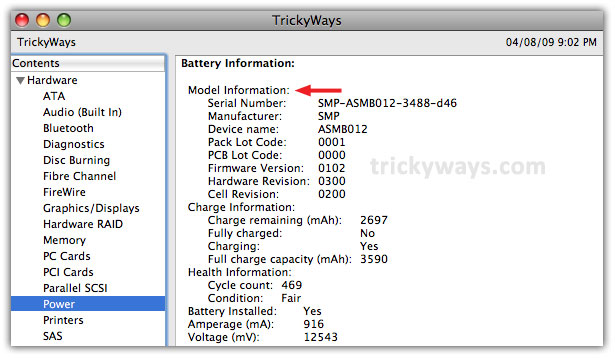
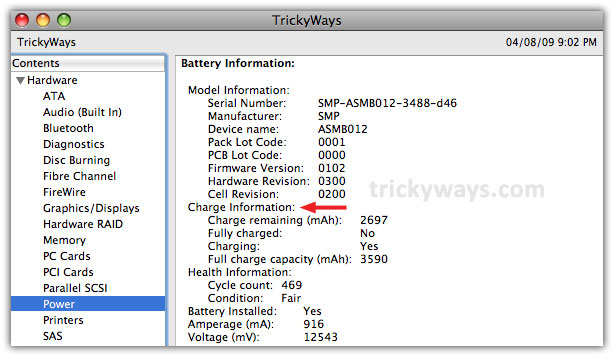
In Charge Information section, you can find the current state of battery as: charge remaining, fully charged etc….mAH (Milliamps Per Hour) is the measuring unit which represents the battery’s capacity to store a charge
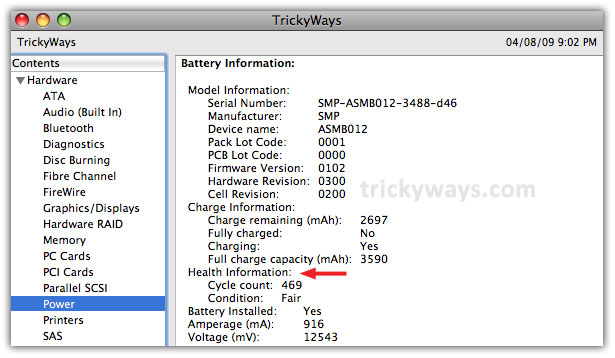
The third section is Health Information, actually here you can find that whats the condition of your battery right now. As in following screen shot Cycle count is 469, which means battery has been discharged and recharged 469 times. And its current Condition is Fair
See also:
How to Maximize the battery life of MacBook
my macbook battery condition is good 🙂
How can i check the battery health of other laptop computer, i have Windows 7 based laptop.
In windows 7 , run command prompt run at administrator , the write down this command
after finish the process you can open the fin in your C drive and check the capacity of health your battery.
powercfg -energy -output c:\battery.html
Mine too. I didn’t know the process to check macbook battery health before i read your post
How to increase battery life any tips?
Mine is dead. It doesn’t charge and doesn’t recognize it. All I did was not use my macbook for 3 weeks and POP! the battery dies…
i didn’t used my macbook for months and the battery is in good condition! i think something else is going on with your bat
Check this guide for long time storage, your battery should be 60% charged, more about battery life http://www.trickyways.com/2010/07/how-to-maximize-the-battery-life-of-apple-notebooks/
This was the screenshot of my result.
Doesn’t look good. What did I do wrong?
Will buying a new battery even solve my problem?
I think your battery support less than 235 charge cycles and now its done You should replace your battery.
If you are not traveller and stay on the desk then you can keep this battery and plug the AC adapter.
Thanks. I’ll replace it. That’s funny that Apple would have replaced my battery with one that had such a short life span. Wait. Funny? No, tragic. It went kaputt as soon as the warranty was up. Figures.
Great post keep up the good work
Salamande
Under Heath Information it states that my condition is Check Battery. What does that mean? Thanks.
There is something wrong with the Macbook battery. You should talk to Apple support for this, they may change your battery if its under warranty.
check this link also: http://www.apple.com/support/macbook_macbookpro/batteryupdate/
my cycle says 160 under normal, what does that mean?
It means battery condition is normal, you don’t need to worry about it 🙂
Battery Said 215 count and my macbook won’t charge and I got a green light?
What is 215 count means??
Its battery charge cycle count, once you fully charged the battery and use all the Macbook battery power will count as one cycle. 215 count is not bad you may have any other battery related issue.
What is the battery condition you see under preference on your Macbook.
Would you please tell me you Macbook model details.
Hi – mine has 1159 cycles and normal condition – however i won’t charge? Can I restore it or is it a goner?
Thanks for great post!
/DonF
hi,
my battery run out very fast.
the condition is normal. cycle count is 19.
this is a 2nd macbook. do i need to replace the battery?
macbookpro mid 2010 unit
I charged my battery 100% on my macbook and then went travelling and left it at home for 6 months unattended- returning home my battery was dead- subsequently I’ve read I should have only charged to 50% – anyway I can salvage my battery??
Is it good for my battery if I just keep it plugged in most of the time?
Nice article. One minor quibble: “mAH” stands for miliAmps times Hours (not per) and is a measure of power.
Sorry, that should have been energy.
The Ma is negative. What does this mean?
Charge Information:
Charge remaining (mAh): 3734
Fully charged: Yes
Charging: No
Full charge capacity (mAh): 3825
Health Information:
Cycle count: 654
Condition: Normal
Battery Installed: Yes
Amperage (mA): -1263
Voltage (mV): 12186
Great help!!! I have a Macbook 7,1 MC516ZP/A. Last few months been having problems with sound, bluetooth, charging battery and, now, could not power up or use macbook without power plugged in…batt issue done, rest yet to diagnose.
THANKS…after 4 days of trying to use Bootcamp Win7 to check battery health (as advised by multiple forums), gave up and was gonna go to the service centre. This article SAVED me! Screenshots and details finally got me to check battery health on Mac OS 😛 and….gotta replace battery 🙁
PLEASE HELP! Please do some more screenshots/links on how to replace it myself…What specs/details I should look out for when buying a replacement battery? etc etc?
BTW, if I usually use macbook at home (with power) and only occasionally elsewhere (without power), should I install the new battery only when I’m going out? Should I just use the macbook without battery installed while at home?
Help….TQTQTQ 😀
Battery Information:
Model Information:
Serial Number: 9G116036SE1MA
Manufacturer: DP
Device name: bq20z451
Pack Lot Code: 0000
PCB Lot Code: 0000
Firmware Version: 0201
Hardware Revision: 0002
Cell Revision: 0158
Charge Information:
Charge remaining (mAh): 0
Fully charged: Yes
Charging: No
Full charge capacity (mAh): 0
Health Information:
Cycle count: 1050
Condition: Replace Now
Battery Installed: Yes
Amperage (mA): 0
Voltage (mV): 12271