If you want to run Windows operating system on your Mac besides Mac OS X then Boot Camp application makes this task easy for you. Boot Camp application is included in Mac OS X and helps to create a partition to install Windows operating system on Intel based Mac systems.
Here we tell you the method that how you can use Boot Camp to create/delete partition on Mac to install Windows operating system.
Create Partition on Mac to Run Windows OS through Boot Camp
Step 1
Click on Finder

Step 2
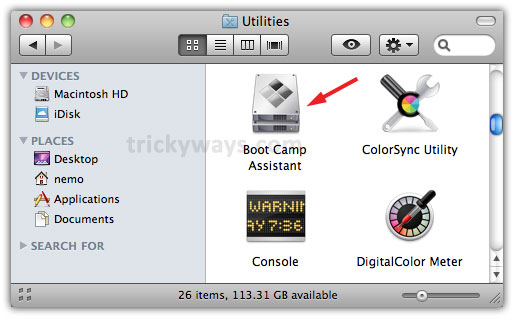
Navigate to Applications >> Utilities and double click on Boot Camp Assistant icon
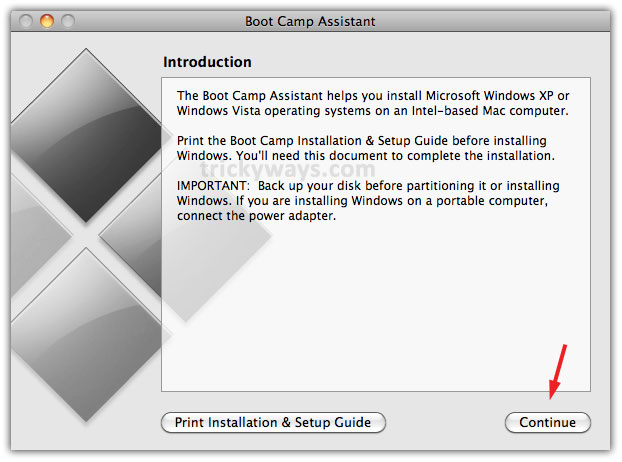
Click on Continue button to proceed further

Step 3
On following screen set size of partition by dragging Dot point right or left, or click on buttons bellow according to your choice and click on Partition button

Step 4
Now a separate partition has been created where you can install Windows OS. You may click on Start Installation button to proceed further or click Quit & Install Later

Delete Partition on Mac through Boot Camp
Step 1
To delete the created partition launch Boot Camp Assistant by navigating through Finder >> Applications and Utilities folder and click on Continue button
Step 2
Select the radio button with Create or remove a Windows partition and click Continue

Step 3
A pop up screen will display so enter password of your Mac system and click OK

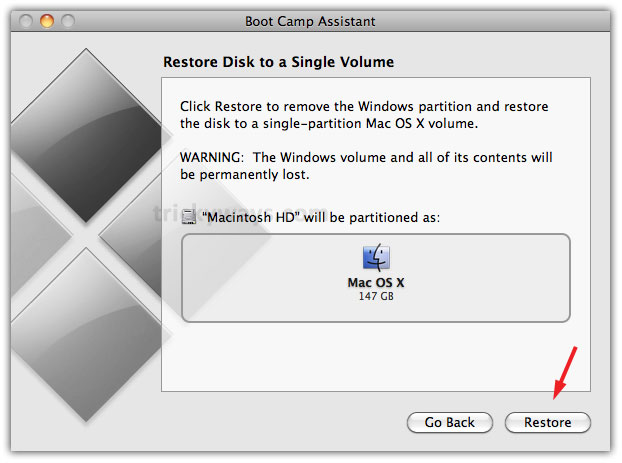
On following screen click Restore button and that will remove Windows partition and all of its contents will be permanently lost
Step 4
On completion of process click on Quit and that’s all

Its really easy to create and delete partition on mac
Is there any other option except boot camp to install windows on mac os x, like VMWare.
how to partion on my mac?
i use window xp also?
If you use Win XP then you must let windows format the partition or you will get an error message when booting. This option differs depending on the version of the win xp install disc.
Hello. The step 3 is not workin for me. I made 40 GB for Windows, pressed Partition and i’ve got message like that:
Back Up the disk and use Disk Utility to format it as a single mac os Extendet (journaled) volume. restore your information to the disk and try use bootcamp assistan again.
What should i do?