After creating columns in word document there are some more options for columns in word that you can change column width, columns spacing, lines between columns and apply columns to word document (whole document, on a specific page or even on a paragraph). This guide works in both Word 2007 and Word 2010
Step-1
Open your document in Word 2007 or 2010, Click on “Page Layout” tab > “Columns” > “More Columns…” options
line between columns in Word
Step-2
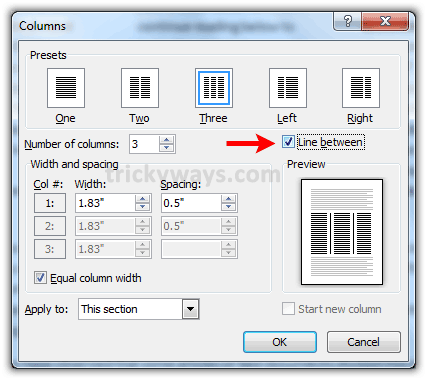
To bring the lines between columns, just check the “Line Between” Check box and hit OK button
Change column width and spacing in word
Step-3
Under “Width and Spacing” section enter the column width and spacing value or just click the tiny arrows right to the value to increase or decrease the value, this will change the columns width and spacing with equal value of all columns.

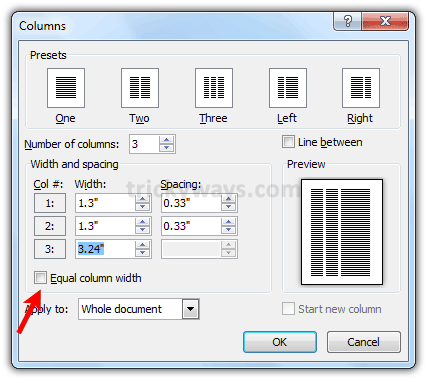
If you want to give different width and spacing to some columns than uncheck the “Equal column width” check box and enter different values of each column as you want.
thanks for these Word 2010 tips
Hi.
Self evident when you know it but a nightmare when you don’t. Thanks for the guidance. I spent half an hour trying to find this setup info by myself. ;-))
No where else i found info. about to remove line between columns, thanks
Searching for the same thing, thanks for writing on word column width, spacing and line between
what the hell is this
Thank you. As someone mentioned earlier, easy once you know where to look, but a nightmare when you don’t.
Thank you. Word doesn’t make it easy, but you do.
Thanks a Million. It is a brilliant one
thank you!! This helps a bunch with my Homework I understood you better than my book!!!
How do i modify the length of the line that in between the columns? The line changes in length between files I have and I need them all to be consistent.