If you someone make change in a copy of your word document without Track Changes ON then there is another option to compare word documents side by side. Microsoft Word 2010 and 2007 includes “Compare” option which allows users to compare two versions of a same document to identify the newly added changes by authors.
 Compare documents Word 2007 / 2010
The process to Compare two word documents version in Word 2010 and 2007 is same.
Step 1
Open Word document, click on “Review” tab > “Compare” > “Compare… ” option as shown below

Step 2
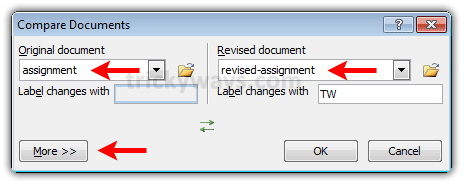
Select the “Original document” and the “Revised document” from their concerned drop down menus or browse the documents from computer by clicking on folder icons beside each drop down menu. After selecting documents click on “More” button to view other settings that what you want to compare in two files.
Step 3
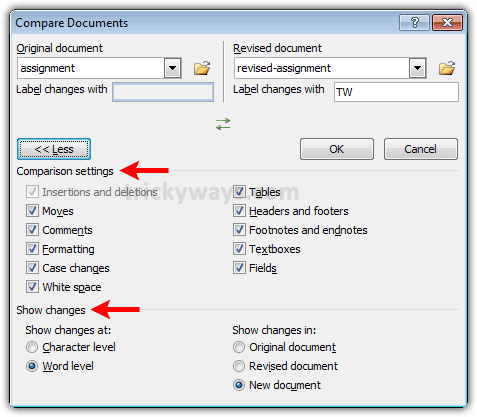
Under “Comparison settings” section, check the check boxes options on the basis of what you want to perform comparison between files.
Also set the “Show changes” section options as you want and click “OK” button
Step 4
Word will open a new document which will show the text of revised version of your document and highlights the changes made in revised version of document. You can Save that document as a separate file if you want.
This comparison will not add any change in the source documents.
Note: “Comparison Settings” selected under “More” will set as the default settings for next time.
its useful for teachers to compare two documents in word.
Its easy to compare documents, thanks
Thnaks dear you relay solve my problem to compare files
Thanks!
Thanks
In this case you can only compare two doc files, but what if you want to compare your file with some external webpage, for this you have to use online comparison tools like this prepostseo.com/plagiarism-comparison-search
These can help you to compare two text files, pdf files, doc files even two different webpages.