If you have both Mac and PC and want to control Mac form PC here is the simple and easy way to do that. This guide is written using Mac OS X Snow Leopard and Windows 7 and both computer are on same network. But you can use other Windows version like Vista or XP as well to access Mac remotely.
Remotely access Mac From PC
Steps on Mac OS X:
Step-1
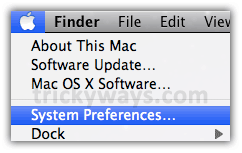
Click on “Apple” icon and select “System Preferences”
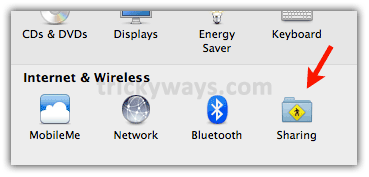
Click on “Sharing” icon
Step-2
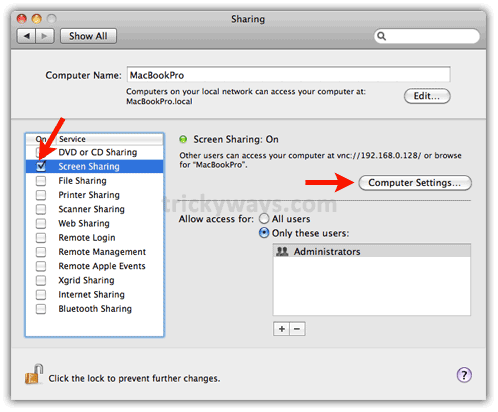
Click the “Screen Sharing” check box, Note down the IP address as in below screen shot “192.168.0.128” your IP address may be different. Click on “Computer Settings” button as shown below.
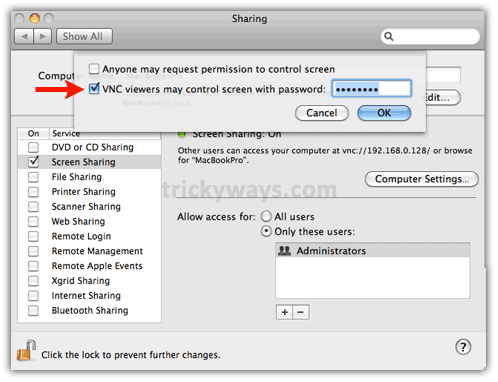
Check the “VNC viewer…” check box, enter a password for it and click “OK” button (you will enter this password when try to access Mac from PC).
Steps on PC / Windows:
Step-3
Download this TightVNC for Windows on your PC (Download a stable version.)
Step-4
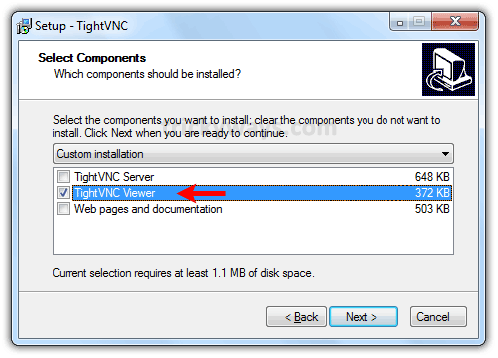
Install TightVNC, during installation wizard only select “TighVNC Viewer” on “Select Components” screen. Don’t install the TightVNC Server, we don’t need that.
Step-5
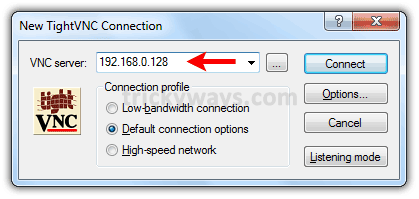
Run TightVNC and enter the IP address of Mac computer (noted in step-2) and hit “Connect” button (Explore the “Options” button).
Enter password that you setup on Mac in step-2 and hit “OK” button

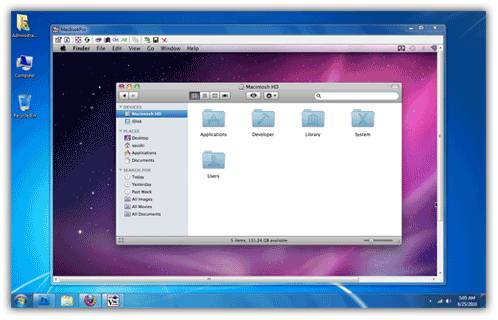
You are done! you have remotely accessed Mac from PC.
You may also interested in:
Wow this is a great resource.. I’m enjoying it.. good article
Thanks for the info! And did you hear some information about Actymac VidShots Remote? I know that it allows to
get video from Mac desktop to iPhone. May be it is very useful for remote
parental control and employees watching.
My new favorite website. Nicely done.
What bothers me is the use of absolute IP addresses.
My machines move (network to network); the solution I’m most interested in you have covered … ability to drive the Mac from a single keyboard / dual monitor PC.
In order to support N-wireless, I had to discard my DLink router and switch to Apple Extreme, which also gives me dual frequencies (2.4, 5.3 Ghz).
Unlike the DLink, I cannot figure out how to reserve a mac address (the network term, not the Apple product) to a fixed IP.
So, the machines “float” on different IPs, and a fixed IP in this solution isn’t so convenient for long-term usage.
Your article was a great get-started receipe. Thanks!
You can also just type the name of the machine in the server box!
Instead of just typing the IP address you could type “MacBookPro” and it will connect as long as they are on the same network / workgroup
I recently purchased Macbook-Pro and I was wondering for a perfect guide which tells me that how can I remotely access Mac from PC.
I found instructions set on your web site which works perfectly and now I can access my Mac from my Windows computer.
Thanks for all of this nice stuff.
Really interesting and informative Mac post.
Very nice guide to learn how to remotely access Mac through PC…thanks a lot for this stuff.
Nice post but for some strange reason I’m getting the error “No configured security type is supported by 3.3 viewer” any ideas guys?
Very nice man; Biggups.
Thank you for the helpful article. I just have a question how to access the mac computer if it was not in the same network with me. The IP that you provided is an IP within the same network. I tried to access a mac using the original (I looked it online on the mac) IP and it didn’t let me access it.
Thank you
Great stuff. Thanks for this.
I have had it work great for me, but now i am getting an error saying that “connection was gracefully lost”….what do i need to do to fix this?
Totaly useless if you use multiple desktops on a mac or have dual monitors as the vnc screen share totally doesn’t work.
Never thought of using it with remote access. I have Mac OSX Installed on my pc.
Great info! So easy to follow. Thank you so much!
Nice. very informative. I just have one question. How do i make it function like a duel display? i have my mac next to the computer and use both of them.
Thanks for the above article. MAC from PC can also be accessed using remote support tools like logmeinrescue, gosupportnow, GoToMyPC etc.
Can we incorporate iphone simulator from the Mac machine to windows by this method
Very nice indeed. I used TeamIvewer until now to do the same.
However, I could not yet find how to pass some control keys to the mac – like Alt Tab etc.
Thank you, thank you, thank you! This was exactly the solution I needed and I can’t thank you enough for the wonderfully clear directions and link!
This is A solution but VNC is not Remote Desktop. It does not lock up your Remote computer and anyone who would come to your desk can see what you do and have an authorized access to your remote computer, This is not a secure solution.
Then close your desktop when you walk away from your PC…really??
Fantastic!, many thanks