If some programs are running in Windows 7 and you Shut Down it then Windows 7 will spend some time to save data and close running programs before shutting it down. By default this time is 12 seconds in Windows 7 but you can reduce this time to speed up the shut down time. Its recommended to save you data and close all programs before Shut Down the Windows. Lets see how to speed up the Shut Down time in Windows 7 through registry.
Step-1
Press “Windows + R” keys form keyboard, type “regedit” in the “Run” window and hit Enter key.

Step-2
In the “Registry Editor” window on the left side open the location "HKEY_LOCAL_MACHINE\SYSTEM\CurrentControlSet\Control"
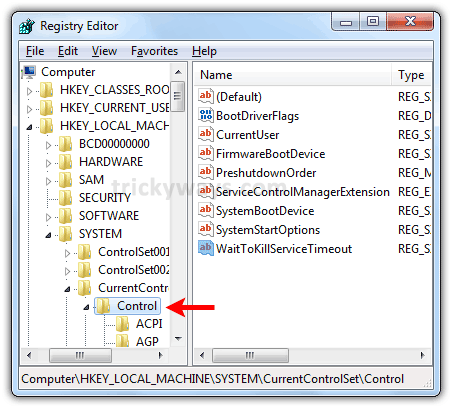
Step-3
Double click to Edit “WaitToKillServiceTimeout” key in the right pane of Registry Editor and change the value to 2000 (2 sec.) in “Value Data” field. Click OK to save data and close the Registry Editor. You can enter value from 2000 to 20000.

See also:
I don’t think its a good idea to force Windows 7 to shut down, let Windows save all data and then shut down the system
Let the Windows take its time to shutdown. b/c it may don’t save your data if you force to shutdown.
@Gwasger: Exactly.. system needs time to save data.. it isn’t safe to force shutdown..
Yea i agree