MAC Address is unique hardware address of any Wireless or Ethernet capable device. To find Mac Address on Galaxy Tab you can use one of the following methods.
Find Mac Address from Galaxy Tab WiFi Settings
Step-1
On “Home” screen, tap  “Menu” key > “Settings”

Step-2
Then tap on “Wireless and network” > “Wi-Fi settings”
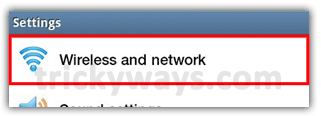
Step-3
Tap “Menu” key > “Advanced” and there you will find Mac address
Find Mac Address on Galaxy Tablet from Status
Step-1
On “Home” screen, tap “Menu” key > “Settings”
Step-2
Scroll down and tap “About Tablet” > “Status” and there scroll down to view Wi-Fi Mac address

See also:
Hi Already connect it and i try to add wifi network but it is not range. thats my problem.what it does mean?
I am trying to find my MAC address and it says “Not Available” . How can I find out what it is?