So you have iPhone and want to know how to upload photos from your iPhone to Facebook. Just follow the steps given below. Screenshots used in this guide are taken from Facebook app version 3.2.3
Note: make sure your iPhone is connected to internet or you can see the following guides: Share mac internet with iPhone / Share PC internet with iPhone.
Step-1
If you don’t have Facebook application installed on iPhone then first install it. Run App Store from your iPhone and Search for Facebook. To install tap on FREE.

Step-2
Once you have installed the Facebook Application, run the Facebook application and enter your login detail.

Step-3
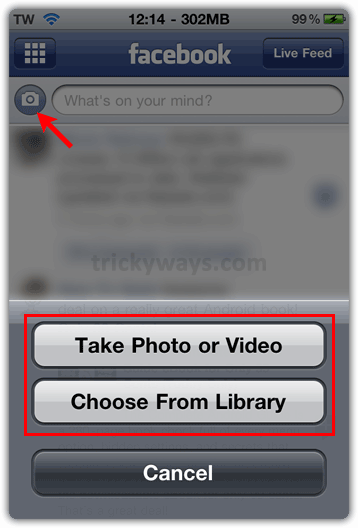
Tap on Camera icon and then Choose Existing Photo button if you have already photos in iPhone.
If you select Take Photo, the camera function will be enabled and you can take your photo then tap Use Photo.
Step-4
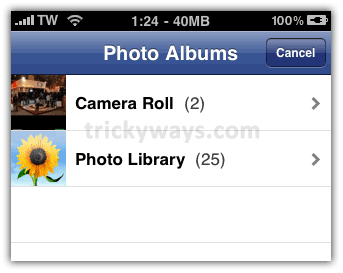
Select a photo from you Camera Roll or Photo Library.
write a caption for the photo and press Upload button, this photo will be posted on Facebook from your iPhone and added to Facebook Mobile Uploads


That’s all, Now you can upload photos from iPhone to Facebook.
See also
How to Upload Photos to Facebook
How to Upload Videos on Facebook
Facebook app 3.0 is released, can you update the upload photos guide?
I uploaded photos to Facebook from my iPhone by following these instructions thanks.
my iPhone 4 suddenly cant upload photos, how come will it be like that!?
Steps didn’t work, do I need to update the facebook app?
Yes, please update your Facebook app on iPhone to latest ver.
Thanks…I knew this required an app.