There is nothing special to find what was the date when you installed Windows on your computer or may be there is some case you want to find. However, if you want to find out original installation date of Windows operating system on a PC then here is a simple process to do that.
Step 1
Run the cmd from Start menu
Step 2
Type this command in Command Prompt, hit the Enter button and let it complete the processing for few seconds
systeminfo|find/i"install date"
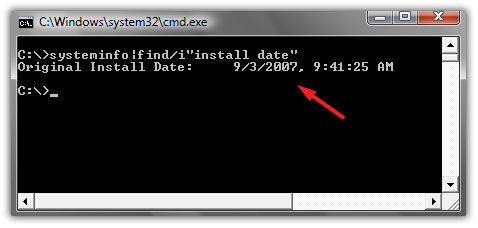
Now, see it shows the original installation date and time of operating system
Thanks
Nice trick
My system is compatible, just waiting for Windows 7 release in this October
don’t know what’s the purpose of this tip but I try it
nice
this tip could work when you are going to buy a used system
Impressive for which Windows version it works?
this works with most windows os i think.
im using windows 7 and this tip works 😉
tnx neMo
Yes it works for windows vista and windows 7, i did not try on windows xp.
its useful tip if you want to upgrade windows or applications
Thnx for the tip!
Had to check a client install for a customer who claimed that it wasn’t downgraded.. but it seems he played with the Down/upgrade himself..
windows v6 and later only
Thanks