If you have some items purchased in your iPhone or iPod Touch, and you want to transfer these items from iPhone or iPod Touch to iTunes. You can transfer these items to any iTunes/computer that is authorized by iTunes Store user name and password.
 This guide will work on both Windows and Mac and iTunes is used, So lets see how to transfer iPhone or iPod purchased items to iTunes/computer.
See also: Transfer iPhone Pictures to PC Windows 7
- First you need to authorize the computer to transfer purchased apps from iPhone or iPod Touch.
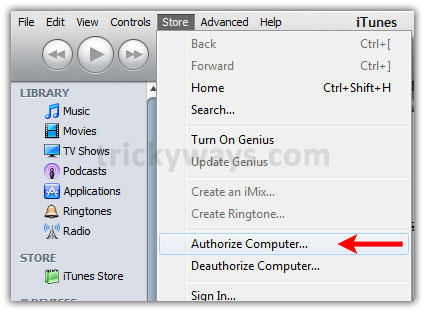
Run iTunes and Click on Store menu and then Authorize Computer (for Windows users if File menu is hidden then press the Alt+F keys from keyboard first, this will show the menu bar).
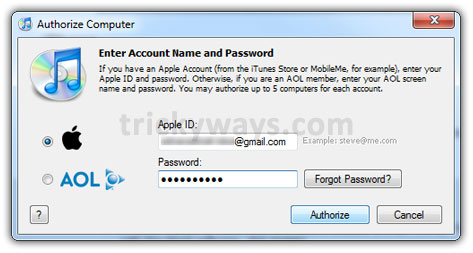
- This will prompt for the account information, enter the user name and password to authorize the computer.
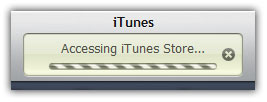
This will start Access iTunes Store… wait for a while.
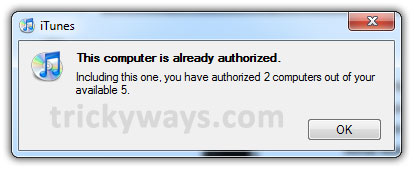
If computer is already authorized, you will get this message, Click OK button.
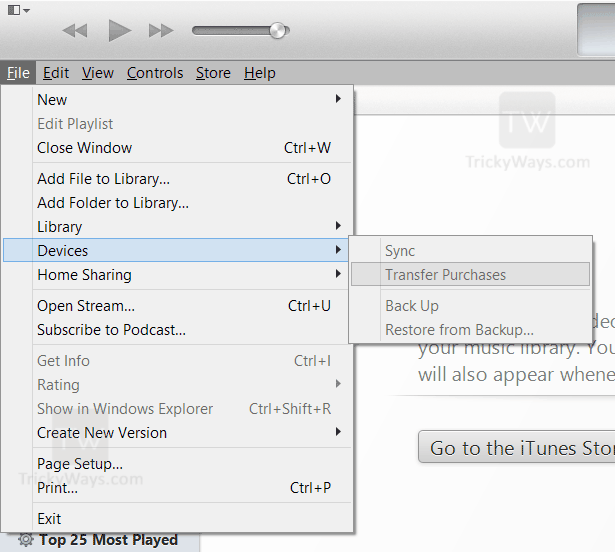
- Now connect you iPhone or iPod Touch to computer and Click on File menu then Devices > Transfer Purchases…
If you have older version of iTunes you will find this option directly under File menu.
-OR-
Simply Control+Click (Mac) or Right click (Windows) on iPhone or iPod Touch device icon and select Transfer Purchases (if the sidebar is hidden and you can’t see you device listed then press Ctrl+S keys to show sidebar).
This will start transferring purchased as well as free items from iPhone or iPod Touch to your Computer.
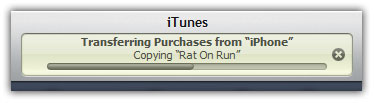
All purchased and free items from your iPhone or iPod Touch transferred to your iTunes/Computer, lets see where iTunes saves the apps.
On the left side Click on Applications menu under Library section and then Control+Click on application > Show in Finder (Mac) or Right Click on application > Show in Windows Explorer (Windows). This will open the folder where iTunes saves the apps.
Using this guide you can transfer your apps to a new computer, from one computer to another, to iTunes, to iPod Touch, from PC to Mac and more…
Feel free to ask question about transferring your iPhone or iPod Touch data to Computer, if you have successfully transferred your data leave some comments below.
Thanks trickyguy you are awesome, finally i have saved my iPhone application in computer that purchases from app store.
Its not transferring my all purchases from iphone
Make sure you are using the same login info. that you have used during purchasing application.
I’m having the same problem. I’ve only ever used 1 itunes account but it still will not retrieve all of my apps (including both free and purchased ones)
Any suggestions or help would be greatly appreciated
You can try about the FonePaw iOS Transfer which can transfer purchases from iPhone to iTunes. And it’s easier to use. You can also transfer contacts, songs, SMS, videos etc between iPhone/iPad/iPod and computer or iTunes.
Nice iTunes tips.
all well and good, but how do you transfer the apps from itunes to ipod?
click on your ipod in itunes on the left side, then click sync in the bottom right corner.
hey, i wanna update my ipod touch version to the 4 OS. if the purchased app in my ipod touch transfered to pc, how to transfered it back to ipod touch after i update the version. thanks!
After updating to iOS 4, connect you iPod Touch to computer
Run iTunes and click on Apps section on the left side and see if all required apps are available in it, otherwise drag and drop all saved apps to iTunes.
Now click on your device icon on left side in iTunes
Click on Apps tab
Select apps that you want to transfer back in iPod Touch and hit the Sync/Apply button
Hi there
Basically, I haven’t synced my ipod touch for ages due to the hard drive on my laptop being small and constantly low on space.
I recently purchased a new external hard drive and have transferred my itunes library onto it. However, I have approximately 300 apps on my ipod, and when i click transfer purchases, not all of them (about 120) appear in the apps library in itunes (some free and paid apps have transferred whilst some have not).
One of the reasons for doing all this is so i can upgrade to iOS 4, but I dont want to do this until I know that I will be able to re-sync all my apps afterwards.
Is there anyway that I can get the rest of my apps off my ipod into itunes or will they all be there when I come to sync after updating? Does apple keep a record somewhere of the apps you have downloaded – both free and paid – so you can download them all again without having to select them individually – 120 apps would take a long time)
Any help would be greatly appreciated
Just to clarify, 120 apps are not appearing – my apps library says I have 180.
Also, I just noticed that when I click transfer purchases, the toolbar at the top says the missing apps are transferred but they still fail to appear in the library
Click on Apps section in iTunes and right click on any App and select Explore option, this will open up the folder where all apps copied. Check out how may apps are there and backup them if you want.
When I do this, there is only 183 apps – still approximately 120 missing
Do you know of anyway that I can get the remaining apps off my ipod or will they be copied when I sync it? As I said above, I don’t really want to have to go through all 120 apps and download them individually
Did you ever figure this out? I am having the same problem and cannot tale it anymore. I have followed all the instructions to no avail.
Thanks.
Mohara
I was trying things for ages but nothing I could find would work. Whenever someone suggested a program to download and use (quite a few were suggested to me on yahoo answers when I posted a question about it), their replies always looked a bit dodgy and suspicious – so I avoided doing that.
In the end I decided to give up trying and to just go for it. I had read in places that sometimes apple will let you download all the apps again (both free and paid) if you explain your situation (although they say this is an exception and that they don’t normally allow it).
I did one last sync but they were still not appearing so i just proceeded to update the software. As far as I can see there has been no issues and I think all of my apps are there – although they still don’t appear in Itunes
Hope this helps
I had this same problem! I called Apple and this is what they told me to do… Go into the same iTunes account that you made your purchases and purchase them again. If you start searching for your missing stuff in iTunes or the App store it should just say “Install” and you can reinstall it. Otherwise, buy it again and even if it tells you that you already purchased it and asks if you want to purchase it again, do it…you won’t be charged again. Now, I’m sure you are saying “I can’t remember all 120 apps I’m missing” So according to Apple you log into iTunes, at the top right click on your email address and log into your account, click on your purchase history and it will sort ALL of your purchases by date. I’m sure there is an easier way, but I went through my entire purchase history and made a list of the missing items by searching for each one on my ipad in this case. Then I went into the App store, iTunes, etc and searched for the missing items and re-downloaded them. It didn’t really take as long as it sounds and I got all my stuff back, so it’s all good! Good luck!
Thank you! This was very helpful.
Great help!! thank you!!
THANK YOU…finally found an easy way to do this instead of downloading something and going through all kinds of stuff to figure this out. I probably could have done it myself but I’m too impatient to actually explore iTunes. 😉 THANKS again!
Worked great! After a few hours of frustration trying to transfer things from the iTouch to iTunes on a new computer this was successful! Didn’t have to pay for software to do it either (which just makes sense). Thanks so much!!!
how can i transfer paid apps from my iphone coming from other apple user name and transferring them to my computer using my own user name?
i have the same problem.. most of the paid apps i have are from a diff account name. i want to update the iOS of my Touch without risking all my apps that has not been backed up. Is there a way to save all my apps then after updating iOS , I can put them all back?
Thanks!
This is awesome thread. Thanks much.
Great post, thanks! But my paid apps are from another account and the other account has been deleted. So I have no idea how to transfer the apps:(
Sry, but my iTunes account is shared with my bro, so what if I don’t want to transfer all the apps from the acc? Can I just transfer some apps?
omg u are amazing you helped me so much now i can download the new version software
i upgraded my iphone to version 4.1. how to downgrade to version 3.1.3
Tell me the iPhone Model you are using and also mention the Baseband.
the model is iphone 3gs.
i have no clue what a baseband is
how do you transfer iphone applications from pc to iphone using usb cable?
Thanks so much! My apps just disappeared off itunes one day and I was afraid I’d lose the saved data in the apps if I had to redownload and sync them again.
THANK YOU!this pretty much helped
i don’t want to transfer the music and apps from my iphone to my computer… i got the phone already used and don’t need any of the previous owner’s stuff. my computer is constantly saying “could not transfer some purchased info including…bc this computer is not authorized.” but then i only have the options to choose “Dont ask again” which I choose.. and then to AUTHORIZE or CanCeL.. I cancel and have to do it again and again. how can i stop this?
awesome tips! saved me a lot of stress!
This worked for me! Thank you soooo much!
We got a new Windows 7 computer. I want to keep my apps organized as they are on my iPhone. is there a way to transfer that onto the new computer. it already has all the apps, but when my husband synced, it restored them in alphabetical order. i have over 75 apps organized and don’t want to have to do it again
Thanks that worked awesome
it doesn’t work on my iPhone. 🙁
This works if you have songs not downloaded from iTunes? (not illegal, but from CDs etc)
Thank you so much for this. I’ve been trying to figure out how to do this! You’re a life saver! 😀
dear trickyguy. i also can’t solve my problem to transferring purchases to my itunes.i have already authorize my computer then i also can’t transferring my application so all in my iphone4 to my itunes. got any solution of this?
Thanks dude! This was such a simple and easy guide. The pictures helped as well. Will definitely come back and visit again to see what other tips you have, insh’ALLAH (God Willing)
Peace
Thankz, it wad very helpful
Thank you so much! this was so easy to follow. I was waiting on the phone forever with apple support and still no help. I appreciate the tips!
worked! thanks.
thanks it worked!! lucky I don’t have to loose 20 apps!!!
can I trasfer purchased apps from my ipod touch to itunes library on my laptop ??? Send answer to my email address
Fantastic! At last a clear and understandable way to transfer. In the words of the late Gomer Pyle, “Thank ye, thank ye, thank ye!”
Thanks so muchh! I love you! 😉
Hi TrickYguY!
You are heaven-sent!! thanks for saving me hours of frustration & grief!!
thanks
does this also work for songs? because my computer broke down earlier and now i have all these songs, apps, and pictures on my ipod, but not on my computer and if i try syncing it i will lose all the songs on my ipod. so will this work?
THANK YOU!!!YOU SAVED MY IPOD!!!
I had my iPhone jailbroken at a shop, and after the procedure, they put some apps (that I selected from their archive) into my iPhone. Needless to say that they used their own Apple ID in doing so.
But now, I have already my own ID, and following the procedure as enumerated above, I was successful in transferring MY OWN purchased apps into my PC.
The question now is; those apps that were initially uploaded (from the shop where my iPhone was jailbroken) into my iPhone, how can I transfer them too? I hope you can give some tricks as there is no chance I can go back to the shop anymore. I can’t afford to lose those apps.
Thank you…easy to transfer the files with your tutorial…finally able to backup my apps, etc. Thanks!
THIS DID NOT WORK 🙁
YOU ROCK BABY
when i do the bit that says right click on the apps button, it just gives me the option of opening apps in a new window. what do i do?
it good i transferred my application from computer to iphone …thanks alot
Worked like a charm….thanks for helping to recover my apps!
Thanks, it helped me out..
Thank you!! I should have don’t this months ago. The iTunes Help didn’t ‘help’ me at all.
Thanks alot, worked!
thanks so much!!! ur an angel!
Nice Share.. I just change my netbook, and i don’t know how to transfer my purchased apps to itunes library at new netbook. Even i’ve lost my apps on my ipad cause i sync it to new netbook..
after read this share, i restore my ipad apps from first netbook, then i follow this share, and it’s work..
This is the solution, thank’s a lot… ^_^
Did it smoothly with your guide. Great help. Thanks!
Thanks for the tips. I find iTunes is great when it wants to work. Unfortunately, it falls short when trying to either move an existing iPod to a new computer, or when restoring a new iPod on an existing computer. Then, iTunes does whatever it wants with files and folders. I’m trying to get iTunes to work on a new computer. The problem is as soon as I click the Sync Apps button, iTunes shows a popup about erasing all settings and data. I went thru that and then did a restore from backup. That brings all of my files and folders back, but unchecks the Sync Apps button. This is a frustrating and vicious circle.
only one app was transferred
Omg, thank you so much! I was trying to update my iPod the last time and it told me about my apps but I just ignored it nad proceded. Half way through it was updating I realized EVERYTHING for my iPod was gone and totally had a mental break down and unplugged my iPod. It wouldn’t even turn off. There was literally NOTHING on it. And that was at nearly 4am and so I tried getting to sleep and worring about it later in the day. But I couldn’t stop thinking that I think I will bust it if the battery runs out. So I tried again and proceded with the transfer for the software and after it was done I saw that I lost all of my apps and I had over 30 of them. Lucky I got them all back and wrote them down this time just incase that ever happens again! But now that I done this I think I will be fine!! Thank you so much though :))
After authorizing and then after clicking transfer, the authorization box again appears? Why?
THanks worked it seems , but now my ipad says if i back up contents will be lost because there was an error????
My friend have iphone 4 jailbroken with lots of application installed. Is it possible to transfer or sync all the application from my friend’s iphone to my ipod touch 4g (not jailbreak). Pls help.
i did all of those things but when i sync my ipod it says remove 13 apps. i click ok then it proceeds to sync but it doesnt remove anything. it also doesnt add the new apps that i purchased onto my ipod.
To delete apps that you do not want, go to your iPod on the right side in iTunes, click Apps at the top, right click on one of the apps that you want to delete, and click delete at the bottom of the list. As for adding the apps, you should be able to add them to your iTunes library by clicking sync in the bottom right corner when you are in your iPod in iTunes (by clicking on your iPod in the left column when you open iTunes), and it should automatically add them to the library, if it doesn’t then I do not know why it is not working.
Thank heaps, glad i found this =)
I bought a 3rd gen Ipod Touch from my friend, and they have lots of songs and apps on it. I have been trying, but when I try to transfer the apps and songs, it work. Can you guide me through it?
OH MY GOSH THANKS!!!!!!!!!!!!!!!!!!!!!!!!!!!!!!! I searched for how to transfer my music to my computer but the answers i went to didnt help at all 😛 this did tho! 😀 THX!
Thanks man..
Found your article very helpful.
Saves my apps 🙂
*smiles*
Thanks to this site i have been able to save my apps to itunes no other site told me that you need to authorize computer first, Thank you so much…
thanks it really worked!!! most of the things i try on the internet does not usually work but this did.. THANKS!!! 🙂
Wow, TrikyWays, thanks a lot; you sure did make the trasfer easy.
Under “File” in iTunes the button for “transfer purchases from my iPod” is not there. The device is present in iTunes and is synced. How do I transfer my purchases? I believe this is due to a different most recent version of iTunes. Any help
nevermind, found the option. It was under “File” > “Devices” > “Sync purchases from ‘iPod'” the option must have been moved during the most recent version of iTunes
how to transfer iPod apps to iTunes/computer. in itunes 11
In iTunes 11,Transfer Purchases option is changed and available under File > Devices > Transfer Purchases. (press Alt key if menu is hidden)
Above guide is updated for the latest iTunes version. If you still facing any problem please reply, Thanks.
Thanks it easy and fast.