Most of the Mac users don’t know that they can use their Mac computer as a wireless access point to share their Ethernet internet connection for other wireless devices like Mobile Phones and Laptop computers. Sharing an internet connection on Mac is quite an easy task just follow the step by step guide given below.
This guide is written using Mac OS X Snow Leopard and can be used for the later Mac OS X versions. you can share the internet with iPhone, iPod Touch, iPad, Xbox, PS3, PSP, PC, Windows, Mac, Mobile Phone, and all other WiFi-capable devices.
Sharing Mac Ethernet Connection Over WiFi
First, verify your LAN connection is working properly.
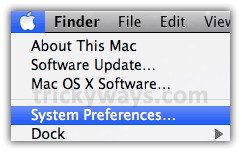
- Click the “Apple” icon and select “System Preferences”

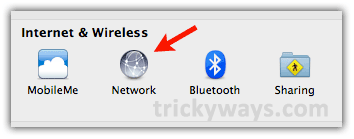
- Click on the “Network” icon.

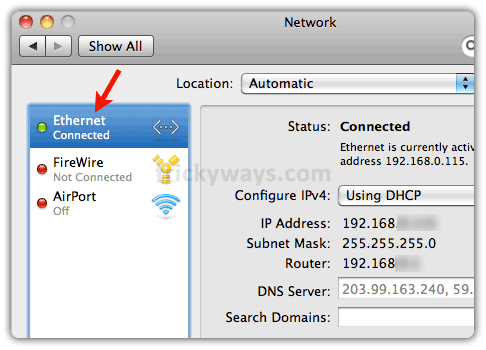
- Make sure Ethernet is connected and working on your Mac by opening any website in browser.

- Enable Ethernet sharing:
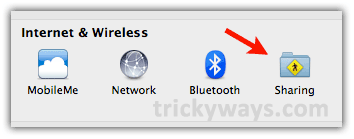
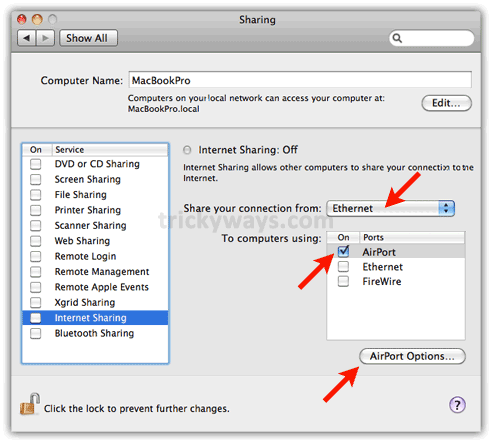
Now go back and click on “Sharing” icon in “System Preferences” to enable Internet Sharing on Mac.
- Click on Internet Sharing option on the left side (don’t check the checkbox just click on text).
Select Ethernet from the drop-down menu and check the “AirPort” checkbox as shown below.

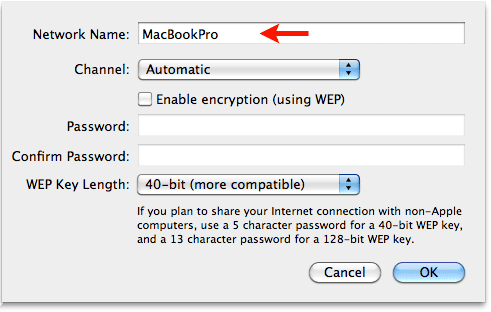
- Click on “AirPort Options…” to set a connection name and secure it with a password if you want (Optional).

- Now click on the “Internet Sharing” checkbox to start sharing the internet connection of Mac.

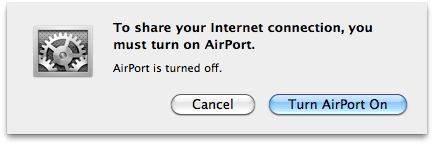
- This may ask you to turn On the AirPort, do it and next prompt for confirmation to start sharing the internet, click the “Start” button.


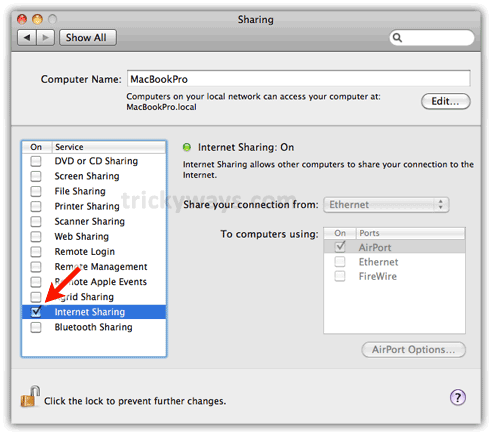
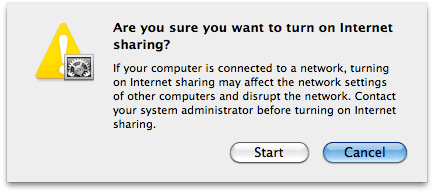
Now your Mac Ethernet connection is converted to a wireless access point using Mac AirPort. Scan for the internet connection on your other laptop or mobile phones that have WiFi capabilities.
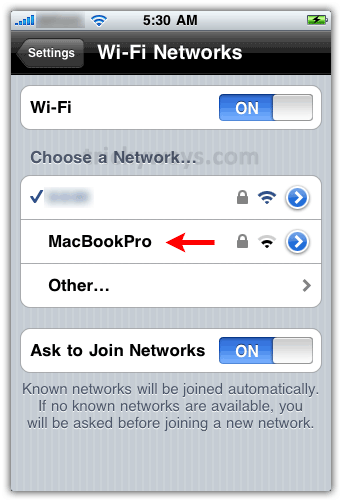
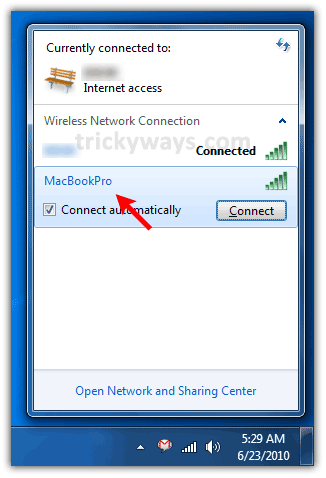
I have checked it on my Notebook and iPhone, see screenshots below.
Ethernet connection shared to iPhone:
Here you can see the Mac’s LAN internet is shared and showing in WiFi settings on iPhone:
Also available on my PC
So its mean i can use my Macbook as an wireless router and use wifi internet on my mobile phone, right?
This guide is for mac, can i share internet connection in Windows 7 ?
Now i don’t need to buy wireless router 😛
Great man now i can wireless interent on my ipod touch.
Wow its really usefull
This is really nice trick to share internet with iPhone or any other device.
wow i love you. they kept saying i couldnt use my macs internet for my blackberry but this did it! youre a winner! screw the data plan!
Great guide, i am using my Macbook as as wireless router and using internet on my iPhone, don’t need to buy a wireless router to share internet for my iPhone. Once again its great.
Not much point in buying a separate AirPort – nice thanks.
I’m still confused as to have it password protected – Win7 finds
it but won’t connect with a password – but for now it is
doing what I want it to
Cheers
its works
mantab gan nice inpo hihihi
It’s never been a secret to share internet with iphone, though this doesn’t work for pc, since encoding is not the same.
there is supposed to be some real trick to connect pc to mac…
Its working fine, i have tried this trick and i can share internet with PC from Mac.
Really really informative mac article. I do share internet connection of my Mac with my other wi-fi enabled devices.
Hi there
I’m trying to connect a windows XP to my MAC connection and it doesn’t work 🙁
From MAc i’m connected with an USB to internet. I tried with Airport, Ethernet and nothing.. what i’m doing wrong?
Thanks!
im using bsnl broad band connection which is pppoe service with that i am unable to connect with ipod…
is there any solution to this
Great article thanks! Stuck here in Tokyo in a wifi-challenged hotel and being able to tether the other way is VERY useful. Thanks!!
Very good , thank you!
I HAVE I PAD, IPHONE IN THE HOUSE WITHOUT INTERNET …NOW I CAN SHARE WITH MY IMAC
GOOD BLESS, THE SMART PEOPLE AND FORGIVE THOSE WITHOUT SKILLS LIKE ME…!!!
Too bad the Mac only shares its connection using WEP security. So, if you’re live for more than 5-10 minutes with some hacker nearby, you’re owned.
Thanks, it really helped me.
i use sony w8 (android 2.1).
i did all this, n my phone even catches the signal n shows it is connected, but doesnt load anything.
btw, if it is a concern, my ethernet uses a proxy server address to connect…
what should i do?
Many thanx, finally found this page that helped me get my network running again
Wow, DONE
Thanks you so much
After I’ve set internet sharing on my Mac running OS 10.5.8 I can connect successfully with an iPod touch but if I shut the machine down and restart I can’t reconnect with my iPod. I check the Sharing system preference and all the internet sharing settings are still showing as on but the menu bar shows only the airport icon, not the airport internet sharing icon. Does restarting the machine reset the internet sharing to being not functional even though system preferences show the settings are on?
That made simple a problem that was driving me nuts. Thanks for the explanation, it worked great.
Thank you! You rock!
thanks that is so easy and understand..
hey i got a problem i dun have here airport options in my mac my version mac OSX 10.8.3.. plz i need some help how i get it
Can you tell me your Macbook model?
I couldn’t connect my iPhone 4g (OS 6.1.3) to MacBook Pro (10.5.8) connected via ethernet, as well as i couldn’t connect a Macbook (10.6.x) UNTIL in the Internet Sharing under AirPort options instead of automatic channel i picked 11 (the highest number). After this everything worked fine. A PC is also connected, as another iPhone (traffic getting large lol)
P.S. I used the same trick with “normal” routers, like LinkSys – problems connecting several machines solved after picking the highest Channel (GHz or MHz – dont remember now).
Thanks! This’ very useful!
Set up the MacBook Pro exactly as you say.
The iPad sees the network, but won’t join, Wheel gear spins forever in front of network name, same with iPhone, other devices. Why can everyone else in the world do this so easily, but not me? Thanks
Did you secure internet with a password on your Mac?
Thank you so much for such helpful info! Just what I needed! Thanks! 🙂