If you have forgotten Mac OS X account password, then there is a tricky method which let you create a new administrator account on Mac OS X and through that admin account, you can reset password of the previous account.
So, let’s see how to create an administrator account on Mac while you lost your Mac passwords. This guide was written using Mac OS X Snow Leopard and also testing on OS X Yosemite as well.
Creating new Mac OS X account to recover old account
- Restart the system and hold “Cmd + S” keys from the keyboard until it shows Terminal.

- Now type the following commands one after one and press “Enter” button after each command to execute it individually.
/sbin/mount -uaw
rm /var/db/.applesetupdone
reboot

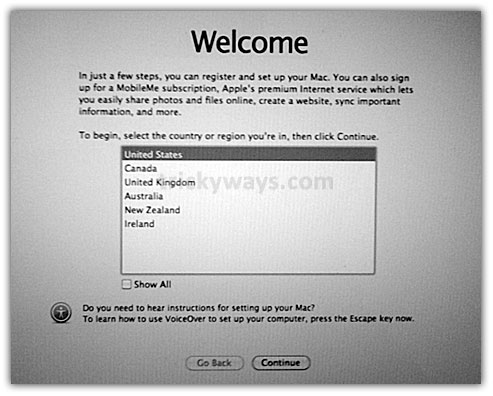
- “Reboot” command will restart the Mac, and you will see the “Welcome wizard” after beautiful welcome messages animation.

- Follow all the wizard instructions, until you see the following screen to create a new account. Fill all entries and hit Continue button.


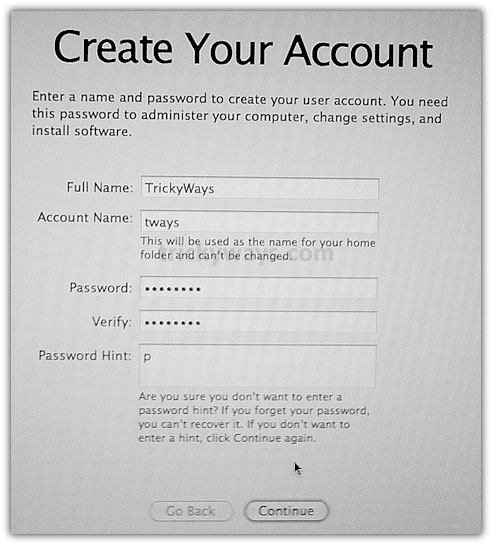
This will create a new administrator account and automatically log into it.
Reset old user account password
Now you can reset the password of your old Mac OS X account using this new account, here is the process.
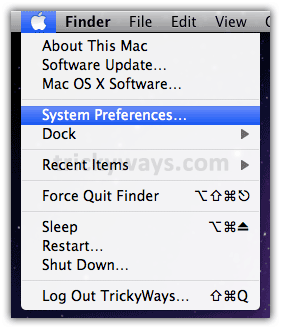
- Click on “Apple icon” and then “System Preferences.”

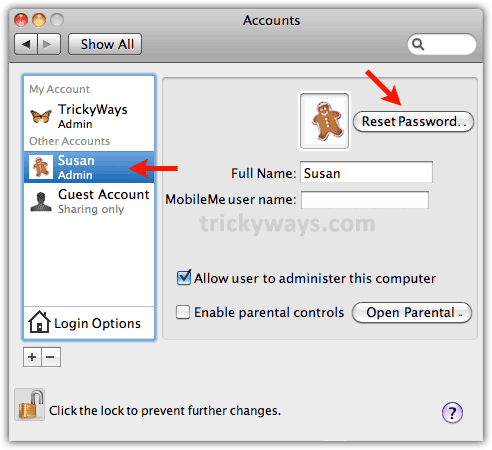
- Click on “Account”s icon

- Here you can see all Mac OS X user accounts are listed, new account “TrickyWays” that we have created and “Susan” the old one that we want to recover.
Click on the lock icon to enable previous account “Susan” and reset its password.

Enter the Password of current user account and hit the OK button

- Now your prev. the account is enabled for changes, select that and hit the “Reset Password” button

Enter “New password”, “Password hint” and hit “Reset Password” button to reset the account password.




Now log out and log in to your prev. account “Susan” and you can delete the account “TrickyWays” that we have created to recover prev. account “Susan”.
Leave a message below in comments, If you successfully recovered your account or need further help to solve the problem.
see also how to reset the Root password on Mac OS X or check out our Mac OS X section for more Mac Tricks
This is some type of hacking Mac computer and its really bad if in bad hands, but i Its useful for me i forgot my Mac password.
What a great resource!
it Worked!
Not working for me, i cant get passed:
rm /var/db/.applesetupdone
it says:
No Such file or directory
never mind, i was adding a space befor the . THANKS!
Mac OS X Snow Leopard
which OS ver. you are using?
It worked!
i was following your directions, and when i got to entering the new password for the account i am trying to recover, it asks for a master password. so i tried typing in the one that i created earlier in your directions but it keeps saying the password is incorrect. what should i do?
thanks so much!
Can you tell me the exact step where its prompting for the password.
If its prompting on step-5 then enter the password of the user that you created in step-3 of wizard.
Feel free to reply.
it is happening at step six. one top of the new password space it asks for master password. so it looks like this:
master password:
new password:
verify:
password hint
i tried putting in the step three password for the master password and it says it is incorrect.
If your previous Mac account was protected by FileVault then you must enter the master password first to reset it. If you forgot the the master password i don’t thing there is any way to bring your account back b/c its encrypted by FileVault.
ok, is the master password the one i set for the filevault? i really appreciate the help!!
now, a new window comes up and it says
reset password failed.
CSSM_ERRCODE_MEMORY_ERROR.
what does this mean?
According to your comments with TrickyGuy so far i think FileValut was enabled on the account that you want to recover.
If FileValute is enabled on a Mac account its mean you have a Master Password as well and you have to enter this before editing any account information on Mac.
I must agree with the rest, I tried other methods to try to get my password reset with no luck. This worked exactly as explained. Thank you so much! I am bookmarking this site.
Not working for me, i cant get passed:
rm /var/db/ .applesetupdone
it says:
No Such file or directory
Don’t put space before “.applesetupdone”
write like this:
rm /var/db/.applesetupdone
Feel free to reply.
I did the steps and it rebooted and no welcome screen?
The same thing happened to me. I got through the rebooting part fine, but when it restarted it led me directly back to my original desktop screen with no “Welcome” screen or any of the other steps?
I’m having the same problem in that I cannot get past the 2nd step. I’m typing in all of the “:/root” variations properly, then my system goes to reboot but the “Welcome” screen doesn’t come up; instead it goes directly back to my original desktop. What should I do?
this was excellent…worked perfectly…thx
I having problems with the first step do you restart the cumputer and press cmds or how ?
Yes, restart your Mac, press and hold the “cmd + S” both keys until it shows terminal
I cant get it to work I tried restarting and holding command + s and it boots up like normal every time. I have osx version 10.6.8 what am I doing wrong??
I have the same problem. After the system comes back up, I press Cmd + S and absolutely nothing happens (vers 10.4.11)
Never did get a reply. Please help. When I reboot my Mac and hit the Comnd key + S key … nothing happens.
Does this effect my macbook warranty to break password?
this is not working
Its working fine. Can you tell me the error?
Thanks for the hint. My only complaint is the “digg tweet buzz etc. icon covers a fifth of my screen and it could not be harder to read the goddamn text.
What screen resolution you are using on your computer?
I wrote the commands and it worked perfectlly, but then the “step 3” didn’t appear.
If you able to run command successfully then it must show the step3.
after reboot command this will show welcome intro, let the intro completes and get to the step3.
Does this work with MAC OS 9 or OS X only
I am not sure this will work with Mac OS 9, you can try to run the command at your own risk.
i dont have the apple keyboard.. i am using a wireless microsoft.. can i still do this???
I don’t have Microsoft wireless keyboard. But i think you can connect Microsoft keyboard with iPhone as well, because Bluetooth keyboards uses the standard method for identifying and connecting with other bluetooth devices.
loved it!
thanks, thanks!
Will this work on Mac OS X 10.4.11?
Does this erase everything currently installed? Or will it keep as is but just reset the password?
This will not delete anything, using this method create a new account and through that account you will recover your previous lost password account.
I have wireless keybord and it doesnt work to press cmd+s. Nothing happends. Help
If your on a server, will the serve show that you made yourself admin?
Very Very Very Very Helpful THANK YOU SO MUCH…PEACE
I TRIED THE FIRST STEP NUMEROUS OF TIMES AND IT TAKES ME TO ” CHOOSE YOUR OPERATING SYSTEM”, PAGE. CANT GET PAST IT. I RESTART AND HOLD COMMAND WITH THE S BUTTON, AND NOTHING. PLEASE HELP MUAHH!!!!!!!
I think you have installed dual Operating Systems and some kind of utility to select one OS at start-up. Remove this utility of see the utility documentation how to get into command terminal.
Delete what utility i keep pressing command s as well but it starts up regularly and nothing
Worked fine!
But:
On my leopard I had to do “/sbin/mount -uaw /”.
Also, the “/” moved to the “-” button since I have a non-us-keyboard.
This guide is written using OSX Snow Leopard. Which version you are you using, OS X Leopard or Snow Leopard?
This does work but 90% of the people replying to this should not be messing around in single user mode and would be MUCH better served booting with the original MacOS disk and using the “reset password” command there.
This is the most impressive trick I have tried on a Mac!
I was possible to change not only the pw but the language as well! Super-duper. Besides from that I could upgrade my 10.5 to 10.6- so now my old iMac is as new…J
Thanx alot for ur help
Docus
Hi trickyguy – followed your suggestions. Works up to step3 but instead of Welcome screen I get the Mac OS X “choose your language” screen and stays there no matter what I select. Any thoughts?
Can you send me the screenshot? Also tell me which Mac OS X version you are using?
My client has brought his Macbook with 3 sets of disks – 10.5, 10.4.7 and 10.6.1 “I was doing an upgrade and something went wrong and now I can’t login”. So that is why I was trying your trick to create a new supervisor password. As for a screen dump – the system won’t let me do anything – it just displays the language dialogue.
I’m having the same issue, any ideas on how to resolve?
Same problem here with 10.5.6 iBook G4, select a language, window disappears then re-appears a few seconds later for a language selection. I noticed the presence of a .AppleCustomMac in /var/db/ – could this be the trouble maker?
Thank you so much! This was a very easy to follow guide and worked like a charm. The administrator at work forgot the admin password and I was always frustrated that I couldn’t use the MAC side of my Macbook pro because that is why my company purchased the laptop for me in the first place. I must admit I was nervous to do this but after seeing the beautiful MAC flash page I was thrilled.
i did create a new user account but my laptop is now messed up it shows the apple and the wheel but after that it turns blue and then grey help me !!!!
OK it seems like your method works because the crowd is going all crazy. I just wanted to ask; will this method delete everything on my computer? So if I change the admin, will it format everything in everyone’s account?
This method just creates a new Admin level account to recover your previous account.
will this delete any of my data for my accounts?
omg. thank you SO much. this was SO helpful
This method worked great – until I turned the machine off. Now when I turn it on I get the Apple and the perpetually spinning wheel. I booted into single-user mode and attempted the process again but this time .applesetupdone could not be located. I’ve ran fsck several times and it tells me it appears ok.
Any suggestions?
No Deepfreeze. I have tried to boot from the original disc and as long as I hold “C” down it reboots over and over. If I release it I get the spinning wheel.
And if there is DeepFreeze on your computer?
No Deepfreeze. I have tried to boot from the original disc and as long as I hold “C” down it reboots over and over. If I release it I get the spinning wheel.
Hi, I followed steps 1-3 however step 3 keeps repeating itself, it does not automatically log in. Can you please assist? My mac is now unable to be used due to not being able to log in. Your assistance is greatly appreciated
hello
didn’t work for me, becuse the apple setup won’t go to the end.
how can i revert to the original login page ?
tx
jerome
I have the same problem too. can you please help me? did you fixed your MAC already?
Worked like a champ on a freeby-from-the-dump G4 with panther. The very clear instructions were a HUGE help to an Apple newby.
One’s first thought is ‘security hole’ but of course if someone can sit down at your computer and do this, he can simply remove your hard drive and do ‘whatever.’
its not working for me. after i reboot it i have to type in :/root# its not there
i have mac os x here in office, they just give me this Mac to use, the problem is the previous user set a password. i cannot use the Mac now because somebody lock it..
i follow the step that you advice here, the problem is the Command+S is not working.. it goes straight to Ask the password of the Admin user..
they also lost the CD/DVD of this Mac Os X.
HOw can i reset the password..
the Command+S is not working in me..
Is there a way to undo, my computer will not complete setup. so everytime I boot it just loops back to setup.
I’m having the same problem. Did you get it fixed? How?
have the same problem…after setup nd account setup it boots back to the welcome screen initiating startup…pls help
I reached the step 3 and already put the Password but when I click “continue” it restart to the welcome wizard and showed the start of the step 3. What am I going to do? thanks
BTW, I repeat it several times but it restart again and again.
really really great work.
i need help regestering it keeps saying phone and everytime i enter it doesnt take ten numbers
Thanks! I had a computer at the school that locked me out (I’m a teacher) and I was able to use this hack and get back in! Now I can use the computer, and so can my students!
I’ve followed this exactly but on reboot it returns to the sign on screen?
Thanks so much. Reseting the password worked on osX panther. You know,… the old multi colored tv looking apples. My daughter was trying to reset her password and did something wrong and reset it with a password that she didn’t even know! LOL. Anyway,… I thought that I would try your solve,… and it worked great! Thanks, Well done.
Shawn
command s does not work, always booting on user choice panel
What must I do ????
Is it possible that applejack or onyx cancel the command-s ???
great thanks
Thank you for this.
Thank you. It worked perfectly. You saved my day 🙂
Almost worked! Got thru step 3 after I figured out there was no space before the period of .applesetupdone. What happens after the reboot is the sign-in screen appears asking for a name and password. Nothing entered works to get past this point.
The reason I was looking into a password reset was because the iMac 27/3.06/4GB/1TB running 10.6.8 froze up when settings adjustments were being done to System Preferences/Accounts/Login Options. This iMac is part of a Windows Server network and Login Options were set to check a users ID against a DB in the server. If Name and Password matched, the user was “let in” to OSX. Once this thing froze, NO PASSWORD worked at all. 2 hours with AppleCare and 5 searching for a possible remedy like this have still not fixed it.
I think the resources which enable the Login and Login Options are so badly damaged that only a complete system installation can fix. I wish it weren’t so!
Anybody got through this one successfully?
A perfect advice for entire world to use this unified examples. Very beautifully recovered my system, using your tricky methods. Congratulation for you support. Thank you very much
the command s doesnt work for me. i keep holding it down but nothing happens can someone plzzzzz help me!!!!!!!!!!!
OMGOMG thankyouthankyou! i cant explain how thankful i am! i so desperately needed to get on my account, you are my ultiment life saver !! 😀
I need to recover a password for a Mac is x 10.8 please help
Did the process and now when I turn the machine on it brings up a weird screen I’ve never seen with an apple in the middle and sings a song then it’s just stuck there please help
It will not work for me I have tried the Command S so many times durring reboot and powering on but it never goes to the terminal only the log in
you are the best …. work and i’m so happy … THANKS !!!!
I recently bought an iMac G5 at a surplus store. For some reason, Command + S doesn’t bring up the terminal as described. It keeps going to the login screen. I’ve tried holding down the keys until the screen comes up, and I’ve also tried repeatedly tapping them. Any assistance is greatly appreciated.
Will this work with lion 😛
Cheers Jonathan
Thank you! Everything works great. I’m on version 10.6.8 and it works fine to reset the password. Thanks
i have the same version but command+s doesn’t work for me!!
can i still use these steps for my imac?
It works!!!
I have successfully completed all the steps to reset the admin account,
However when i am asked to set up my new account the keyboard doesn’t allow me to type my information, is there a keyboard lock or another code necessary to enable typing?
Matt,
I’ve run into the same problem… how did you get passed this?
I can’t get past the wireless network screen, the wheel keeps spinning!
I’m pressing command+S but it not showing anything, Could anyone help me please.
This worked perfectly for me. I’ve been dealing with this issue for a very long time now. Nothing else ever worked. Thank you so much for the help!!!
Thank You Thank YOu Thank You…. I just had to reset my password and this worked perfect on the first try…
the keyboard will not communicate with the computer in the terminal mode thingy. (excuse my lack of technical knowledge). force rebooted computer and keyboard works fine in normal mode. its wireless, does it have to be a corded keyboard?
Thanx alot… you’ve made my day 🙂 🙂 🙂
I am having the same problem as a lot of folks… Command+S is not working at all for me either, Has anyone who has had this problem found a solution?
I cant get past the welcome wizard; i fill out everything and continue on to the next but once im done and I reach click on the button that creates the account, which should be the last step. It then starts me up all over again on the welcome wizard! Its sooo annoying hearing that welcome theme over & over; PLEASE HELLLPPPPP!
Same thing is happening to me. Did you get past it? How?
really great it help me really thnx aloooooooooot
I’ve tried countless times,but after reboot I don’t seem to get that Welcome screen. pretty much I don’t think it works for me please Help
Thank a lot neMO, this help me solve my problem. yo’re great one. thanks
This is great you recover Mac Password without using Disk.
absolutely brilliant worked very well thanks.
worked like well oiled machine, thanx.
I does not give optional to creat new account
it worked. tnxxxx. it was great.
Got the set up wizard part done, however system preferences and a number of other applications on the dock appear as question marks and do not open. Can anyone help me fix this ?
thank you… you save my day! 😉
YOU ARE THE BEST!!
Worked perfectly! Thanks!
For this till step 3 is ok. but when i fill the registrations again & again its showing the same window, i couldnt get login page or step 4 pls asist me
Great work ! Thanks for sharing ! Back in control after following these directions : ) !
THANK YOU! The only site that it actually worked!!! This is on a macbook 2006 w/ Leopard.
Everything went swimmingly until I realized the new account that it created is not an administrator account (it’s standard) and can’t make any changes. In fact, it appears my computer does not show the administrator account (if it exists). The account I have been using is a standard one also (I can get into and out of it fine, but for anything requiring an administrator account I’m out of luck). Please help!!!
I followed all of the instructions, but instead of the welcome wizard coming up, the log in screen comes back!!! Help 🙁
It worked to create a new account but not reset the password for the old account!!! Now i’m logged off of my main account with all my files & still don’t have the password!!!!! Wanna cry….
thanks a lot! easier than it looks 🙂
amazinggg!!!! THANK YOUUU!!!!
I did it and lost all the files I have on the computer including my Itunes library etc. How do I get it back. Please help me
Worked great – thank you! But now I can’t delete the “dummy” account….any suggestions?
Sweet! Thank you Thank you Thank you!
Can’t believe. It totally worked. Thanks a LOT
I mounted the drive removed applesetupdone and now my Macbook Pro dosnt boot up. It stays with a spin wheel and a grey screen >:(
My key board is not working probably – I cant type the’ /’ – does anybody know what to do? I have tried everything. I have a danish key board. When I type shift7 it types an ‘&’ – arggghhhh, going out of my mind…..
Find the required character like “/” on this keyboard and press that button.
http://www.trickyways.com/wp-content/uploads/2012/11/apple-keyboard.jpg.png
THANK YOU A LOT
أحبك كثيراً
CA MARCHE SUR MACBOOK PRO
IT WORKED ON MY MacBook Pro, after 2 hour of surfing on the net. . . Thanks a lot
شكراً
OMGGG Thank you a looooOooOoOoOooOoot !!!
“Forgot Mac Password? See how to Reset Without Disk”
I am trying to help a friend. He is running 10.7.2, on a MacBook Pro. He wanted to update Flash Player, while over at my place and had forgotten his password.
I was able to change it, using the cmd S and terminal mode. But was unable to change his keychain password. Hours of searching and I landed here.
Is this a work around to get him back into his keychain? I would be a REAL hero if this will work for that. This fellow doesn’t know what an operating system is…and I am still running 10.6.8 on my MacBook. I am hesitant to try this unless it will get me where I need to go. I am afraid of resetting his keychain and loosing all of his passwords.
My SEARCH END AFTER SO MANY HOUR 🙂
THANKS ALOT
It works!! great help! thank you so much!!
Hi I managed to do all the steps but when i try to log into my old account it says that the system was unable to unlock the login keychain? Please advise?
I got through everything up until the “change password” for the account I need and it asks me for my old password to set up a new one. I’m doing this because I forgot my old password 🙁
Oh wait, never mind I was on the account I just made lol sorry! Yayyy! This worked like a charm thank you so much! I have irreplaceable pictures on here I wanted to get ahold of. Can’t thank you enough!
Brilliant! Thankyou 😀
Worked great! Fast and easy advice! Thank you so much!
It worked!!! My boyfriend was making me mad and to be immature I reset my password on my computer. Well it backfired! Even I couldn’t figure it out!
I press the hdm + s it goes to the reboot screen I followed the instructions and it goes back to the home screen where it say to enter my password i dont have a recovery disk should I take it to the apple store
So.excited it has worked.thanks so much !!!!!
AWESOME!!!!!!
Worked perfectly…thank you!
It only lets me do step one and two!
I want to thank you for posting this. I couldn’t log in to our iMac… (a Leopard). After visiting other blogs, trying their methods, I was feeling like I was going to have to give up. I came across this blog, and I thought it says it is only for Snow Leopard… but what do I have to loose. I tried it, and it worked with my old Mac. (It was a Tiger to begin with and I updated it to a Leopard).
Thank you so much. I really appreciate your help. Have a nice day!
Great resource. I spent hours on you tube and found nothing helpful. I found this and it work great, I was able to use my mac again thanks to you.
everything worked but when I hit continue on create your account it just gos back to first page (language page) any ideas ?
thanks
thank u very much! i create new user account using your tip. my os mac os x 10.4.11.
I tried 4 other different ways… yours did the job, thanks!
THANKS a lot, you are legend!
Very cool, thank you so much!
I’m stuck on step 4.system preferences won’t open.
It’s not working for me… help…
When I type: rm /var/db/.applesetupdone ,I get this
-sh: rm: command not found
Please start typing your command with rm not -sh
The laptop is not rebooting. The Apple is there, and the little wheel (not the beach ball) just keeps spinning.
Thank you! Thank you!!!!
Trikyguy Will this delete all my files and pics?
I did the three commands and it just took me back to the login page… help please
I did the three comands but it just ended up taking me to the login page please help
This guy is a genius!! It’s given me huge confidence with what’s known in the apple shop now as a vintage unfixable computer! Thanks a million! 🙂
HI i tried the same method now i have new account i have resetted the password also but i am not able to reset the keychain login password now i cant go back to my old account pls help..
I desperately tried your approach. Typed in all the prompts and rebooted but never saw the “Reboot” and you will see the “Welcome wizard” after beautiful welcome messages No welcome wizard. I’m stumped.
Just worked for me. I was able to reset the keychain password with my Apple ID that I did know. I am not a geek, so i do not have anything to add other than it helps me understand that anyone that has the physical computer can reset an admin password…
I am a Novice Mac user but not new to computers. I have used dozens of sites. This one is by far simple and easy to use. Thanks for the pics too! You are awesome indeed. I tested this and worked for my Snow Leopard
A Million Thanks
It works very well. thanks for sharing
All other experts’ instructions did not work. Your information, neMo, helped. Thank you very much! If I had found your post earlier it would have saved me more than five hours of headache. Thanks again, cheers and prosit! 😎
Thank you so much, it’s really work.
please i really need help to open my MacBook
I have completed all the steps but after last step, I am seeing the massege “Setting Up your Mac…” from last 45 mins. Will it take such a long time in creating new account ?? Plz help
Try this:
Press and hold the following keys from keyboard Shift+Control+Option and then press Power button to turn off your Mac. Now release the Shift+Control+Option keys and turn your Mac on normally.
wil this delete everything off of my computer
No its not going to delete anything from your Mac, your will just create a new user account to get access to the account that you can’t logged in.
Worked perfectly!! THANK U!
Worked like a charm!
I’m trying to reset my password for my Mac OS X 10.4.11 I’m on step one when I rest the computer and hit Command which is the four leaf clover and the letter S it’s not doing anything I need help ??
This procedure worked great.
Great instruction, can get into my old G5 iMac again!!!! Don’t think this is really hacking, because it is dead easy to do this. Thanks tricky ways!
It’s reAlLy AweSomE.
ship hang my
I tried different ideas to recover Mac password with no Luck, yours was the best Good Work!
Flawless
if you cant get your password this way try the other site before this one with bigdogoncampus or like that, he’s more in depth and no he states you cannot have wireless or anything but a wired apple keyboard to do it, mine finally worked with lion after some trials with single user programming, when i tricked the computer and got all new user and password names it wont retrieve the info and apps from the previous user/password names, there was lots of stuff i could use, any suggestions on recovery would help