Microsoft Word gives us option to create automatic table of contents for our documents or books. Here you can see how to create table of contents in Word 2007 / 2010.
See also How to Create table of Figures Word 2007 2010
Create Table of Contents in Word 2007 / 2010
Step-1
Prepare you document in Microsoft Word. I have created a small document as an example, you can use your own word file.

Step-2
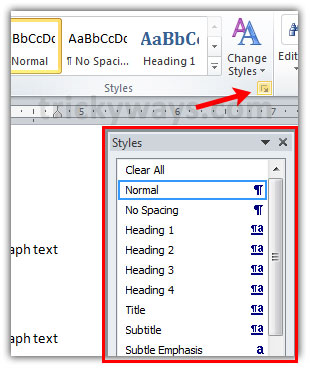
Click on Styles arrow to show the Style windows, see screenshot below.
Step-3
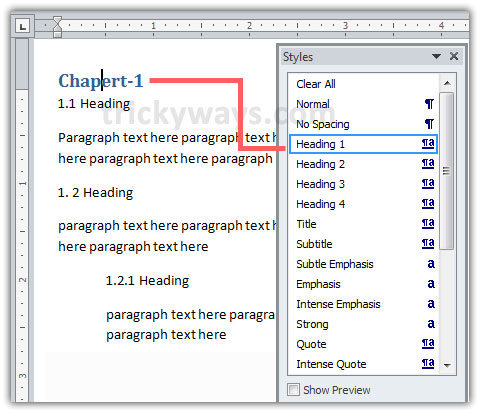
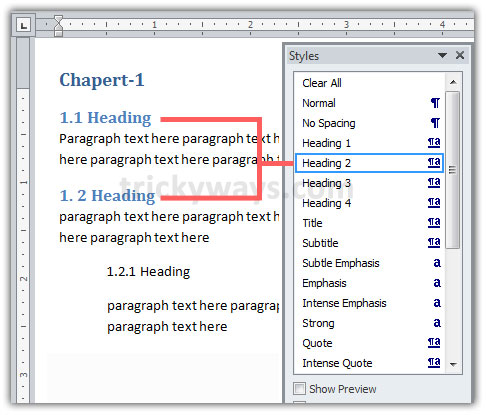
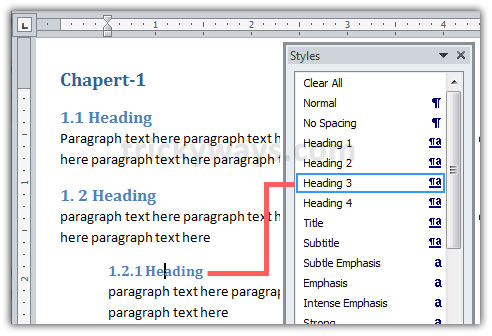
Now start applying styles to headings and sub headings according to its level
Heading 1 > Chapter heading
Heading 2 > Content heading and so on. For more detail see screenshot below.
Step-4
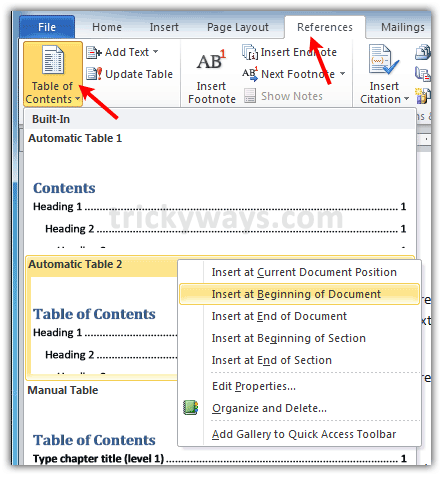
Now insert table of contents, Click on References tab and then Table of Contents, right click on predefined Automatic table of contents option and then select suitable option like Insert at Beginning of Document.
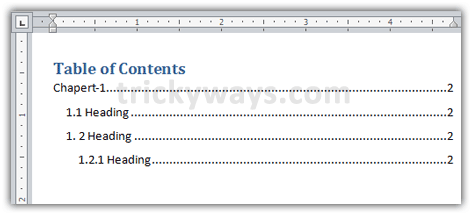
View after inserting table of contents.
Step-5
If you already have page numbers in your document header or footer then skip this step.
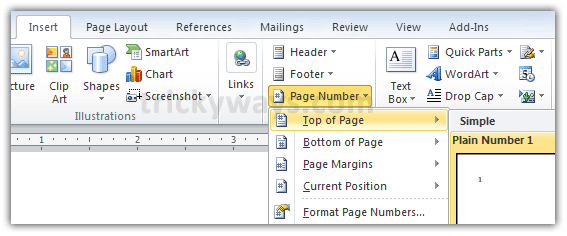
To insert page numbers in Word document click on Insert tab then Page Number and select a page numbering preset.
Update table of contents
If you have made some changes in your Word document after inserting Table of contents then you need to update this Table.
To update Table of contents click inside the table and then click on Update table option.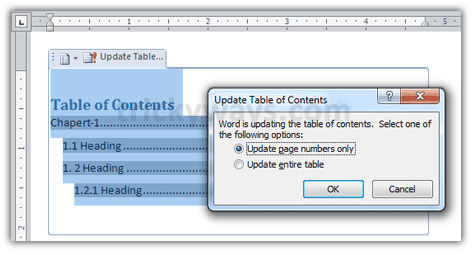
Feel free to ask any question, leave your question below in comments section or you can leave thanks note.
Hi! to create table of contents in word is really seems easy after reading your this article.
Very well written with graphical images, nice guide to create table of contents
Very useful article because it was quite difficult for me to create table of contents in microsoft word
nice word tip
Thanks for posting. I was playing with my document for a long while. This is far better than the ‘help file’ in MS word. 10/10 Well done.
this is really easy to create table of content in word 2007.
Hi, thanks for your post.
I have the following problem:
1) I have document 1 with page numbers in one format.
2) I have document 2 with page numbers in another format.
I want to create a table of contents in document 1 with headings from document 2.
Is this possible? Thanks in advance
Word 2010 – Is it possible to format the actual table of content styled DIFFERENT from the Heading styles within the document. In other words, I want the table of contents to have stripped down formatting – no bold, 10pt font, etc.
You can modify the styles.
Follow the step-2 to show Styles windows, right click on the heading styles or the style that you want to change and click on “Modify” to change font and other format..
This is great…but my doc has 5 levels. In 2010 how do I get levels 4 and 5 to display when I generate the TOC?
When you open the “Styles” window in step-2, at the bottom there are 3 icons.
Click on the last icon “Manage Styles”, a window will open
Click on “Recommend” tab
Either select all headings from the list (Heading 1 to Heading 9) or select one by one and click the “Show” at the bottom. When done click OK button.
Now you have all heading from heading 1 to heading 9 in Styles window to create more levels.
I have the same problem as kymmie202. I have tried your suggestion trickYguY but I did not show level 4 and 5 in TOC despite the fact that all 9 levels are displayed in step 2 !!!
Please, help if you have any solution…
So succinctly explained,especially with the window images.Thank you,this was a little more of trouble to me but I got it very quickly here!
je ne sais pas comment je peux vous remercier, vous êtes géniales
I would like to have TOC which has titles without page number for level 1, and page numbers for all other levels. Is that possible?
I did everything u said, but… I don’t know for what reason the TOC does not show the 4th heading…
I mean I have:
Heading 1
Heading 2
Heading 3
Heading 4 (missing)
I tried to refresh with F9… and everything… nothing changes 🙁
I have the same problem. I can use styles “Heading 1”, “Heading 2″….and so on until “Heading 9” but in my TOC they do not show past “Heading 3”.
In the References tab, Table of Contents section, when I click “Add Text” with my “Heading 4” text highlighted, it does not give me the option to add “level 4” to my TOC (Or any level higher than 3).
OK i figured it out-
Start with a new TOC. References Tab > Table of Contents > Insert Table of Contents.
Under the “General” Heading (in red), at Show Levels: Choose the extent of levels to show in your TOC. I used headings 1 -5, so i chose Show Levels: 5
Thanks emilyjane–found this and was able to help someone with the same problem.
Great – thanks! Just to add, in order to get to these options, don’t click on the table previews right at the top of the ‘Table of Contents’ menu, but click on ‘Insert Table of Contents…’ which you can find towards the bottom.
Very helpful! Now I know that how to create TOC in Word 2007.
I want to put the numbers of falling section within the chapter at the left, how do I do?
Your word tip help a lot. Thanks for the tip !
Hi, TrickyGuy —
Many thanks for the tip you have come up with as far as building a TOC — it has been a great help to a dummie like me. It would be greatly appreciated if you could also give me some help in getting rid of the page numbers when the TOC is built. I need it for my novel which will be presented as an Amazon Kindle Ebook (after years of trying to get a publisher or Lit Agent to handle it). Anyway — page numbers are irrelevant with the Kindle system as page formatting differs from Ebook reader to Ebook reader.
Thanking you in advance and wishing you good health and many more years of Tricky ideas.
Regards from Munich, Germany,
Lester C. Muller
P.S. It would be fantastic if you would be able to answer (asap) by email :-)))) — Tx.
truly this is a great & easy trick for making TOC in Ms-word.thanks for this post..
Thanks very much for the post. The visual aspect helped a ton.
thnx for the posting…Imgz got me better understanding..
thank…….
Superb!!
I was unable to make a TOC even after reading multiple articles and tutorials. Your have done a great job by inserting relevant images for each of the steps.
Thanks
I created a TOC fairly easily, but the main chapters and subordinate titles I had within my document were originally black, bold and centered. Now they are blue and at the left margin… still reflecting the “Heading 1” or “Heading 2” properties from when I designated then m for the TOC. How do I get them to go back to the way I originally typed them within my document?
The explanation is easy to understand…Thanks. You can also visit the below website that explain the how tos in MS Word.
Okay, here is a tricky one — I want to create a customized TOC template that I can use for a “form” document. This form document has 17 headings. the first 13 headings will always stay the same, however, with each newly saved document, the text in headings 14-17, will change. is there a way to create such an auto-generated TOC template? I have tried to create a macro, but I can’t get the page number to record. I have been working on this for days and am about ready to give up. thank you in advance.
How do I apply the styles?
Patti
Overall, very useful. However, I want to have only the 2-3 words of a paragraph as the (usually level 2) heading in the TOC. Every time I update, it puts the entire paragraph in the Table. It’s a lot of work to clean it up rather than just using the selected text. Any suggestions? Thanks.
I want a table of content without page numbers as I want to publish the document in Amazon Kindle. I can’t seem to find that option. I assume Kindle does not adjust page numbers to its format?
Very, very helpful. In addition, I would like to click on any item on the TOC and get to that page. How to accomplish it? Thank you very much.
plz after doing all as directed what appears on my table of content is this Error Bookmark not defined, and I have two in all the pages instead of having different page No. plz what should I do to correct dis, response urgently needed tnx.
It seems you made some changes after inserting Table of contents in document, so you need to update it. Click inside the TOC and hit the Update Table button as shown above, last screenshot in then guide.