People ask me mostly about different Windows processes and now trying to answer one by one, let’s see the csrss process, What is csrss.exe? What is the process file location? How to identify the original and viruses and how to remove csrss without a tool.
The csrss.exe is a Client Server Runtime Subsystem process file, which must run all the time on Windows OS. Csrss.exe file works for Win32 console windows, manage the majority of the graphical instruction sets including GUI shutdown, creating or deleting threads and some parts of the 16-bit virtual MS-DOS. In laptops, the csrss.exe process file works dependently with power management schemes defined by the systems under Control Panel option.

How many csrss.exe files run in Windows OS?
There is just a single csrss.exe file exists on Windows operating system, but users may experience that more than one instance of csrss.exe are running under Task Manager as this is the case in Windows Vista which we observed that at least two instances of csrss.exe run at the same time. The number of csrss.exe file instances may differ according to the operating system version, but still, the Windows OS has just one csrss.exe file (see below where is csrss.exe located).
Can we remove csrss.exe?
Csrss.exe removal, the csrss.exe is a default process and holds critical features and functions for Windows. This is not recommended to kill or terminate the actual csrss.exe process improperly. Doing that may result in the Windows Blue Screen of Death.
Is csrss.exe a virus?
The csrss.exe is a critical system file, and it’s not a virus. But, sometimes it may get corrupted by a virus. Sometimes the virus, trojan and spyware use the same name csrss.exe, just to hide from system users. In return, any anti-virus program can be used to scan and eliminate those malicious files.
Where is csrss.exe located?
Orignal csrss.exe location is C:\Windows\System32\ (your drive may be different from C:). You can open this folder by typing %systemroot%\system32\ command in Run windows
How to identify original csrss.exe system file and handle csrss.exe problems?
Method-1
The path or location or original csrss.exe is mentioned above. In case there is more than one instance of csrss.exe running in Task Manager then you check their location by taking their properties
Right click on running csrss.exe process in task manager and select properties or Open file location.
If the file location is different from the above-provided address, then it means those are not original Windows files and should be killed and removed from its place. You may need administrator privileges to take properties of the running process.

Method-2
There is also an alternative way to identify original csrss.exe file, just navigate to Task Manager > Processes and right click on csrss.exe and click End Process
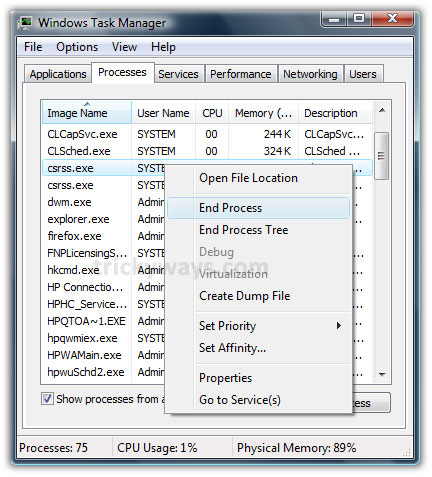
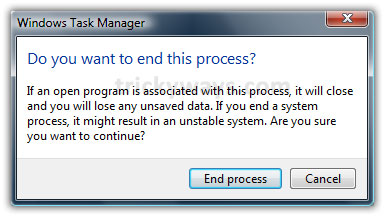
If this csrss.exe is a virus, then it will not show any critical message about the deletion. Otherwise, you will find the following message that the removal of this file is crucial to the system.
Share your experience about csrss.exe windows process, leave some comments below.
You might want to explore some other Windows operating system processes like svchost.exe, explorer.exe, ipodservice.exe, dwm.exe.
I have two csrss.exe process running in my Windows Vista. I have checked as you said these are not virus.
Yes, if csrss exe is not in system32 folder then its fake and virus.
thanks for providing answers to our questions about csrss.exe file.
Nice tricks to check csrss.exe is virus or not, thanks.
i was just wondering about csrss.exe but now i am completely clear about the process.
dang. i really wish i had known this stuff last weekend. i removed a couple of trojans a couple of weeks ago, then this past weekend, after i had started an online av before i went to bed and expected to find my computer in sleep mode the next morning, i wake up, go to my computer and the cpu is at 100% and it’s all from the csrss process. it had apparently been going like this for several hours, i guess. i just shut the computer down and that was the end of it, but i didn’t know what this post of yours said and didn’t know to check if it was a trojan or not. darn!
i’ve also found out that if this process is hogging memory, check to see if it’s using a lot more memory than normal, too.
I’m almost wishing it would do it again just so i can see if it’s a trojan or just a corrupted user file. ( which i’ve learned can also create the csrss problem)
csrss.exe is not virus
its not virus its windows system file
csrss.exe process is client server runtime process
My friend attached usb and transfer spyware in my system is taht possible? i am not sure. but after that i got running 2 csrss.exe process in my task manager now. I will try your method to remove csrss.exe spyware from my computer
It doesn’t work on my computer. I got my external hard disk’s folder converted to 1 kb shortcut and Location: Diecox. Does any one can help me?
check the following link to fix file association fix
copy and open this link: dougknox.com/xp/file_assoc.htm
download and try the following fixs
Drive Association Fix (Restores default settings for hard drives)
EXE File Association Fix (Restore default association for EXE files)
Folder Association Fix (Restore default associations for File Folders)
i have one csrss process running but it has no description, also nothing happens when i right click and go to properties. It’s also not connected to any services and when i say end process it says access denied, it doesn’t give me a message like above. I have a winlogon.exe process that is the exact same. Any suggestions?
Are you using Windows 7?
i’ve exactly the same doubt as him.
And yes..im running win7
Same here. It gives the warning message if you try to end the process, but under ‘user name’ and ‘description’ is is blank and clicking ‘open folder’ does nothing (works with the other running processes). I also have one winlogon.exe that is doing the same thing (and is the only other process that similarly lacks user name/description info and won’t open a folder).
Did Microsoft do that on purpose so people don’t end critical processes (I could easily see someone making a decision that irritating to ‘protect the consumer’ or some other BS) or could one or both of those be a very suave Trojan that somehow knows how to stop the legit instance of each process and replace it entirely with something nefarious?
do this:
1. click “show processes from all users”
2. click “image name” (this sorts them alphabetically)
now it/they should have descriptions and say the user is SYSTEM, u can also now open the file location
Thanks for this tip, now I can see the properties. For some reason, I’ve got two copies running. Right-clicking either of them gives the location of System32 and dated 14.7. 2009, however, of course then can be only one copy there. I assume it shows up double because of multiple users and is not harmful? Puzzling.
alright so if i try to end it and it says it cant be done then its a virus?!
Make sure you have administrator privileges on Windows, If this process location and name (csrss.exe) is exact same as mentioned above in the post then its not a virus.
So I checked the folders and just like you said, there’s a csrss.exe in “C:\Windows\System32\” but I also have one in “c:\documents and settings\*USER*\local settings\Temp\” and I use my anti-malware to remove it because it says it’s a virus, but it’s just back again everytime I restart the computer. And I’ve tried End Task in the task manager, but they both give me the important system file warning. Uhhh… is there anything you can tell me about this?
csrss.exe
test for to see if its a virus
under windows task manager
under username : (blank–no description/entry)
under description : (blank–no description/entry)
when checked to see it end process works. End process confirmation appears but rejects end process > are you sure you wan to end process ” csrss.exe” > yes> “access denied”
Comments plz
also right click > open file locations returns with no results
Hi
Paging file problems here
2 x csrss (1 x MUI?}
thought compressing would help but if I try, only trusted installer has privilege! ( I am Admin.)
Any advice on how to maximise memory ~ which programmes should I uninstall?
Thanks for giving this information,
I have got 2 crss.exe files too
but if i want to close them it gives the critical message at both, and they are in the same directory.
Thanks =]
AD there are only one csrss.exe and its virus or not
I have the same problem. It gives the warning message if you try to end the process, but under ‘user name’ and ‘description’ is is blank and clicking ‘open folder’ does nothing (works with the other running processes). I also have one winlogon.exe that is doing the same thing (and is the only other process that similarly lacks user name/description info and won’t open a folder).
I have verified that the real csrss is in the System32 folder but the one showing under the task manager I think is a fake one or virus. Help! How do I remove the fake csrss in the task manager?
i just replied to a similar post above with the same problem, follow those steps and u will have access to the “open file location” function
Can you guys help me? Im on Windows 7, there is a process “rk5jccss.exe” running from the startup… may i know wat is that exe is associated with?
I use windows Vista . I went to task manager , at first i saw only one csrss.exe and when i right clicked i was told to “perform administrative tasks” . I did this and 2 csrss.exe came out :
1. They both use my pc’s USERNAME.
2. one of the csrss.exe uses about 5mb , while the other uses 958kb .
3. I did a search on my startmenu and only one csrss.exe came out and that was in system32.
Am i infected or what ?
what if you see the csrss.exe running in the windows task manager, but the only info it provides is the name, system memory, and i can’t get into the properties of it?
i tried to see the location of csrss but when i click properties nothing happens.
i looked in win 32 folder and there are 2 files
csrss.exe.mui and csrss without extension
csrss.exe.mui is not in the task manager
The csrss.exe seems to come up in the top few processes in the Task Manager whenever my mouse is being moved and using 03 of the CPU.
Thank you for your complete explanation of this process! The only thing I noticed different on my computer is that in TaskMgr it (csrss.exe) is the only process that doesn’t show its path and as well won’t (upon a right-click) allow me to open its file location or view its properties. It did however pass your test of giving the warning upon attempting to terminate it. I couldn’t tell by your screen-shot if it is normal for it to not show any details in taskMgr.
I’m on Win-7 Home Premium and an HP Laptop
Thanks again for your detailed information!
Glenn
quotation: “If this csrss.exe is a virus then it will not show any critical message about the deletion and complete the process otherwise you will find the following message that the deletion of this file is critical for system.”
I think also a virus is a typical windows-process and therefore there is also the same message box when killing the virus because you everytime get this message box if you kill any process, no matter if SYSTEM, NETWORK SERVICE or USER. Therefore this quotation isn’t correct.
I didn’t read the whole answers listed above, so sorry if anyone did already say it once.
I talked to a McAfee tech today that told me that this was definitely a virus even after the alert said don’t delete. tried to sell me some very expensive support to remove it. Microsoft says I have no issues. My laptop has same files in System folder , need to check to see if one is not supposed to be there.
I have tried to delete the csrss.exe (trojan) from my computer. Idenifying the trojan within the task manager and selecting end process I get an error message “Access is denied”. How do I get rid of this trojan, does anyone know?
is very good of you .thank u so much
I had dell support to check the “CSRSS.exe”
I have the virus “CSRSS.exe” in my laptop, My laptop started failing the speakers Sound, specially when I hook on the headphones also started going on sleep mode after only 1 minute of not touching my laptop, so I did changes in the Power options, but still the same problem, so I called Dell support and they did the troubleshooting connecting directly to my laptop, they couldn’t fix it, so they showed me in Task Manager how I have 2 instances of the process “ CSRSS.exe” running, they told me one of them was a “trojan” they explain that this application was a Hacker, that whoever was doing it was spying , that they could see all my information, including Passwords , banking accounts etc. Dell wanted me to pay for 199 dollars for one year subscription, money that I can’t afford.
So looking at your info I did look for the location of the file and both files are in System 32 in windows, so I couldn’t tell they were Trojans, so back to the beginning, how could I be sure what the people of Dell told is true or not?
I am using windows 8 and i also have 2 instance of csrss.exe. You don’t need to worry about that if these instances belongs to C:\Windows\System32\csrss.exe
Take properties of this file and click on details tab to check more info about file.
1 min sleep problem, this may be windows power management setting issue.
Try to reset your power plan settings goto Control Panel\Hardware and Sound\Power Options\Edit Plan Settings and then click on Restore default settings for this plan.
By the way I have Windows 8 with 64bits and I have 2 Instances of CSRSS.exe running, Dell believes is a Trojan, in file location shows that is a windows application, in system32, so I’m confused and don’t know what to do, any ideas?
I have 5 csrss.exe files on my win 8.1 laptop! Surely there isn’t supposed to be that many of them, if so then, which ones do I get rid of or should I leave them to breed in peace?
Help!
when i try to see properties of the csrss.exe in task manager.. nothing happens.. i end process and it says i cannot do that.. will not let me view properties or containing folder?
You can’t end the csrss.exe process but you can view the properties and location of file original csrss.exe file process. Which Windows version you are using, Is it Windows 8 or 7?