If you have switched from Windows to Mac or just want to transfer Outlook emails to Apple Mail due to any reason then you are at the right place. I write this guide using Mac OS X Snow Leopard and Windows 7 and hopefully this works on other OS versions of Windows and Mac as well.
Outlook and Apple Mail does not support a common mail file format so we will use Thunderbird on Windows a free email application to transfer our Outlook emails into Apple Mail or transfer emails from Windows to Mac.
Steps on Windows:
Step-1
- First we need to transfer emails from Outlook to Thunderbird and then to Apple Mail
- Download Thunderbird for Windows, install it and Run it.
Step-2
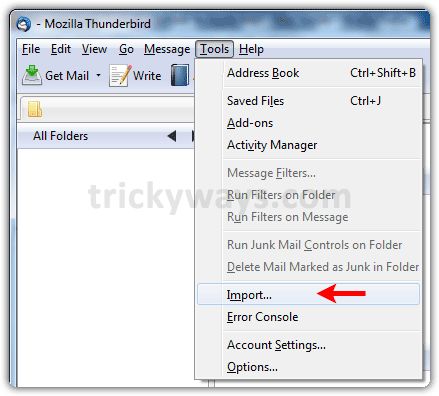
Click on “Tools” menu and select “Import” option.
Step-3
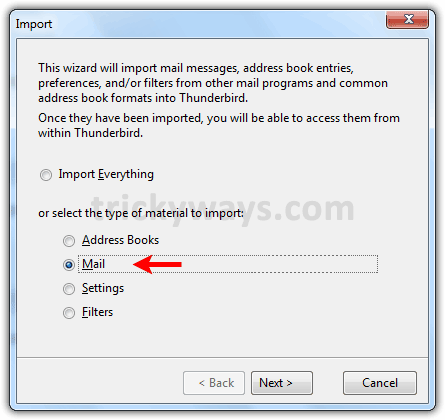
Select the option what you want to import, as i select “Mail” option to import emails from Outlook and click “Next” button.
Step-4
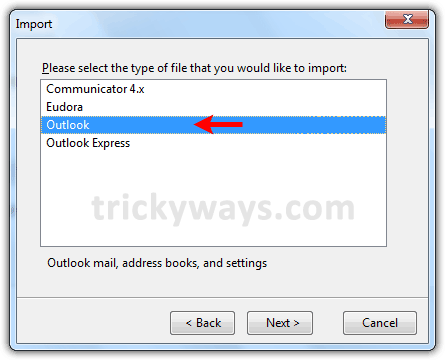
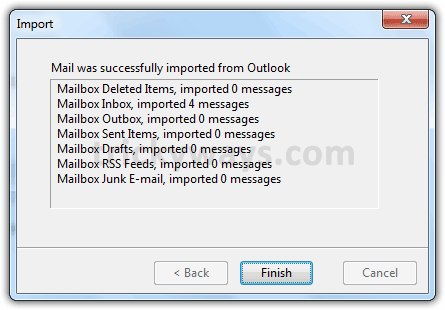
Select “Outlook” option and hit “Next” button. Wait for a while and let the Thunderbird to import emails form Outlook and hit “Finish” button when it done the import process.
Step-5
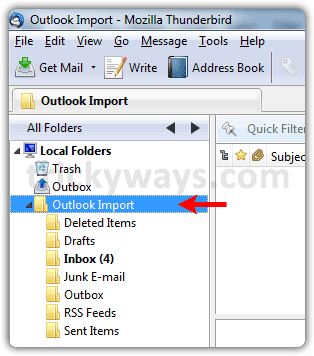
Now you can see all Outlook emails imported to Thunderbird successfully under “Outlook Import” folder, as shown in the screenshot below. You can see the “Inbox” contains 4 emails.
Step-6
- Now we need to know the location of this “Outlook Import” folder to transfer it from Windows to Mac.
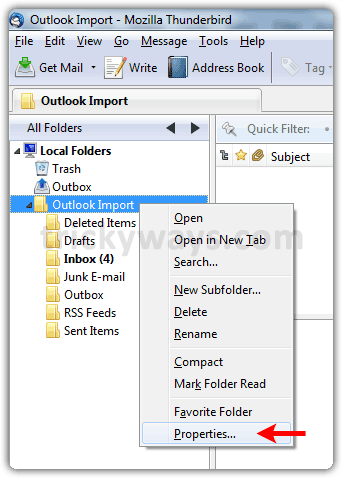
- Right click on the “Outlook Import” folder and select “Properties” option.
Step-7
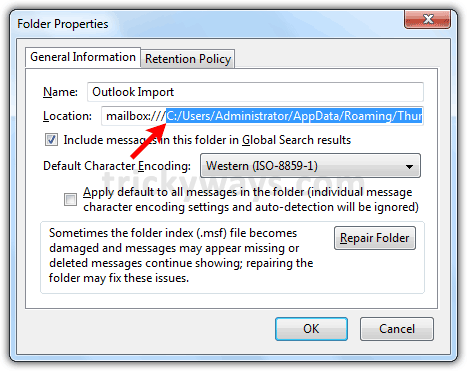
See the folder path and open this location.
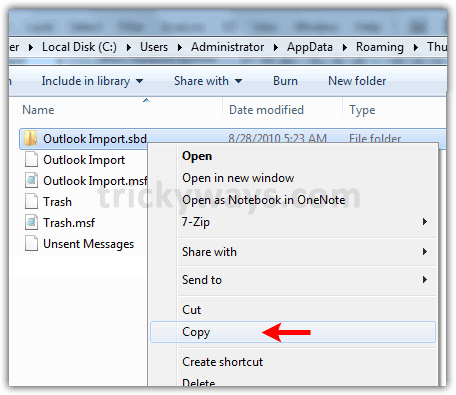
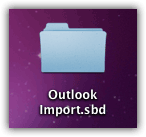
Copy the folder “Outlook Import.sbd” to a storage device like USB and transfer it to the Mac quickly or See how to share files between Mac and PC.
Steps on Mac:
Step-8
Now we have emails folder on Mac that we transfered from PC (Windows) and ready to import emails into the Apple Mail.
Step-9
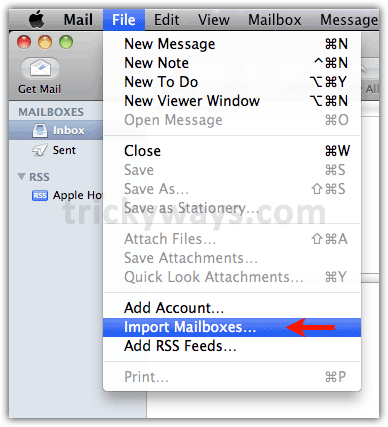
Run Apple Mail on your Mac, click “File” menu and select “Import Mailboxes” option.
Step-10
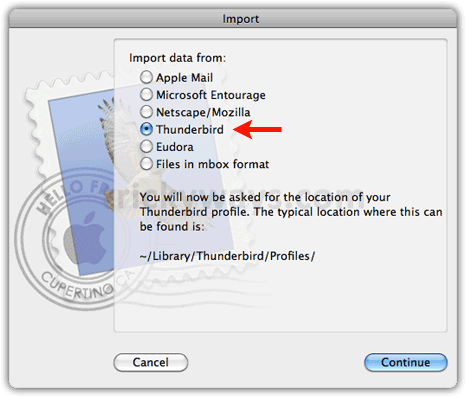
Select “Thunderbird” and hit “Continue” button.
Step-11
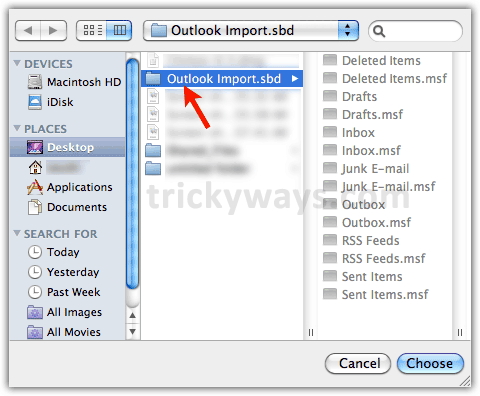
Choose the emails folder “Outlook Import.sbd” that we have copied from PC (Windows) and hit the “Choose” button.
Step-12
Hit the “Done” button when import process finished by the Apple Mail.
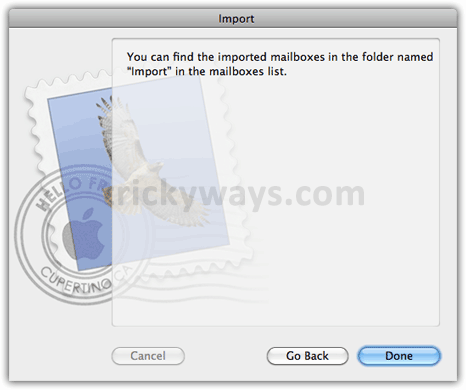
Step-13
Now you can see all emails are imported into a new “Inbox” folder under the “Import” folder in Apple Mail, so you have successfully imported the Outlook emails into Apple Mail.
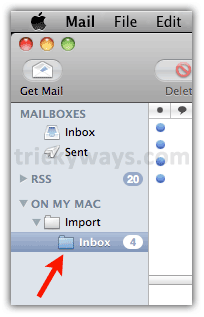
Step-14
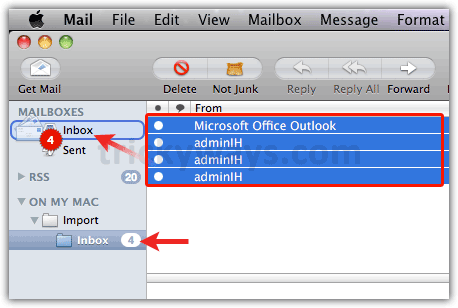
If you want, you can move these emails to the “Inbox” folder of Mailbox that you have already configured on Apple Mail.
Select the “Inbox” folder under “Import” folder that you have imported, press cmd + a keys form keyboard to select all emails and then click and drag all emails to the Mailbox “Inbox” folder of your Apple Mail.
If you are facing any problem to transfer emails from outlook to Apple Mail fell free to discuss in comments below, if it works for you then leave a note!
See also:
- Transfer emails from Outlook Express to Outlook 2007
- Transfer emails from Outlook Express to Windows Live Mail
- Move emails Outlook to Thunderbird
It worked flawlessly as described!
I was able to move all my Outlook folders from Windows XP SP3 to Mac Mail 4.3
Hi, pls can you help since you were successful in transferring your mail. I got to stage 7 but then once at the path folder was unable to open the “location” so therefore could not copy. Any advice? Thanks
I suggest you to show Windows hidden files & Folders and open the location manually, don’t copy and paste the location path into Run Window/Explorer to open it.
To Show hidden Files/Folders
Windows XP:
– Double click on My Computer.
– Click on Tools menu then Folder Options.
– Select View tab and under Hidden files and folders, click Show hidden files and folders.
– Click OK button
Windows Vista/7
– Click on Start Button.
– Type Folder Options in Search field and click on Folder Options above in Search results
– Click on View tab and uncheck the Hide extension for known file types option in Advanced settings
– Click OK button
This is great but I am having trouble with step 7 as cannot open “location” in order to copy? Any suggestions
Hi, that is great all worked perfectly thanks for your help.
This is a nice tutorial, but it’s not working for me. I’ve done it twice and it doesn’t transfer all of the messages. The first time it lost about 400 messages. The second time it lost about 800. 🙁
A follow-up to this. On the PC side, all of the mailfrom Outlook will import perfectly into Thunderbird. I can then transfer the appropriate .bsd folder to my Mac via the network. After the transfer, I can compare the file size on the PC with that of the Mac and they are usually off by about 1,000 bytes (which is hardly anything when you’re dealing with 3.3GB of mail). Then when I import this folder into Mail, it does not import a LOT of messages. For example, my Sent Items folder on the PC has 572 messages sent since Sept. 2, 2010. The imported Sent Items folder does not have anything beyond Sept. 2, meaning that 572 messages has been lost in that folder alone!
I didn’t lost any email while transfering to Apple Mail, its working file for me. Your emails may be corropted or virus infected.
Try this (I am not sure will work):
Create 2 copies of .sbd folder, from one folder remove files with the name “Inbox” and from 2nd folder remove files with the name “Sent Items” and import both folders one by one.
I am having the exact same issue. Thunderbird imports the entire folder, I transfer a folder of about the same size to my mac, I import to Mail and only 300 of the 1800 messages that Thunderbird sees in the folder actually show up in mail. What is going on? I am trying to move the messages to a different folder in outlook then try again to see if that might help.
Anyone ever solve the mystery of the dropped emails? I’ve tried this process twice, and keep losing considerable amounts (some folders are just empty, others lose just a couple of messages, to make things extra annoying…)
Me too! I was happy to follow the instructions and have some success… but there are lots of emails missing that I really need!… Any ideas on how to correct this?
I had the same problem.
But when i used entourage(trial version should be fine) to import the .mbox files, there was no loss of any email.
Then you can go to Mail-files-import mailbox and just import from entourage. All mails should appear in mac mails without losing any. Hope this will help.
I followed the steps. Now I have two folders under ON MY MAC/Import; Archived Folders and Personal Folders. I can not do anything with the folders. Both indicate unread emails. I can not move, see any of the emails or delete the folders.
Any suggestions?
I just used your method for moving all my emails from a PC to my new Mac. You were dead on – simple – easy- and fast. Thanks
After importing Outlook to Thunderbird some of the folders became empty. Alternative is TheBAT! It can import Outlook messages and export unix mbox. The only inconvenience is that you have to export one folder’s messages at a time.
I was happy to finally find a free way to make the transfer and it worked perfectly. Thanks a bunch for the awesome directions – you rock!
This worked brilliantly!
I was able to migrate 1.25 GB of Outlook 2003 emails to Apple Mail 4.4. That’s quite a transition.
You are a genius!!! I spent $12 on O2M and it did NOTHING for me – cost me an hour trying to figure out why it only picks up just a few emails and not transfer the rest… if only it doesn’t work AT ALL, then I wouldn’t even try – ARRRGGHHHH… but your solution – simple and elegant – no trouble at all once you work pass the hidden AppData folder. Thank you so much!
Did anyone solve the issue with not all emails importing from the Thunderbird file? I’m having the same issue with the majority of the emails in my folders not importing. Any ideas appreciated
Stacii, Perhaps you have to import a few times, outlining which sub folders.
In my case, I chose sub folders and had to go back and choose additional parallel sub folders.
Worked perfectly… better then the advice I got from Apple Tech Support…and they made me pay for something that not only didn’t work but the techy couldn’t tell me why or how to use it.
FABULOUS
Hi all,
I have tried the sequence twice, and I also loose files when importing in OSX mail (Lion). I am decreasing file size to be transferred, but so far this hasn’t helped. TrickYguY: any suggestions or recommendations?
Thanks, MR
For this to work, one must have Outlook installed on the PC which you have Thunderbird installed. My PC with Outlook failed-dead. I have only the outlook.pst file.
I installed a windows partition on my Mac and installed Thunderbird there. But in Step 4, Thunderbird is expecting the outlook.pst file to be where Outlook would file it. I don’t have Outlook anymore-nevermore.
I have read that every transfer method know, requires Outlook installed because the bought/free programs all use routines within Outlook to convert outlook.pst to something readable by their program.
Outlook 2002 could export in a number of formats, but Microsoft locked that out with Outlook 2007. Thanks Bill Gates!
I really hate the thought of buying Outlook just to convert to Mac mail, but at the moment, I don’t see an option.
I get as far as Step 4 but even though I’ve tried it three times (each taking over 30 minutes as I have a lot of emails) I don’t get the Outlook Import folder. It lists all the email folders as at the end of Step 4 but there is no .sbd file on my machine.
Any suggestions?
Other than needing to use the manual configuration approach to setting up a thunderbird account, this was very straight-forward to use and all the data transferred safely! Very relieved and contented!
I would like to know (before trying) whether this tricky way will also transfer the folder structure I have set up in my Outlook mailbox? Any advice is appreciated, thanks in advance.
Hi,
I am trying to transfer from Outlook 2010 to TB on a PC so I can then import my mail onto my Mac. When I get to step 3 it says it can not detect my outlook. Any ideas?
Cheers for the help!
Melina
Nice site, looks very helpful. I tried importing my Outlook emails into Thunderbird and ended-up having Tbird crash part way through. I have multiple PST files that are fairly large so I’m not surprised.
Yay! and thank you very much. Was really struggling and it was all over and done quickly with your awesome tut!
Found this solution on a forum on Apple’s website (https://discussions.apple.com/thread/2664208?start=0&tstart=0). I lost a lot of emails using the outlook-thunderbird-mail solution. I then thought I would try Outlook for Mac instead. I downloaded the free trial. After easily importing my Outlook PST file, I decided I did not want to buy Outlook for Mac as it lacks some of the features it normally has on Windows. So here’s what I did at that point to migrate to Mac Mail:
“In Outlook for Mac (assuming you’ve already imported your Outlook PST file from Windows), Select the folder you want to move (If there are folders within the folder, you have to select each individual subfolder, as the subfolders won’t copy along with the main folder, only the messages in the folder will copy). Click and drag the selected folder (ex: inbox folder) to a new folder on your desktop. I couldn’t figure out a way to select all the folders, so i dragged each folder and subfolder from Outlook into the folder on the desktop. Once you’re done copying all the Outlook folders, open up Mac Mail. Go to File –> import mailboxes. Then select “Files in mbox format” and click continue. Then select desktop, and the folder you dragged all of your Outlook folders into. Hit “Choose.” Mac Mail will import all of these folders, and when it’s finished, will tell you that they are under the folder labeled “imports” in Mac Mail, and you just have to move all your subfolders back into their main folders.”
Hope this helps someone!
Fatpeter, you are a 5-star diamond geezer. Yours is the only suggestion that worked for me. I’d tried Eudora, Thunderbird and Outlook2Mac, all of which failed for reason and was about to give up completely when I saw your advice, and it worked a treat.
Thanks very much.
Micky
Just want to echo the thanks here for fatpeter: THANK YOU! I just migrated back to Mail from Outlook (both on Mac) after a server change at work, and you just saved me what I was certain would be several weeks of referring back and forth between Mail and Outlook until the email threads remaining in Outlook could be archived. I can’t thank you enough!
Amazing! Thank you so much. Worked perfectly the first time–thanks!!
You are Lucky to be at the right place to find how to transfer emails Outlook to Apple Mail.
Do I have to do the import to Thunderbird on the Apple, or can I do this on Windows, and them import the Thuderbird files to Apple email once they are transferred to the Apple?
If you read the clear and concise instructions that are written above, then this question will be answered, but I will answer it for you.
“Outlook and Apple Mail does not support a common mail file format so we will use Thunderbird on WINDOWS…”
The import to Thunderbird is on Windows.
Thank you for trick
Help me a lot
Worked perfectly fine for me, Thanks!
Thank you, Thank you!!
Well, I migrated the mail-files successfully, but now I have an extra level of folder-hierarchy, since everything is in the Import folder. How can I get rid of it and move everything up? After a successful migration I don’t care anymore if it came via import from another mail system or computer.
Thanks
Excellent and painless. THANK YOU.
Chris
great- worked a treat. Very clear and concise instruction. thanks!
Great article….saved me hours of time.
Thanks
Super_chet
Awesome!!! Amazing!!! It worked so well for me. Helped me migrate to Mac in a day.
Works like a charm!
perfect! thank you for the instructions. 2.6GB without a problem. ok, I had to move some directories but this only took 5 minutes.
I did as instructed and the majority of my emails transferred successfully. how for some folders and subfolders there are no longer any emails i.e. they did not appear in mac mail. i do not know how to fix this problem.
Transferred 2119 emails from Outlook to mac mail without a hitch. Thanks, just made my live easier.
Excellent tutorial. I was able to transfer 4 years of email from PC Outlook to Mac mail on my new Macbook pro. Thanks
Just transferred my old Outlook emails (1,000’s) to my new iMac without any problems, excellent step by step guide.
Finally decided to invest in a new 27 inch iMac – RIP my old PC running on XP !
Thanks
Windows XP v 5.1 SP3 to MacBook Pro 10.6 worked as you described. I accessed the T-Bird files directly over my in-house network – what a joy Mac networking is.
Worked just as you said! Thanks!!
Is there a way of moving all the imports (in their sub folders) so that sub folders (and their sub folders) appear in Mac mail like they were in Outlook? (I need to understand Mac Mail a bit better so please excuse this newb question)
I have successfully transferred all emails and folders from Windows Outlook to TB but when copying to my Mac via USB all folders copied but only 6 emails copied over. Any suggestions please 🙂
Perfectly explained for dummies like me.
All my mail in my MAC. Bye bye! PC, once and for all!!!
Thanks! nice post!
Worked perfectly and effortlessly!!
Thanks so much. Had been looking for a solution for a while
I found this so easy and quick to use and it only took me 15 minutes to install, copy and move all my old Outlook folders to Mac Mail. Brilliant!!
It worked for me! Thank you very much!!!
Awesome! Thanks man 😉
Didn’t copy all emails – all folders are there but some are just empty. Help please!
Excellent solution!! Worked very well for me:)
DT
This is PURE GENUIS. I am converting our last windows 7 holdout to mac today. He has 2 GB of emails in folders in Outlook 2003. This saved me hours and hours of frustration trying to transfer his mail filing system from Outlook 2003 to Mac Mail OS X Yosemite. It worked flawlessly. LOVE this website !!!
After the conversion is made to Mail, can I then delete the Microsoft User Data Identity? This is taking up a good deal of space on the hard drive.
I think you can delete outlook data file because all emails transferred to apple mail and now its in form of Mail application. I would suggest you to keep this data file for few months on external storage USB drive of CD/DVD other wise you can delete Microsoft outlook data if you don’t need it